 Recall
tl;dv alternatives compared: when you do not want a bot in the meeting
For people looking for a tl;dv alternative. We compare the bot and bot-free recording, where the record goes, free limits and pricing, and who should stay on tl;dv and who fits Recall.
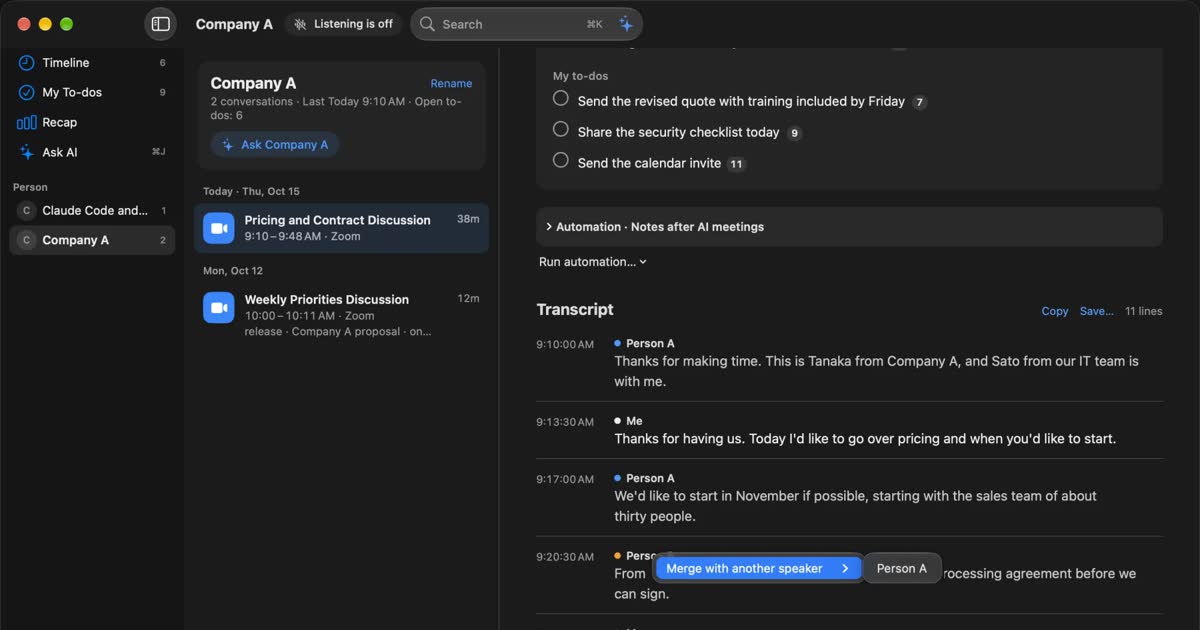
Short answer: you can drop the bot and stay on tl;dv
If all you want is no bot in the meeting, you do not need to leave tl;dv. Its desktop app can record your computer's audio without a bot joining. A replacement is worth looking at if you want the record kept on your own Mac, do not want to start a recording each time, or do not want the audio kept at all. In those cases, Recall is a candidate. If your team reviews recordings together, logs calls to a CRM, or works on Windows and phones, tl;dv fits better.
This article is written by KOROMO K.K., the developer of Recall, a transcription app for the Mac. We are comparing our own product, so please read with that in mind. Details of tl;dv are limited to what we confirmed on November 2, 2026 on its official site, pricing page, help center and privacy policy. We have not compared transcription accuracy, because we have not measured it under the same conditions.
| Your situation | What fits, and where to read next |
|---|---|
| You want to drop the bot and keep tl;dv | tl;dv bot-free recording. See the bot and bot-free recording |
| Your team shares recordings and summaries | tl;dv. See where tl;dv is stronger |
| You do not want conversations on outside servers | Recall. See where the record stays |
| You want a record without pressing a button | Recall. See how each one starts |
| You want to know what is free | See free limits and pricing |
| You think no bot means no need to tell people | Please read telling the other people first |
The tl;dv bot and bot-free recording
tl;dv has two ways to record: a bot joins the meeting and records video, or the desktop app records your computer's audio. Without the bot, nothing is added to the participant list, but only audio is kept.
What tl;dv is
tl;dv is a meeting recording and AI notes service from tldx Solutions GmbH in Germany. Its company page describes a meeting intelligence platform for sales and customer success teams. Beyond recording, transcripts and summaries, it covers CRM updates, analysis across meetings and sales coaching. It is less a personal notebook than a tool for teams to use what was said in meetings.
What each way of recording does
| With the bot | Bot-free recording | |
|---|---|---|
| What you use | Calendar connection or Chrome extension | Desktop app for Mac or Windows |
| Participant list | The bot appears | Nothing is added |
| What is kept | Video, audio, transcript | Microphone and system audio, transcript. No video, screen share or chat |
| Meetings covered | Zoom, Google Meet, Microsoft Teams | Other meeting tools too, if they play audio |
| How it starts | Joins the meetings you set automatically | You start recording in the app |
This comes from the help articles on recording without a bot and the desktop app. On a Mac, it needs the Screen Recording and Microphone permissions. Any music or notification sound playing on your computer is recorded too, so it is safer to silence other audio during the meeting.
Speaker separation seems to differ. A table in tl;dv's own comparison post lists speaker identification as “Yes (bot mode)”. We could not tell from the official pages how well several speakers are separated without the bot. If you use it for large meetings, test that first.
Answers by reason for avoiding the bot
“I do not want a bot” can mean different things, and some reasons do not call for a new product.
- You are uneasy about it sitting in the participant list: tl;dv bot-free recording solves this. It is no reason to switch.
- It joins meetings you did not mean to record: The cause is the auto-record setting rather than the recording method. Narrow the meetings it covers, or turn it off.
- You talk on tools the bot does not support: The tl;dv desktop app can record system audio for tools such as Slack huddles. Recall does not depend on the meeting tool either.
- The other company refuses bots: First find out whether they refuse the bot or the record itself. If they refuse the record, do not keep one with any product.
- You do not want conversations with an outside service: This is not about the bot. Bot-free recordings are stored with tl;dv too, so read the section on storage.
Stopping the bot takes one more step
Even after you start using bot-free recording, the bot still heads to your meetings if auto-record stays on. The desktop app help says that with auto-recording enabled, tl;dv will still try to send bots after you quit the app. The help on stopping tl;dv also says the Chrome extension and desktop app do not control whether tl;dv is invited automatically.
So installing the app is not enough. Review the Auto-record calendar events setting in tl;dv. If colleagues are invited to the same meetings, it is worth checking theirs as well.
How tl;dv and Recall differ
The main difference is that tl;dv is a cloud service for teams to use recordings, and Recall is an app that builds up what you hear on your own Mac. This table compares against tl;dv's bot-free recording.
| tl;dv (bot-free) | Recall | |
|---|---|---|
| How it starts | You start it in the app. It can notify you when it detects a meeting | Stays running and listens automatically |
| When it becomes text | Within minutes of the recording ending | While people talk |
| Where transcription runs | On tl;dv's service | On this Mac |
| Where summaries run | On tl;dv's service | On-device AI by default. Pro can use an outside AI |
| Audio | Kept | Discarded once it is text |
| Video | Not without the bot. Kept with the bot | Not kept |
| Importing audio files | Yes. Free allows 5 | No |
| Team sharing | Library, clips, automatic email | You copy or save a transcript and pass it on |
| CRM connection | HubSpot, Salesforce, Pipedrive and others | No dedicated connection |
| Languages | 30+, with translation | Built around Japanese and English. No translation |
| Devices | Web, Mac, Windows, iOS, Android | Macs with Apple silicon on macOS 26 or later |
| Account | Required | Not required |
Recall's details are on the features page.
How each one starts: press, or leave it running
The biggest daily difference is whether you need to start a record. With tl;dv bot-free recording, you press Start Recording in the app. The desktop app can detect a meeting or call and show a notification, but that notification prompts you to record. We found no setting in the help that starts a bot-free recording on its own.
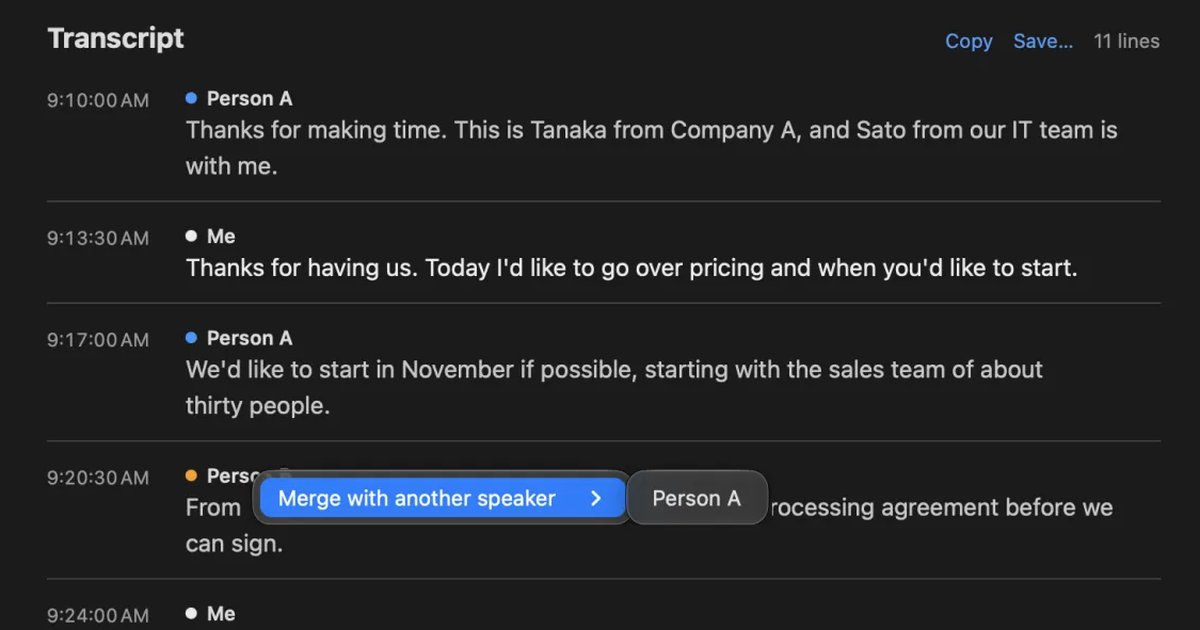
Recall has no record button. It stays in the menu bar, listens to the microphone and the sound your Mac plays, and divides what it hears into conversations. It works with any meeting tool, and there is nothing to forget. In exchange, it also hears conversations you may not want kept. Use pause to stop it, and add apps such as banking to apps not to record. It also uses some CPU and battery while listening. If you want to decide each time which meetings to record, starting by hand as in tl;dv suits you better.
What Recall does
Recall turns what you hear into text, in meetings and also in webinars and videos, so you can find it later. These features are in Free.
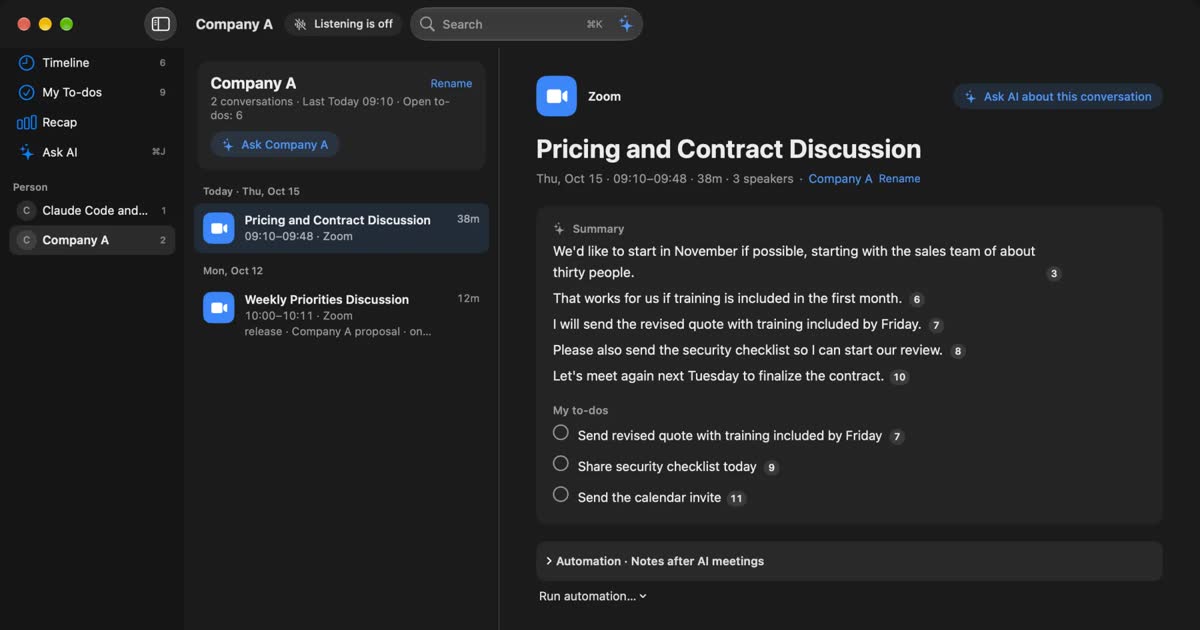
- When a conversation ends, the on-device AI writes a summary and your to-dos.
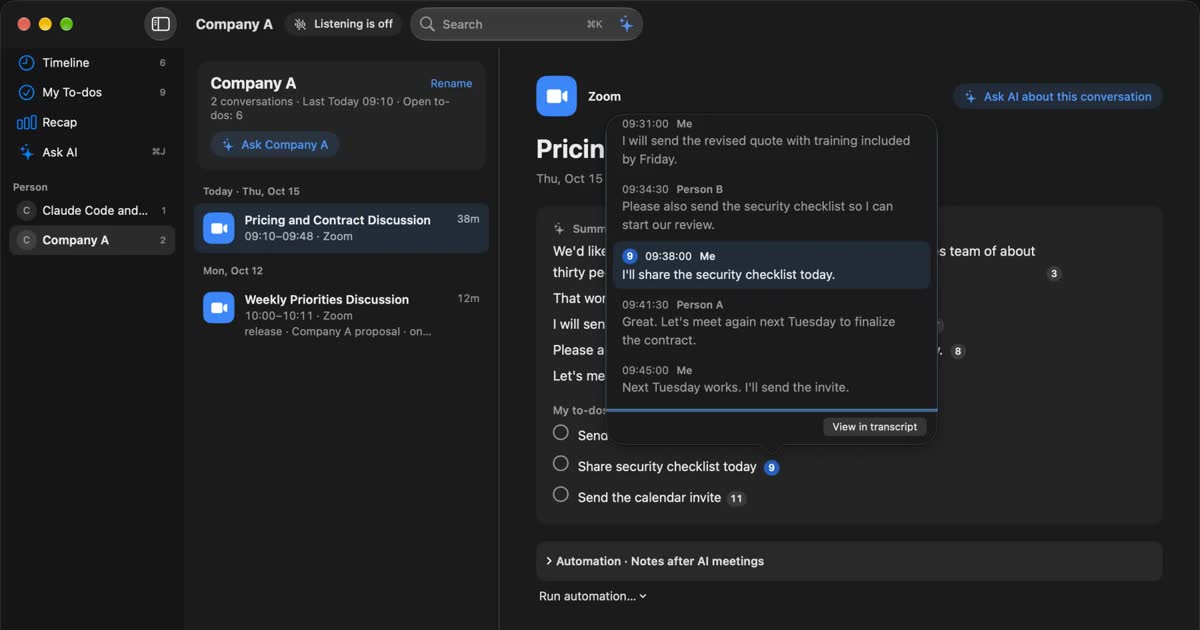
- Each sentence of a summary carries numbers for the statements behind it, and you can press one to see the original.
- ⌘K finds past statements by word, date, app or person.
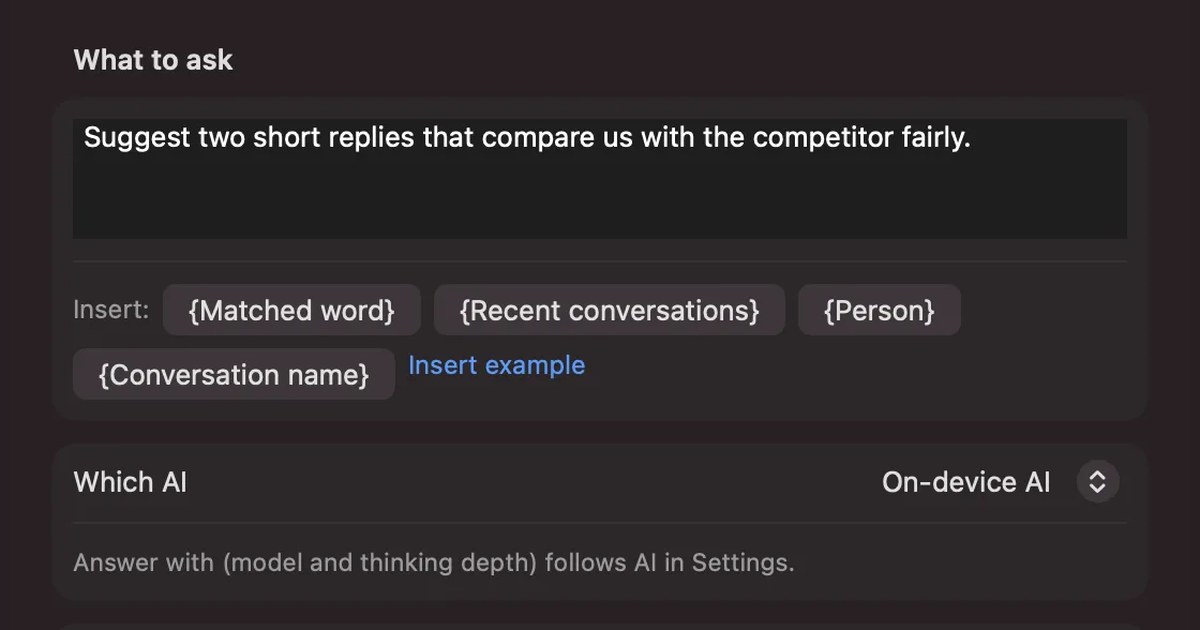
- Ask the AI, and it searches the record first, then answers with numbers for the statements it used.
- During a meeting, the live panel shows captions and can summarize so far.
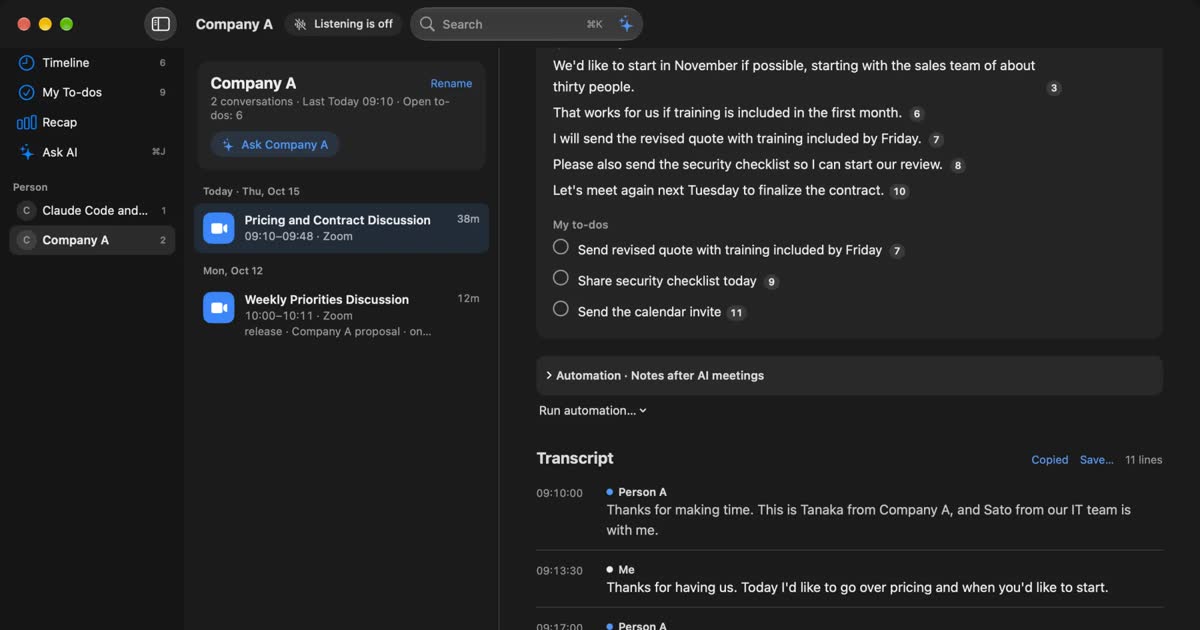
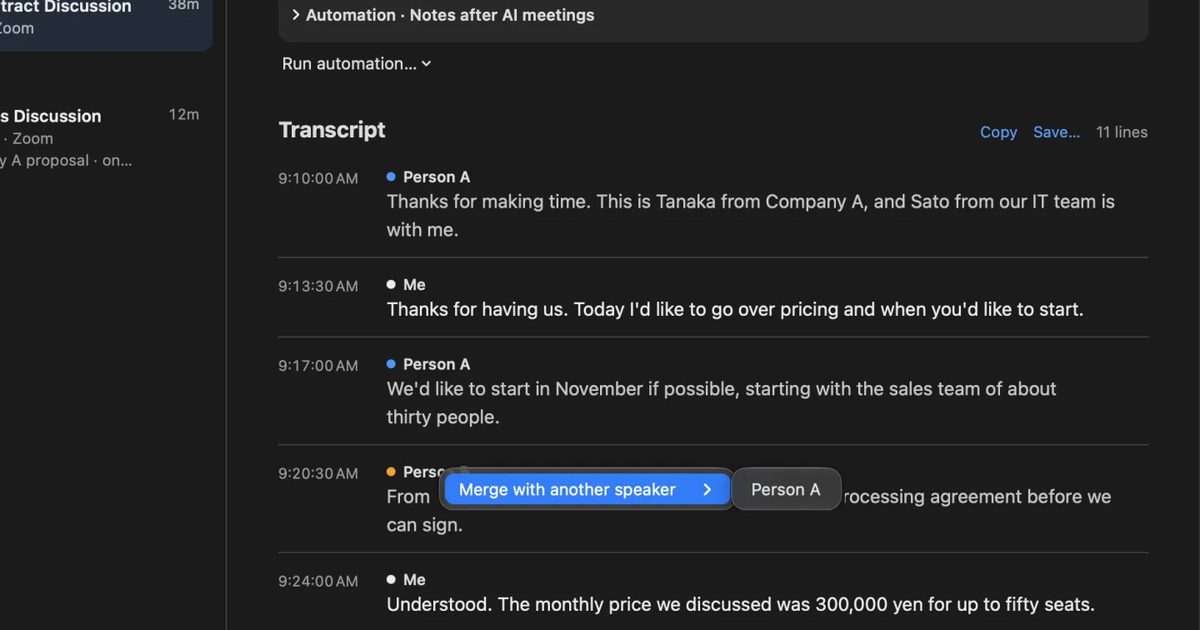
The microphone is treated as you and the Mac's sound as the other side, and up to four speakers are separated by estimate. For in-person meetings, registering your voice lets Recall separate the other person's voice from yours. However many people are in the room, though, it records them as one.
What happens after the meeting
What you want to do afterward also separates them. tl;dv is built for passing things to people: jumping to a moment in a recording, making a clip, sending a summary to attendees, writing to a CRM. You can also get regular reports across meetings.
Recall centers on finding things yourself later. Ask “Did we talk about price with Company A last week?” and it searches the record before answering, puts the number of the original statement on each claim, and is built not to answer what is not in the record. What you took on collects in your to-dos, and conversations and open to-dos are grouped by person. On the other hand, all you can export from the app is one conversation's transcript, copied or saved as a text file. There is no feature for producing and circulating formatted minutes.
Where tl;dv is stronger
For work where a team uses meetings afterward, tl;dv has clear advantages. Here is what Recall does not have.
- Video: With the bot, you can look back at slides and faces. Recall keeps neither video nor audio.
- Sharing: A team library, clips and automatic email to attendees. People in the meeting can get the summary and a link to the recording.
- CRM records: Call notes can be written to CRM fields. CRM field mapping has its own row in the comparison table on the pricing page.
- Analysis across meetings: Recurring reports, coaching and objection handling for sales managers.
- Device range: It runs on Windows. The phone apps record in-person meetings and upload them afterward.
- Consent: For calendar meetings, it can ask participants for consent before recording.
- Organization controls: Enterprise has SSO, SCIM, organization activity logs and privately hosted AI. Its stated compliance covers GDPR and SOC 2.
The question is whether you want an aid to your own memory or a record base for a team. If it is the latter, you have a reason to keep tl;dv even without the bot.
Where the record stays and when it leaves
Whether a bot is visible and whether the record leaves your device are separate questions. tl;dv bot-free recording changes the first, not the second.
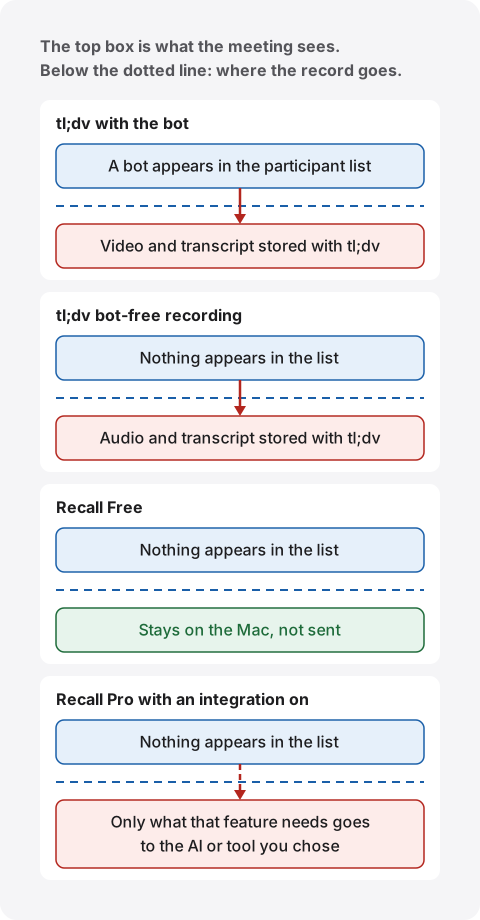
Where tl;dv stores data, and for how long
Bot-free recordings are also saved to your tl;dv library, where the transcript and AI notes are made. The help says all recordings are saved to the library and automatically transcribed. We could not find a mode on the official pages that stays entirely on the device.
The main points of the privacy policy (version of September 9, 2026) are these.
- Location: Personal data is primarily processed and stored in the European Economic Area, and the policy names data centers from Google Cloud, Hetzner and others in Germany and Finland.
- AI processing: Summaries and similar content may use Anthropic models through Google Cloud Vertex AI. Limited portions of transcripts are processed in the EU or the US, depending on the location chosen in account preferences.
- Retention: Recordings and transcripts are kept for 3 months on Free, and until account deletion for paying users.
- AI training: It says customer content such as recordings and transcripts is not used to train generative AI models, and that the same applies to third-party AI providers.
Storage abroad is not in itself a problem. It is something to check if your employer has rules about where data is kept. For a company administrator, the cloud can also be the better fit: permissions and records are managed in one place, and records survive a lost device.
Where Recall stores data, and when it leaves
Recall keeps the record on this Mac and does not send it to our servers. Audio is discarded as soon as it is text. A record can leave the Mac, however, in these cases.
- In Pro, when you turn on answers from your own Claude, ChatGPT or Gemini.
- In Pro, when you let outside tools such as Claude Code read the record.
- In Pro, when a workflow passes the record to a command you registered.
- In Pro, when you choose an outside AI for meeting tidy-ups or triggers during a conversation.
- When you copy or save a transcript yourself and pass it on.
All of these happen only when you turn them on, and when records leave the Mac lists everything sent and where it goes. The other people in the conversation have not agreed to it. Recall also connects to download the first model, check a Pro license and check for updates, which reveals network details such as your IP address. No records are included.
Keeping records locally has its own burden. Encryption is left to macOS FileVault, so please turn it on. We hold no copy of your record, so preparing for a broken or lost Mac is up to you. For the full list of what to check, see what to check if you worry about leaks from AI meeting notes.
Free limits and pricing
tl;dv Free has no limit on the number of recordings and limits AI use. Recall Free has no limit on transcription and limits how far back you can view. The limits fall in different places.
| tl;dv | Recall | |
|---|---|---|
| Free transcription | Unlimited. 30+ languages | Unlimited |
| Free AI | AI notes for 10 meetings. 10 Ask AI queries | Questions and summaries with on-device AI |
| Free retention | Up to 3 months | 90 days by default. Choose from 7 days to no limit |
| Free viewing | While retained. Video moves to archive after 3 days | The last 14 days |
| Paid, monthly | Pro ¥4,980, Business ¥6,980 (per person) | Pro ¥980 a month (tax included) |
| Paid, yearly | Pro ¥3,080 a month, Business ¥4,980 a month (per person) | Pro ¥9,800 a year (tax included) |
tl;dv's yen amounts are as shown on the Japanese view of its pricing page, which did not state how tax is treated in the view we checked. The euro view shows Pro at €29 a month, or €18 a month billed yearly, so the currency depends on how you view it. Pro billed yearly comes to ¥36,960 for one year (¥3,080 × 12 months).
tl;dv Free has conditions beyond the table. According to the help on Free limits (dated November 24, 2025), the AI note and prompt counts are for the lifetime of the account and do not renew monthly. From the eleventh meeting on, automatic AI notes cover only the first 10 minutes. Free recordings can be downloaded only from the notice 4 weeks before deletion until deletion. We also could not confirm whether Free includes bot-free recording, because the comparison table has no row for it. Please check with tl;dv before you start. Recordings are limited to 3 hours each on all plans.
Recall Free has conditions too. Transcription continues without limit, but the app shows only the last 14 days. Older records stay saved during the retention period and can be viewed with Pro. The default retention is 90 days on Free and no limit on Pro, and records past the period are deleted. Summaries and to-dos are made when Apple Intelligence is on, whatever the memory (except when you choose an outside AI for organizing meetings on Pro). Answers to questions need Apple Intelligence on only on Macs with less than 16 GB of memory. If Pro cannot confirm its license for 14 days, Pro features stop and records older than 14 days are hidden. Listening and transcription continue. See plans and licenses.
Prices alone do not settle this. tl;dv's price includes team sharing, CRM and video storage, while Recall's pays for viewing long records and connecting outside AI. If you buy seats for a whole team, tl;dv's cost scales with people, and Recall has no team plan.
Without a bot, you still need to tell people
Without a bot, people lose the on-screen cue that a record is being kept. That is why you should tell them yourself that the meeting is being transcribed. This is the same for tl;dv bot-free recording and for Recall.
By being visible, a bot also served as a notice that a record was being made. tl;dv's help says that recording notifications may not appear automatically with bot-free recording, and that informing participants and following the law is your responsibility. Recall does not notify the other people either.
For example, you can do the following.
- At the start, say “I am transcribing this on my computer so I can check the details later. Tell me if you would rather I stop.”
- If you use a Recall setting that sends content to an outside AI, say that too.
- If someone objects, stop for that meeting.
Sample wording for Recall is in the FAQ.
tl;dv has Consent Collection, which asks participants for consent before recording. If someone declines, recording is disabled for that meeting. It applies to automatically recorded calendar meetings, though, not to unscheduled recordings. Recall has no such feature.
If the host or the other company refuses bots or records, moving to a bot-free tool does not solve that. What they are refusing is the record, not the look of the bot. Do not use any of these products where recording is prohibited or where your employer's rules do not allow it. Rules on recording also vary by country and region, so ask the responsible person at your organization if you are unsure.
Other ways to avoid a bot
tl;dv and Recall are not the only products without a bot. Broadly, some capture on the device and process in the cloud, and others process on the device. Prices are as shown on the date we checked.
| Processing and storage | Price | |
|---|---|---|
| tl;dv | Cloud. Mainly stored in Europe. Audio kept | Free available. Pro ¥4,980 a month |
| Granola | Cloud. Audio not stored. Notes on AWS in the US | Basic free (30-day history). Business $14 per user a month |
| Notta | Cloud. On the device in Privacy Mode | Free 120 minutes a month, 3 minutes each. Premium ¥14,220 a year (tax included) |
| MacWhisper | Can process on the device. Outside AI optional | Free available. Pro €64 once |
| Recall | On the Mac by default. Features you turn on in Pro go outside | Free available. Pro ¥980 a month |
Granola suits you if you do not want audio kept and the cloud is fine for summaries. Its security page says you start it for each meeting, it does not store audio, and outside providers handle transcription and summaries. It does not let those providers train on your data, trains on anonymized data itself, and lets you opt out in settings. Prices are on its pricing page. It does not fit if you need video. See Granola AI alternatives compared.
Notta suits you if you want a Japanese service with the option of on-device processing. Its bot-free help describes recording without a bot in the desktop app, and Privacy Mode on paid plans keeps recording and transcription on the device. In this mode, cloud AI summaries and team collaboration are paused or limited. Prices are on its pricing page. See Notta alternatives compared.
MacWhisper suits you if you want recordings and files transcribed on your Mac. Its official site says it records meetings with no bot joining, and Pro is a one-time €64. It does not suit team sharing. See how MacWhisper and Recall differ.
For choosing Mac apps that work locally in general, see choosing local transcription on a Mac.
Which one fits
If you are unsure, decide in this order: team use, keeping audio, whether the cloud is fine, and which Mac you have. Compare prices last.
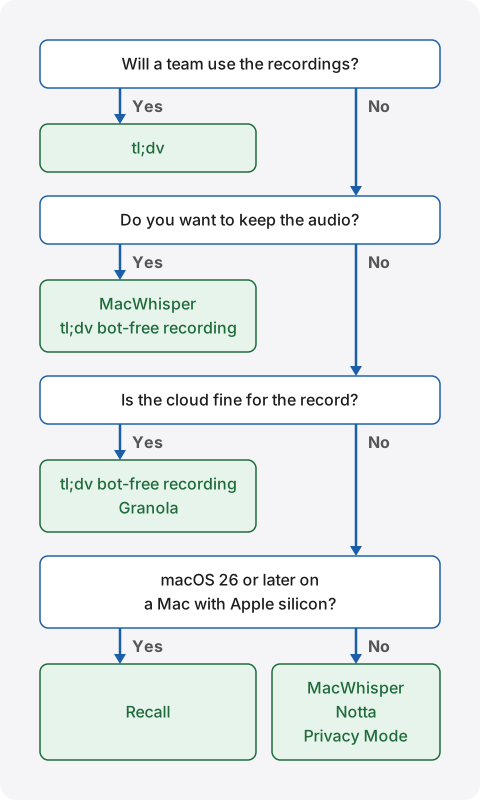
tl;dv fits if
- Your team shares recordings, clips and summaries.
- You want CRM updates and follow-up emails automated.
- You want to look back at slides and faces, and choose the bot meeting by meeting.
- You also work on Windows or a phone.
- You have many meetings in other languages, or need translation.
- You want to decide each time which meetings to record.
Recall fits if
- You do not want conversations on outside servers, or your employer does not allow it.
- You want a record that stays running, with no record button.
- You want text on your Mac, and no audio.
- You want summaries made on the device too.
- You work alone, and want to find what you heard in webinars and videos as well as meetings.
Free to use · No account needed · macOS 26 or later · Mac with Apple silicon · By downloading, you agree to the Terms of Service
Recall is not for you if
- You want to use Windows, a phone, an Intel Mac, or a Mac on a macOS before 26.
- You want video or audio kept so you can review it.
- Your team wants to share the same minutes by link. You would copy or save a transcript and pass it on.
- You want records written to a CRM automatically.
- You want to transcribe recorded files.
- You want several people in the room separated in an in-person meeting.
- You do not want anything always listening.
- You cannot install new apps on your work Mac, or cannot grant the microphone and screen recording permissions.
Choosing by situation
The same person may want different tools in different situations. Here are some common ones.
| Situation | What fits | Why |
|---|---|---|
| Sales team calls | tl;dv (bot) | Recording, CRM and coaching in one place |
| Passing on a product walkthrough as video | tl;dv (bot) | The screen is kept, and you can send a clip |
| A meeting where the other side objects only to the bot and has agreed to a record | tl;dv (bot-free) or Recall | You can keep a record without a bot. Tell them first that it is being transcribed |
| Keeping daily standups and 1:1s for yourself | Recall | Nothing to start, and you can follow history by person |
| Finding a name from a webinar later | Recall | It hears the Mac's sound, and you search by word |
| Not forgetting what you took on in a meeting | Recall | What you said you would do collects in to-dos, with the statement behind it |
| Recording an in-person meeting on a phone | tl;dv | It has phone apps. Recall is Mac only |
| A confidential meeting | Depends on your rules | First check whether storing with an outside service is allowed. If not, choose something that processes on the device |
What to check before moving from tl;dv
What tends to get missed is past recordings and leftover automatic settings. Once you decide to switch, check these in order.
- Mac requirements: Is it a Mac with Apple silicon on macOS 26 or later? If not, tl;dv bot-free recording is the realistic choice.
- Need for video: Will you be fine with neither video nor audio from now on?
- Replacing sharing: How will you pass things to people who got tl;dv links?
- Recordings to keep: Recall cannot import past records. Download what you need from tl;dv. Free recordings have the time limit described above.
- Auto-record: Turn it off. Removing the app alone does not stop the bot.
- Old data: When you no longer use it, consider deleting your tl;dv account. Get the responsible person's agreement before deleting team records.
- First settings: Check Recall's apps not to record, retention period and FileVault.
- Telling people: Decide when and how you will tell them.
Recall is free to try, so you can run it next to tl;dv for about a week and compare proper names, speaker separation and gaps in summaries in your own meetings. Running both in one meeting leaves two records, though, and gives you more to tell people. While you test, tell them that as well.
Frequently asked questions
Can I use tl;dv without a bot?
Yes. The desktop app for Mac or Windows records your microphone and computer audio. Only audio is kept, with no video, screen share or chat. If auto-record is on, the bot still heads to meetings, so review that setting too.
Is tl;dv free?
There is a Free plan. It has no limit on recordings and transcripts, gives AI notes for 10 meetings, and keeps data for up to 3 months. We could not confirm from the pricing table whether it includes bot-free recording, so please check with tl;dv.
Does tl;dv bot-free recording go to the cloud?
The help says recordings are saved to your tl;dv library and automatically transcribed. We could not find a mode on the official pages that stays entirely on the device.
Can Recall replace tl;dv?
For a personal record and search, it is a candidate. For sharing recordings in a team, CRM connections, or Windows and phones, it is not. Recall keeps no video and runs only on the Mac.
If there is no bot, do I need to tell people?
Yes, please tell them. tl;dv's help also says informing participants is your responsibility with bot-free recording. The same goes for Recall. Do not use them where recording is prohibited.
Do Recall's records ever leave the Mac?
They can. A record leaves when you use a feature you turned on in Pro, or when you copy or save it yourself. Model downloads and license checks also connect and reveal details such as your IP address. They include no records.
Which is more accurate for Japanese?
We do not know. We have no results comparing the same audio, so we cannot say. Accuracy depends on the speaker, microphone and topic. Both can be started for free, so test them in your own meetings.
What works on Windows without a bot?
Recall does not run on Windows. The tl;dv desktop app supports Windows. The Granola and Notta desktop apps are candidates too.
Checked on November 2, 2026. Details of tl;dv come from its official site, pricing page, privacy policy, Google Meet page, and help articles including how long recordings are kept and the mobile app. Help articles may have been updated at different times. Prices and features can change, so please check each company's official pages before you sign up or roll out. This article is a general comparison and not legal advice.
Free to use · No account needed · macOS 26 or later · Mac with Apple silicon · By downloading, you agree to the Terms of Service
Get the product overview (PDF) by email →
Related articles
Free AI note takers compared: 8 tools, what the free plans really cover
Free AI note takers stop in one of four places: monthly minutes, counts, how long you can see notes, or features. We checked the free plans of Notta, Otter, AiNote, tl;dv, Fireflies, Fathom, Granola, and Recall on their official pages on November 13, 2026, and worked out which can handle five meetings a week.
Otter.ai alternatives compared: 8 options for English meetings, and when to stay on Otter
Looking for an Otter.ai alternative? We compare Recall, Fireflies, Fathom, Granola, Notta, MacWhisper, tl;dv and Tactiq on bots, where data lives, languages and free limits, and say when Otter is still the better choice.
Rimo Voice (now Rimo) vs Recall: choosing a meeting notes tool
Comparing Rimo Voice (now Rimo) and Recall: where records live, bots, sharing, and cost, with Notta and AiNote in the picture, and who each one does not suit.
How to transcribe Zoom meetings: built-in, cloud services, or on your Mac
Three ways to transcribe a Zoom meeting: built-in features, cloud services and apps on your Mac. Covers the plans each needs, the May 2026 captions change, and how to choose.
Fireflies.ai and Fathom alternatives: bot-free options compared
For people looking for a Fireflies or Fathom alternative. We compare bot and bot-free recording, the participant list, where records are kept, free limits and pricing against Recall, and who each one suits.
Tactiq pricing, how it works, and how it differs from Recall
Tactiq's pricing plans, the Free plan's limits, what its Chrome extension and Mac app can do, how it handles Japanese, and where data is kept, checked against its official pages and compared with Recall, which transcribes on your Mac. Who Tactiq suits, and who Recall suits.
Krisp alternatives: pricing, the free trial, languages, and bot-free options
Krisp AI Meeting Assistant's pricing, how long it is free, how it captures audio, and which languages it transcribes, checked against its official pages on November 19, 2026, and compared with bot-free alternatives such as Jamie, Granola, Tactiq and Recall. Who should stay with Krisp, and who should switch.