 Recall
Free AI note takers compared: 8 tools, what the free plans really cover
Free AI note takers stop in one of four places: monthly minutes, counts, how long you can see notes, or features. We checked the free plans of Notta, Otter, AiNote, tl;dv, Fireflies, Fathom, Granola, and Recall on their official pages on November 13, 2026, and worked out which can handle five meetings a week.
The short answer: choose by where the free plan stops
Every AI note taker on this list says "free," but each one stops somewhere different. Some run out of monthly minutes, some run out of uses, some hide older notes, and some leave out summaries. If you want to keep your daily meetings for free, the quickest way to choose is to work out which limit you will hit first.
Say you hold a one-hour meeting five times a week: roughly 20 meetings and 1,200 minutes a month. Under the terms we checked on the official pages on November 13, 2026, the ones that transcribe all of that for free are tl;dv, Fireflies with the setting that sends its bot to meetings automatically, Fathom, and Recall. Notta's Free plan stops at 3 minutes per recording, Otter's Basic at 30 minutes per conversation, and AiNote's Free plan at 300 minutes a month, so none of them keeps an hour-long meeting every day.
Even when everything gets transcribed, there are other limits on summaries and on how far back you can see. Whether a bot joins the meeting also differs. This article lines those differences up in tables and diagrams.
It is written by KOROMO K.K., the company that makes Recall, a transcription app for the Mac. We are comparing our own product, so read it with that in mind. We checked every product's official pricing page and help on November 13, 2026. We have not compared accuracy on the same audio, so we do not rank accuracy.
| If you want to | Read next |
|---|---|
| See all the free plans side by side | The free plans at a glance |
| Know whether your daily meetings fit | Five one-hour meetings a week |
| Get summaries without paying | Which free plans include summaries |
| Keep bots out of your meetings | Free with a bot, free without one |
| Avoid having meetings used for training | Data handling on free plans |
| Decide which to try | How to choose |
The free plans at a glance (checked on the official pages, November 13, 2026)
For each of the eight products, here is how much the free plan transcribes and what it leaves out or limits. Prices and minutes are as shown on each official page.
| How much it transcribes for free | Not included or limited | |
|---|---|---|
| Notta (Free) | 120 minutes a month, 3 minutes per recording | 10 AI summaries a month. 50 file imports a month |
| Otter (Basic) | 300 minutes a month, 30 minutes per conversation | 3 file imports in total. 20 AI chat queries a month |
| AiNote (Free) | 300 minutes a month, shared by everyone in the workspace. 60 minutes per recording | AI summaries only on paid plans. Data may be used for training. Kept for 1 year |
| tl;dv (Free) | No limit on recordings and transcripts | Automatic AI notes on the first 10 meetings. Kept for 3 months |
| Fireflies (Free) | 3 by default. No limit on supported meetings with Auto Join on | 400 minutes of storage per seat. 20 one-time AI credits |
| Fathom (Free) | No limit on recordings and transcripts | Limited use of AI action items |
| Granola (Basic) | No meeting count stated on the pricing page | 30 days of meeting history |
| Recall (Free) | No limit | Shows and searches the last 14 days. Connecting AI outside the Mac is Pro |
The table compares free plans only. How each joins a meeting (bot or not) and where it runs are under Free with a bot, free without one, and data handling is under Data handling on free plans. Rimo, which has no free plan, and the transcription built into meeting apps such as Zoom are covered in a separate section.
What it costs to upgrade
When the free plan stops being enough, the first paid plans are as follows. Exchange rates and tax change what you actually pay, so treat these as a guide.
- Notta: Premium is ¥14,220 a year billed yearly (tax included).
- Otter: Pro is $16.99 per user per month billed monthly, or $8.33 a month billed yearly.
- AiNote: Solo is ¥1,440 a month on a yearly contract, or ¥1,600 on a monthly contract (before tax).
- tl;dv: Pro is €18 per seat per month billed yearly, or €29 billed monthly.
- Fathom: Premium is $20 per user per month, or $16 a month billed yearly.
- Granola: Business is $14 per user per month.
- Recall: Pro is ¥980 a month or ¥9,800 a year (tax included).
We could not read Fireflies' paid prices off its pricing page this time, so they are left out. Check the official pages before you sign up.
Four places a free plan stops
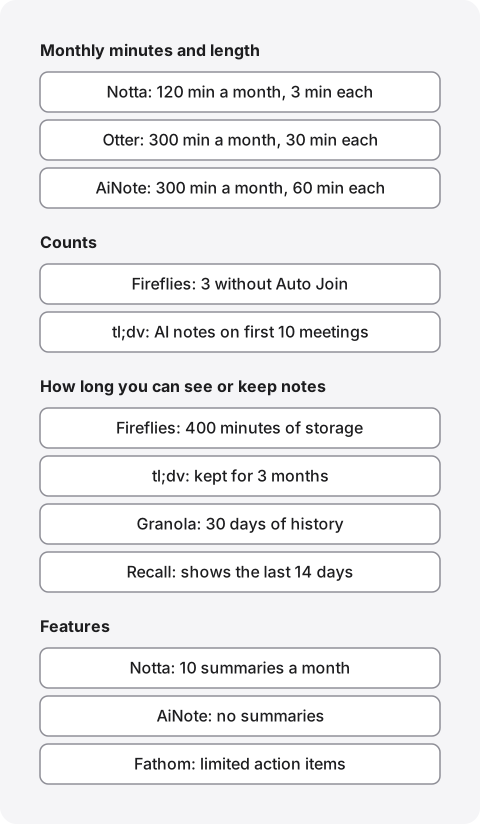
Free AI note takers are limited in four places: monthly minutes and length per meeting, counts, how long you can see or keep notes, and features. Which one applies decides when you get stuck.
Stopped by monthly minutes and meeting length
Notta, Otter, and AiNote limit both the minutes you can transcribe each month and the length of one recording. The length per recording hurts most: once a meeting runs past it, the rest is not transcribed.
Notta's Free plan gives 120 minutes a month, and its pricing page says it transcribes up to 3 minutes per recording. That is a range for trying short voice memos, not for keeping meetings. Otter's Basic gives 300 minutes a month with a 30-minute cap per conversation, so the second half of a longer meeting is lost. AiNote's Free plan gives 300 minutes a month with a 60-minute cap per recording. An hour-long meeting fits once, but five of them use up the month, and according to the Free and Solo page, those 300 minutes are shared by everyone in one workspace.
What happens when the minutes run out also differs. According to AiNote's help page on creating notes, you can still record at 0 minutes, but nothing is transcribed. If important meetings come late in the month, avoid spending the minutes early.
Stopped by counts
Fireflies and tl;dv limit counts rather than time. According to Fireflies' Free plan article, the Free plan includes 3 transcriptions by default. Turning on Auto Join (which sends the bot to your calendar meetings automatically) removes the limit for supported meetings (each uploaded file still uses one transcription). In other words, "unlimited" comes with the condition that the bot joins.
tl;dv's Free plan has no limit on recordings and transcripts; its limits are on AI. According to its article on Free plan limits (dated November 24, 2025), automatic AI notes cover your first 10 meetings, and after that only the first 10 minutes of each meeting. You also get 10 AI prompts. These are lifetime limits for the account and do not renew monthly.
Stopped by how long you can see or keep notes
Some products transcribe everything but hide older notes or make you delete them. tl;dv keeps Free recordings for 3 months and moves them to archived storage after 3 days; unarchiving can take up to an hour and a half. Fireflies' Free plan stores only 400 minutes per seat across recordings and uploads, and once you hit that, you delete older meetings to make room.
Granola's Basic shows 30 days of history, according to its pricing page. Recall's Free plan has no limit on transcription, but the app shows and searches only the last 14 days. Older records stay on the Mac for the retention period in settings (90 days by default on Free) and become visible again with Pro. Fathom's storage article says both Free and Premium users can store unlimited recordings forever, with no monthly cap.
Features left out or limited
Some products transcribe for free but charge for summaries and other features. AiNote's Free plan has no AI summaries; summaries come with a count on paid plans. Notta's Free plan includes 10 AI summaries a month. Fathom's Free plan includes AI summaries, with limited use of AI action items. Recall's Free plan writes summaries and your own to-dos with the AI on your Mac, but only when Apple Intelligence is on.
Five one-hour meetings a week on a free plan
Five one-hour meetings a week come to about 20 meetings and 1,200 minutes a month. Applying each official free-plan limit to that load gives the following.
| Transcription | Other limits | |
|---|---|---|
| Notta | Does not fit. First 3 minutes of each meeting, 120 minutes a month | 10 summaries a month |
| Otter | Does not fit. First 30 minutes of each meeting, 300 minutes a month (10 meetings) | 20 AI chat queries a month |
| AiNote | Does not fit. Five 60-minute meetings use up the 300 minutes | No summaries |
| tl;dv | Fits. All 20 meetings are recorded and transcribed | Automatic AI notes on 10 meetings in total. Kept for 3 months |
| Fireflies | Fits with Auto Join (the bot) on. 3 meetings with it off | 400 minutes of storage, about six one-hour meetings |
| Fathom | Fits. No limit on recordings and transcripts | Limited action items |
| Granola | No meeting count stated | Shows the last 30 days |
| Recall | Fits. No limit on transcription | Shows the last 14 days |
The four that fit still hit other limits over time. On tl;dv, by the second month automatic AI notes cover only the first 10 minutes of each meeting. Fireflies stores 400 minutes, so a month of meetings does not stay. On Recall, the first week's meetings drop out of view in the third week; they are not deleted, and you can see them again with Pro or within the retention period.
If your meetings are short or few, the gap is smaller than the table suggests. A few meetings a month of 30 minutes or less fit in Otter's Basic. Count how many meetings you have in a month and how long they run before you choose, and it becomes clear whether a free plan will last.
If you have meetings over two hours
For trainings, seminars, and long working sessions, check the per-recording cap first. Notta's 3 minutes, Otter's 30 minutes, and AiNote's 60 minutes all cut long meetings short. tl;dv caps each recording at 3 hours on all plans. Fathom and Recall do not state a per-meeting length cap for their free plans on their pricing pages or help. Recall keeps listening in the background, so a long meeting needs no action, though the longer it runs, the more CPU and battery the Mac uses.
Which free plans include summaries
For meeting notes, you usually want a summary and tasks, not just a transcript. Free plans that write summaries are Notta (10 a month), tl;dv (first 10 meetings), Fathom, Granola, and Recall (when Apple Intelligence is on). AiNote's Free plan has no summaries.
- Notta: 10 a month. With five meetings a week, they are gone in two weeks.
- Otter: Basic gets 20 AI chat queries a month, up to 3 per conversation, according to the pricing page.
- tl;dv: automatic AI notes on the first 10 meetings only; from the 11th, only the first 10 minutes.
- Fireflies: the help article calls summaries "unlimited" but also says they are generated from your AI credits, and Free gets 20 one-time credits, so how many you get depends on how you use them.
- Fathom: AI summaries are included in Free; action items are limited.
- Granola: Basic includes AI chat; choosing the model starts at Business.
- Recall: when a conversation ends, the AI on your Mac writes a summary and your to-dos. There is no count limit, but Apple Intelligence must be on. Answers to questions also need Apple Intelligence on Macs with less than 16 GB of memory.
Summary quality differs between products, and we have not compared them on the same meeting. Check a summary against what was actually said before sharing it outside your team. How to turn a transcript into meeting minutes is covered in making meeting minutes from a transcript.
Free with a bot, free without one
AI note takers either invite a bot (a note-taking participant) to the meeting or pick up the sound on your own computer or phone. Note that the products with the most generous free plans tend to be the ones that use a bot.
| How it joins | Where it runs | |
|---|---|---|
| Notta | Recording, files, a bot for web meetings. The desktop app records without a bot | Web, phone, computer app |
| Otter | Otter Notetaker (a bot), or recording in the desktop app | Web, phone, Mac and Windows apps |
| AiNote | Recording on a phone or in a browser, files. The web meeting bot is on paid plans | Phone, browser |
| tl;dv | A bot by default. Recording without a bot is also available | Web, Chrome extension, desktop app |
| Fireflies | A bot (Auto Join for unlimited on Free). Take Notes records without a bot | Web, computer app |
| Fathom | A bot by default. Recording without a bot is a Mac beta | Web. The Mac app for no bot |
| Granola | No bot. Picks up the computer's sound | Mac, Windows, phone |
| Recall | No bot. Runs in the background on the Mac | Apple silicon Mac on macOS 26 or later |
The details of how each one joins are in our comparisons of Fireflies and Fathom, tl;dv, Otter, and Granola, each with the date we checked.
A bot shows up in the participant list, which makes it easy for others to see that the meeting is being recorded. On the other hand, external meetings may refuse bots, and sometimes only the host can invite one. Tools without a bot are invisible to others, so you have to tell people yourself. Either way, tell people and stop if anyone objects. There is an example of what to say in the FAQ on our home page.
Data handling on free plans
Free plans sometimes differ from paid ones on training and retention. If you keep work meetings, check the free plan's terms first.
- Training: AiNote's pricing table marks the Free plan as used for training and Solo and above as not. For the others, check each company's security page or privacy policy.
- Whether audio is kept: Notta, Otter, AiNote, tl;dv, Fathom, and Fireflies when it records with its bot keep recordings in the cloud (Fireflies' Take Notes without a bot keeps no audio). Granola and Recall do not keep audio. Recall discards audio once it is transcribed, so you cannot listen back.
- Where notes are kept: the seven other than Recall keep transcripts and summaries in their cloud. Recall keeps both on your Mac, and they never reach our servers.
- Retention: tl;dv Free keeps 3 months, AiNote Free 1 year, Fathom until you delete, and Recall for the retention period in settings (90 days by default on Free).
Five checks for whether an AI note taker is safe are explained in our guide to meeting AI safety. For work use, check whether your company's rules allow the tool before worrying about whether it is free.
The eight free AI note takers
Here are the eight free plans one by one, with each one's strengths and what to watch for on the free plan.
Notta: the free plan is for trying short audio
Notta is a cloud transcription service widely used for Japanese meetings. It has phone apps, a web app, and a desktop app, and can either invite a bot to meetings or record without one in the desktop app.
The Free plan gives 120 minutes a month, 3 minutes per recording, 10 AI summaries a month, and 50 file imports a month. The 3-minute cap makes it too short for meetings. Use it to try the interface, and plan on a paid plan if you want it for meetings. Data-leak concerns and the privacy mode are covered in Notta alternatives compared.
Otter: meetings under 30 minutes fit for free
Otter is a meeting notes service run by Otter.ai in the US. Basic gives 300 minutes a month, 30 minutes per conversation, 3 file imports in total, and 20 AI chat queries a month. Its pricing page lists Japanese among the transcription languages.
Around ten meetings a month of 30 minutes or less fit in Basic. Longer or more frequent meetings need Pro. How it handles English meetings is covered in our Otter comparison.
AiNote: short meetings recorded on a phone
LINE WORKS AiNote is the successor to CLOVA Note, which ended in July 2025. The Free plan gives 300 minutes a month and 60 minutes per recording, with no AI summaries. Data may be used for training and is kept for 1 year. The 300 minutes are shared by everyone in the same LINE WORKS workspace.
Leaving a phone on the table to record an in-person meeting works the way CLOVA Note did. Recording in a PC browser does not pick up the other people in an online meeting; for that, a paid plan invites the AiNote bot. Moving over is covered in CLOVA Note alternatives.
tl;dv: unlimited recordings even on Free
tl;dv records meetings, transcribes them, and adds AI notes. Free has no limit on recordings and transcripts. Automatic AI notes cover the first 10 meetings, then only the first 10 minutes of each. Recordings are kept for 3 months and move to archived storage after 3 days.
It suits people who want recordings and only need AI notes on important meetings. If you want AI notes every time, consider Pro (€18 per seat per month billed yearly). The terms for recording without a bot are in our tl;dv comparison.
Fireflies: unlimited only with the bot joining automatically
Fireflies records meetings with a bot called Notetaker. Free includes 3 transcriptions by default; turning on Auto Join removes the limit for supported meetings. Storage is 400 minutes per seat, after which you delete older meetings. The help article says it detects over 100 languages automatically.
If you are fine with the bot joining every calendar meeting, you can transcribe many meetings for free. With only 400 minutes of storage, though, it does not suit building up an archive. If you do not want a bot, read our Fireflies and Fathom comparison.
Fathom: no cap on recordings or storage for free
Fathom records meetings and writes AI summaries. Free has no limit on recordings and transcripts, and keeps them until you delete them. AI summaries are included; action items are limited.
With no cap on the number of recordings or how long they are kept, you can build up many meetings for free. It joins with a bot by default; recording without a bot is a Mac beta. We could not confirm its accuracy and support for Japanese meetings from the pricing page, so try it on your own meetings.
Granola: no bot, 30 days of history
Granola picks up the computer's sound without a bot and tidies your meeting notes with AI. It runs on Mac and Windows. Basic shows 30 days of history and includes AI chat. The pricing page does not state a meeting count.
It suits people who want to take notes during the meeting without a bot. Transcripts and summaries are processed in the cloud. What to watch for in Japanese meetings is in our Granola comparison.
Recall: unlimited transcription on the Mac
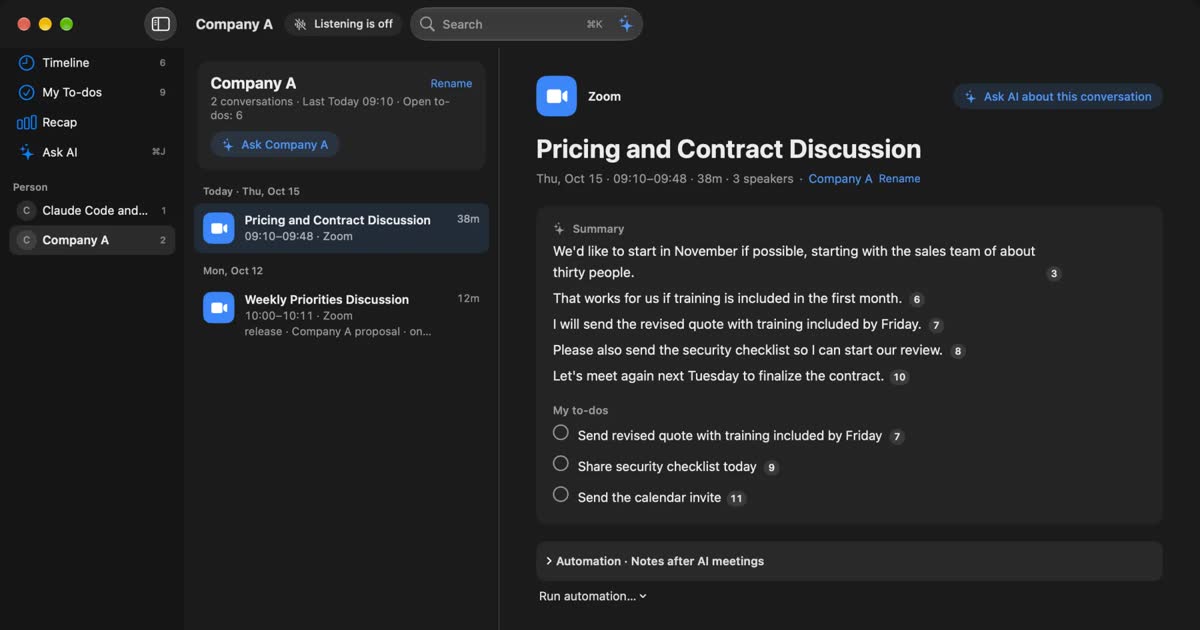
Recall is the Mac app we make. It sits in the menu bar and listens to the microphone (your voice) and the Mac's sound (the other people in meetings and videos), transcribing on the Mac. There is no record button and no meeting bot.
Free has no limit on transcription, and the app shows and searches the last 14 days. The AI on your Mac writes summaries and your to-dos (when Apple Intelligence is on). It runs only on Apple silicon Macs with macOS 26 or later, and does not work on phones or with recorded files. Details are in What Recall's Free plan does and does not do.
Tools without a free plan, and meeting apps
Some AI note takers have no free plan, only a trial. Meeting apps such as Zoom and Google Meet also transcribe, but mostly on paid plans.
Rimo: no free plan, a one-week trial
Rimo (formerly Rimo Voice) lists no free plan on its plans and pricing help page. The Pro and Team plans come with a free one-week trial the first time. The cheapest, transcription-only plan is ¥1,650 a month (credit card only). It does not suit people who want to keep going for free after the trial. How it differs from Recall is in our Rimo comparison.
Transcription in Zoom, Google Meet, and Teams
The transcription built into meeting apps is often unavailable on free accounts, or limited to captions you read during the meeting. We checked each one in its own guide.
- Zoom: free Basic accounts get automatic captions to read during the meeting; features that keep text are for hosts on paid plans (Zoom transcription, checked November 2, 2026).
- Google Meet: built-in transcripts come with eligible plans such as Business Standard, and personal free accounts are not on the list (Google Meet transcription, checked November 2, 2026).
- Teams: business paid plans include recording and transcription. We could not confirm personal accounts or free Teams from Microsoft's feature descriptions (Teams transcription, checked November 3, 2026).
Meeting app features depend on the host's plan. When you attend someone else's meeting, your own plan may not let you keep a record. In that case, use a tool that runs on your side, like the eight in this article.
How to choose
You can narrow down a free AI note taker with three questions: do you record in-person meetings on a phone, is a bot in the meeting OK, and which computer do you use.
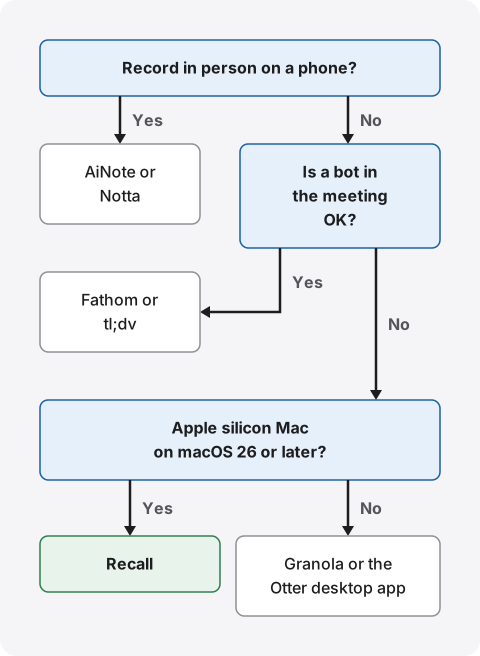
- Recording in-person meetings on a phone: the AiNote or Notta app. Both give little free time, so try them on short meetings or plan on paying.
- A bot is fine, and you want recordings too: Fathom or tl;dv. They keep a lot for free, and you can rewatch the recording.
- No bot, on an Apple silicon Mac with macOS 26 or later: Recall. Transcription has no limit, and your notes stay on the Mac.
- No bot, but you also use Windows or an older Mac: Granola or the Otter desktop app. Granola shows 30 days of history; Otter caps each conversation at 30 minutes.
What to check before you try
- How many meetings you have a month, and how long the longest one runs.
- Whether you need summaries or just a transcript.
- Whether you host or attend, and whether external meetings allow a bot.
- How far back you want to look (14 days, 30 days, 3 months, forever).
- Whether your workplace rules allow outside services and apps.
A free plan is also where you check accuracy and fit on your own meetings before committing. Narrow it down to two and try each for a week on similar meetings. Running two on the same meeting leaves two records, though, which means more to tell the other people.
What Recall's Free plan does and does not do
Recall's Free plan has no limit on transcription, and summaries and search run on the Mac. It also cannot do many things, so here are both.
What Free does
- Listens automatically in the background. Pause for 15 minutes, an hour, or until you resume.
- Separates up to four other people in the Mac's sound. Rename and merge speakers.
- Writes a summary of each conversation and pulls out your to-dos (when Apple Intelligence is on).
- The assistant: your and the other side’s commitments, with who owns each and a due date. Open ones stay visible even when older than 14 days.
- Searches by word with ⌘K. Ask the AI on your Mac and it answers with the numbers of the lines it relied on.
- Copies a transcript with times and speakers, or saves it as a text file, for pasting into meeting minutes.
- The live panel during meetings, and a weekly recap.
Pro (¥980 a month or ¥9,800 a year, tax included) adds viewing and searching records older than 14 days, monthly and yearly recaps, answers from your own Claude, ChatGPT, or Gemini, reading from outside AI tools such as Claude Code, and workflows that pass records to a command. Details are in Plans and licenses and Features.
Free to use · No account needed · macOS 26 or later · Mac with Apple silicon · By downloading, you agree to the Terms of Service
Who Recall does not suit
- People who want to use it on a phone, Windows, an Intel Mac, or a Mac older than macOS 26.
- People who want to keep audio or video and listen back later.
- People who want to import recorded files and transcribe them.
- Teams that want to share the same notes by link. You copy or save transcripts yourself to pass them on.
- People who want to search records older than 14 days for free.
- People who want summaries but cannot or do not want to turn on Apple Intelligence.
- People who need meetings in languages other than Japanese and English.
Recall runs in the background, so it uses some CPU and battery, more while people are talking.
FAQ
Which free AI note taker is best?
It depends on how you use it. AiNote or Notta for in-person meetings on a phone, Fathom or tl;dv if a bot is fine and you want recordings, and Recall for Mac meetings without a bot. Start by counting your meetings and how long they run in a month.
Is there a completely free AI note taker with no limits?
tl;dv, Fathom, Fireflies with Auto Join on, and Recall put no limit on how many meetings or minutes they transcribe. Each still has other limits, such as AI note counts, storage, or how far back you can see.
How many minutes does Notta's free plan give?
120 minutes a month, up to 3 minutes per recording, with 10 AI summaries and 50 file imports a month. For meetings, plan on a paid plan.
Which ones write summaries for free?
Notta gives 10 a month, tl;dv covers the first 10 meetings, and Fathom and Granola include summaries on their free plans. Recall's AI on your Mac writes summaries when Apple Intelligence is on. AiNote's Free plan has no summaries.
Do they work for Japanese meetings?
Notta and AiNote are built with Japanese meetings in mind. Otter lists Japanese among its transcription languages, and Fireflies says it detects over 100 languages. Recall is built mainly for Japanese and English. Check accuracy on your own meetings.
On a free plan, are my meetings used to train AI?
It depends on the product and plan. AiNote's Free plan is used for training, and Solo and above are not. Check the others on each company's security page. Recall keeps records on your Mac and does not send them to our servers.
Is there a free AI note taker without a bot?
Granola and Recall do not use a bot. Otter and Notta record in their desktop apps, and Fireflies and tl;dv also have ways to record without a bot. On Fireflies' Free plan, unlimited transcription requires Auto Join, which sends the bot automatically.
Are records older than 14 days deleted on Recall's Free plan?
No. They are hidden in the app but stay on the Mac for the retention period in settings (90 days by default on Free). With Pro you can view and search them. Records past the retention period are deleted.
If there is no visible bot, do I still need to tell people?
Yes, with any product. Tell people you are transcribing, and stop if anyone objects. Do not use these tools where recording is prohibited or your workplace rules do not allow it.
Checked November 13, 2026. Details for Notta, Otter, AiNote, tl;dv, Fireflies, Fathom, Granola, and Rimo come from each company's official pricing pages and help. Details for Zoom, Google Meet, and Teams were checked in each guide on the dates given in the text. Prices and free plans can change, so check the official pages before you sign up or roll out. This article is a general comparison, not legal advice.
Free to use · No account needed · macOS 26 or later · Mac with Apple silicon · By downloading, you agree to the Terms of Service
Get the product overview (PDF) by email →
Related articles
Notta alternatives compared: choosing when you worry about data leaks
For people looking for a Notta alternative. We split the worry about leaks into three, then cover what you can do within Notta, Privacy Mode, and how five products including Recall differ, and who they do not suit.
Otter.ai alternatives compared: 8 options for English meetings, and when to stay on Otter
Looking for an Otter.ai alternative? We compare Recall, Fireflies, Fathom, Granola, Notta, MacWhisper, tl;dv and Tactiq on bots, where data lives, languages and free limits, and say when Otter is still the better choice.
Is Otter.ai safe? Five checks for any AI meeting notetaker, with official answers
Is Otter.ai safe, and is any AI notetaker? Five checks (audio storage, where processing happens, AI training, sharing, telling participants), how to verify each, and what Otter, Notta, Rimo Voice, Granola and tl;dv officially say (checked November 13, 2026).