 Recall
CLOVA Note alternatives after the shutdown: AiNote, Recall, and how to choose
CLOVA Note shut down on July 31, 2025, and its successor is LINE WORKS AiNote. What changes on AiNote's Free and Solo plans, what to watch for with PC meetings, other options including Recall, and who each one does not suit.
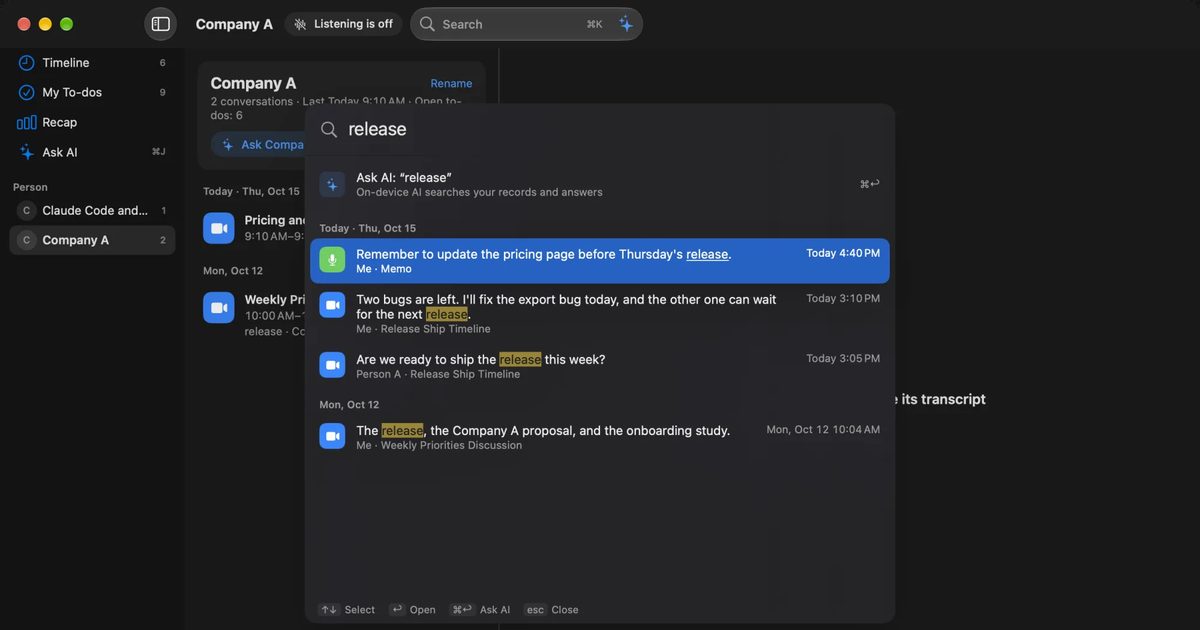
The short answer: AiNote for recording on a phone, Recall for keeping Mac meetings without a bot
CLOVA Note (officially CLOVA Note beta) ended on July 31, 2025. Its official successor is AiNote from LINE WORKS. If you recorded in-person meetings on your phone and shared notes with a team, trying AiNote first makes sense. It is the product the CLOVA Note site points to as the official release, and it works in a similar way. We could not find official guidance on moving records you did not migrate before the shutdown.
AiNote does not come on the same terms, though. The Free plan has no AI summaries and no web meeting recording, and the audio you record may be used to train AI. Recording in a PC browser does not pick up the other people in a meeting. If you want to keep the meetings you hear on your Mac, with no record button and no meeting bot, Recall, which runs on the Mac itself, is an option.
This article is written by KOROMO K.K., the company that makes Recall, a transcription app for the Mac. We are comparing our own product, so read it with that in mind. We checked CLOVA Note and AiNote on their official pages and help on November 13, 2026. We have not compared accuracy on the same audio, so we do not say which is more accurate.
| If you want to | Read next |
|---|---|
| Know whether CLOVA Note still works | What happened to CLOVA Note |
| Keep using AiNote for free | AiNote's plans and what changed |
| Transcribe Zoom or Teams meetings | Recording meetings on a PC |
| Avoid recordings being used for training | How data is handled |
| Compare options beyond AiNote | Other alternatives |
What happened to CLOVA Note
CLOVA Note ended on July 31, 2025, and its official site points users to its successor, LINE WORKS AiNote. The CLOVA Note site says the service ended on that day and asks users to move to AiNote, the official release.
The timeline is in the LINE WORKS announcement of January 28, 2025.
- February 4, 2025: Data migration to AiNote began, and from the same day creating notes and some other functions were restricted in CLOVA Note for everyone, whether or not they migrated.
- How to migrate: Issue a data migration key from the banner in CLOVA Note and move the data to AiNote.
- End date: First planned for the end of March 2025, then extended to the end of July.
Now that the service has ended, we could not find official guidance on moving records that were left in CLOVA Note. If you need records you did not migrate, ask LINE WORKS support.
The AiNote product page describes it as the business edition of CLOVA Note beta, which had one million registered users. CLOVA Note spread as a free phone app for individuals; AiNote is offered as a business edition, a work tool for companies. That is the biggest difference when you move.
Where to move, by how you used CLOVA Note
Where to move depends on what you used CLOVA Note for. Here are common uses matched to the products this article compares.
| How you used CLOVA Note | Where to look |
|---|---|
| Recording in-person meetings on a phone | AiNote or Notta. Solo or above for long meetings |
| Uploading recorded files | AiNote or MacWhisper |
| Recording online meetings you join on a PC | AiNote Solo or above (invite a bot) or Recall (listens to the Mac's sound) |
| Staying free | AiNote Free is transcription only. Recall Free also makes summaries on the Mac when Apple Intelligence is on |
If none fits, or several do, start at How to choose.
AiNote's plans and what changed from CLOVA Note
AiNote has Free and Solo plans for individuals, and Team, Business, and Enterprise plans for companies. Free or Solo is closest to how people used CLOVA Note. According to the Free and Solo price table, the differences are these. Prices exclude tax.
| Free | Solo | |
|---|---|---|
| Price per month (excl. tax) | ¥0 | ¥1,440 annual, ¥1,600 monthly |
| Minutes a month | 300 | 600 |
| Minutes per recording | 60 | 180 |
| AI summaries a month | None | 12 |
| Web meeting recording | Not available | Available |
| Data used for training | Yes | No |
| Data kept for | 1 year | 3 years |
| Users | Up to 30 | 1 (or a small group) |
Team, the business plan, is ¥19,800 a month on an annual contract (¥22,000 monthly, excl. tax), with 6,000 minutes a month, 360 minutes per recording, 120 summaries a month, 5 years of storage, no training use, and unlimited users (from the product page and the pricing explainer). Monthly minutes are shared by everyone in the same LINE WORKS environment, reset each month, and do not carry over (help on creating notes, in Japanese). Solo can add 100 minutes and 2 summaries from ¥360 a month (annual contract).
What changes when you move from CLOVA Note
Applied to how people used CLOVA Note, the table means four changes.
- No summaries for free: Summaries are a feature of Solo and the other paid plans. Free gives you transcription only.
- Recording stops at 60 minutes: On Free, recording ends automatically after 60 minutes and only that much is transcribed. Files longer than 60 minutes cannot be uploaded. For long meetings you need Solo or above.
- You need a LINE WORKS environment: The FAQ says that even individuals must open a LINE WORKS platform. Installing the app alone is not enough.
- Automatic speaker recognition is for business plans: Separating speakers is a basic feature, but recognizing who is speaking from their voice is listed for business plans only.
Some strengths have not changed. AiNote works in a phone app and in a browser, and you can still record an in-person meeting on your phone and transcribe it. It supports Japanese, English, Chinese (simplified and traditional), and Korean. It notes that a single meeting in mixed languages is not supported yet.
When you run out of monthly minutes
You can keep recording after the monthly minutes run out, but nothing is transcribed. The help on creating notes (in Japanese) says minutes are counted from the moment conversion to text starts, and at 0 minutes you can record but no transcription is made. If any time is left, a recording is converted up to the plan's per-recording limit. Cancelled uploads are not counted.
If you are likely to run short near the end of the month, Solo and above can add time with an option. On Free, recording long meetings early in the month can leave later meetings untranscribed. Check the remaining time before you record.
Getting started with AiNote
Installing the app alone is not enough to start AiNote. According to the Free and Solo page, you open Free by filling in a form on a PC, or by choosing "create a service environment" in the app on a phone. Solo is chosen in the admin console after you have opened Free.
A Solo trial can be started from the admin console if you already use another LINE WORKS product, and it cannot be repeated once used. One account can be used on up to two mobile devices. If you used CLOVA Note on both a phone and a tablet, check that you fit within those two.
AiNote vs Recall
AiNote is a cloud minutes service you use on a phone or in a browser; Recall is a personal record app that runs on your Mac. The main differences are these.
| AiNote | Recall | |
|---|---|---|
| Where it runs | iOS and Android apps, browser | An app for Macs with Apple silicon on macOS 26 or later |
| How it starts | Press record, upload a file, or invite a bot to the meeting | Stays running and listens automatically |
| Where transcription happens | In the cloud | On this Mac |
| Summaries | Solo and above, with a monthly count | Made by the AI on this Mac, when Apple Intelligence is on |
| Audio | Kept | Discarded once transcribed; you cannot replay it |
| Recorded files | Can be uploaded (browser: m4a, mp3, aac, wav, up to 300 MB) | Cannot be imported |
| Sharing | Notes can be shared within the organization | Copy or save the transcript yourself and pass it on |
| What is free | 300 minutes a month, 60 per recording; no summaries or web meeting recording | Unlimited transcription; view and search the last 14 days |
| Paid plan | Solo ¥1,440 a month (annual, excl. tax) | Pro ¥980 a month or ¥9,800 a year (incl. tax) |
AiNote details come from the official pages above and the help on creating notes (in Japanese). Recall details match the Pricing and Features pages.
Where AiNote is strong
- Records on a phone: Put your phone on the table for an in-person meeting or interview, just as with CLOVA Note.
- Transcribes recorded files: Upload recordings from an IC recorder or a phone. The browser version takes several files at once.
- Keeps the audio: You can go from the text back to the audio and check the wording.
- Organizational controls: It lists ISO/IEC 27001 and other certifications, single sign-on, and administrator permissions. You can also start a recording from a LINE WORKS calendar event.
Where Recall is strong
Recall's strength is that what you hear is kept without any setup. It stays in the menu bar and listens to the microphone (your voice) and the Mac's sound (the other people in a meeting or video). There is no record button to press and no bot to invite.
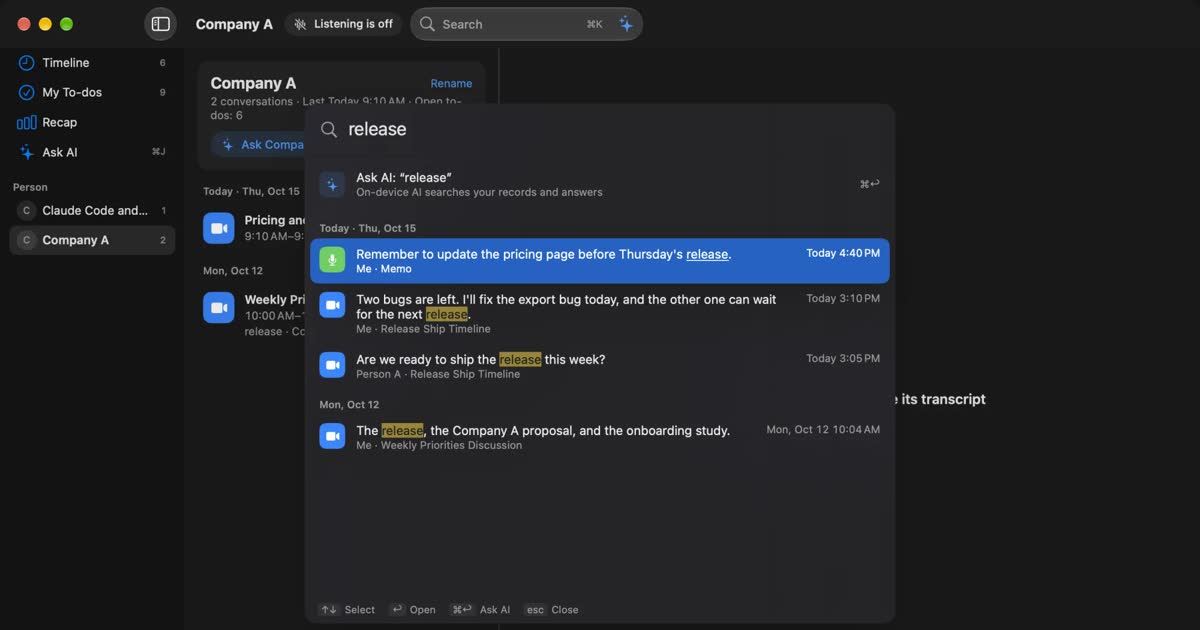
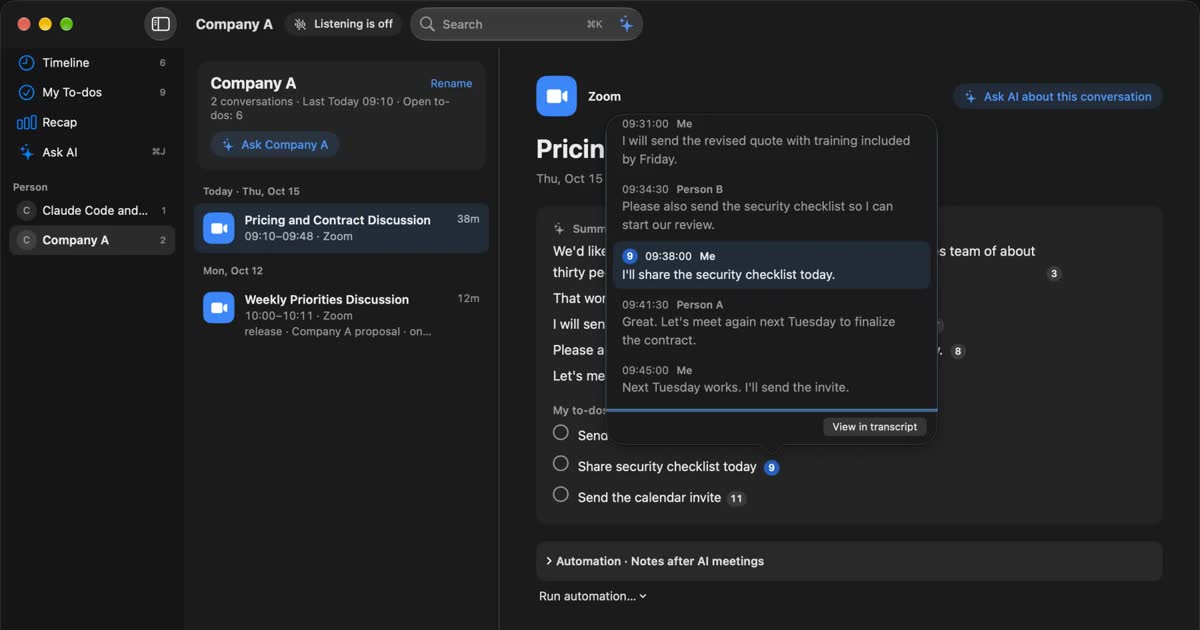
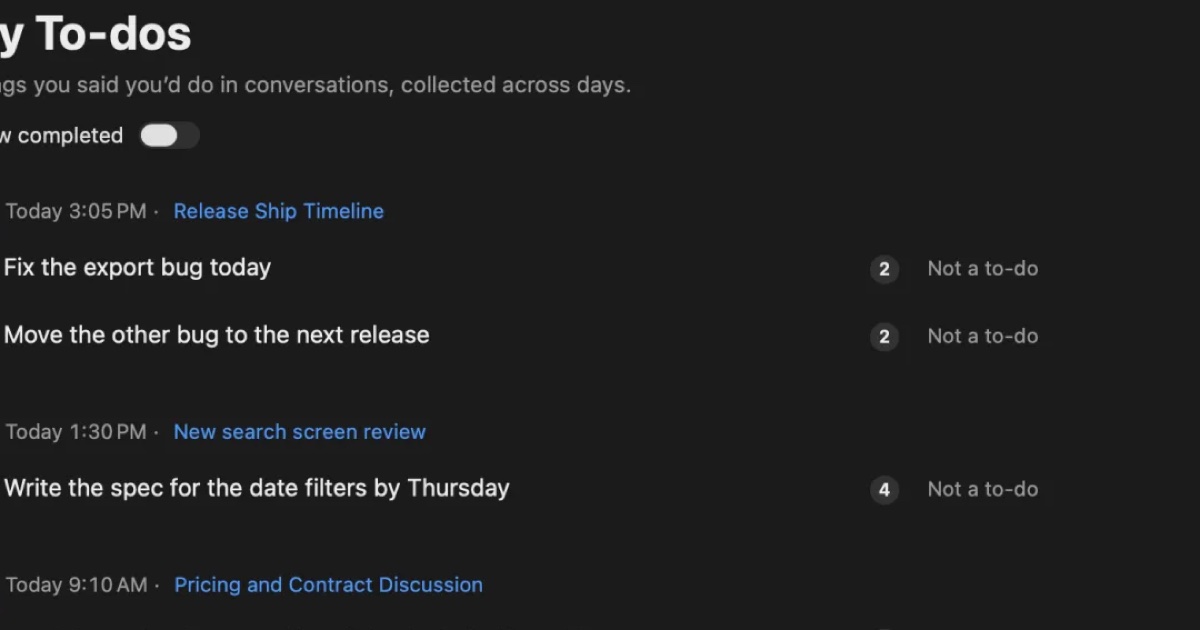
What it keeps is shaped for you to use later. You can search by words with ⌘K, and Ask AI answers with numbered links to the lines it is based on. When a conversation ends, the AI on this Mac writes a summary and what you need to do. Summaries and to-dos need Apple Intelligence turned on. Answers to questions need it only on Macs with less than 16 GB of memory. Transcription is unlimited even on Free; Pro adds viewing and searching records older than 14 days, monthly and yearly reviews, and connecting your own AI and outside tools. See Plans and license.
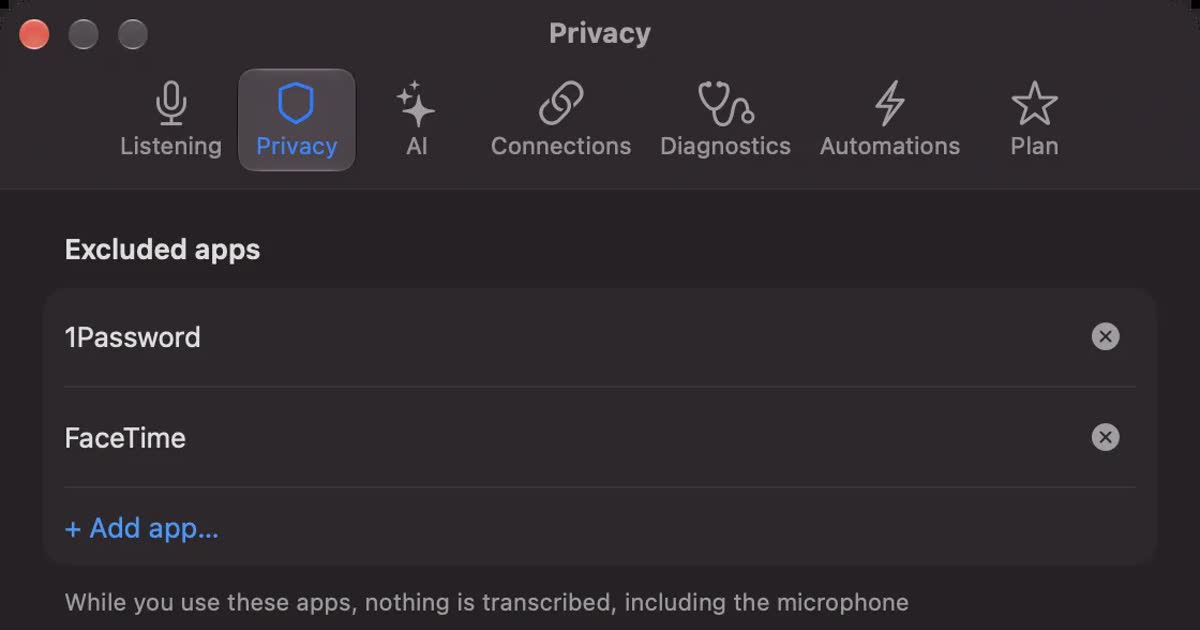
Because it is always listening, unplanned conversations are kept too. You can stop what you do not want kept: pause for 15 minutes, 1 hour, or until you resume from the popover; delete the last 15 minutes after the fact; and mark apps such as banking or password managers as apps not to record.
How speakers are separated
AiNote separates speakers after recording; Recall separates the other people while it listens. In AiNote, you choose the conversation type and the number of participants when you finish or upload a recording, and then it is transcribed. The product page says its speaker separation placed third in the DIHARD3 international challenge (2021). Recognizing who is speaking from their voice is for business plans only.
Recall estimates up to four people heard through the Mac and labels them Person A, Person B, and so on. You can name them. In in-person meetings, once you register your voice, it separates you from everyone else. If you need to split a large in-person meeting finely, AiNote fits better.
Recording meetings on a PC
To transcribe a Zoom or Teams meeting with AiNote, you invite its bot. Recording in a PC browser does not capture the other people's voices.
PC browser recording takes the microphone only
AiNote's help says that recording on a PC needs a microphone, that only sound going directly into the microphone is recorded, and that sound playing inside the browser (such as a web meeting) is not recognized. If you record with the browser version while in a meeting on your PC, what you get is mostly your own voice.
Web meeting recording uses a bot
With AiNote's web meeting recording, you enter the meeting link and AiNote Bot joins the meeting to record it. It supports LINE WORKS, Zoom, Microsoft Teams, Webex, and Google Meet. The same help lists these conditions.
- On Zoom, Webex, and Google Meet, only the host's account can admit the bot. For a meeting someone outside your company hosts, they have to admit it.
- It is not available on Free. It is a Solo-and-above feature.
- When a meeting service changes, the connection can pause, and it may take a day or more to come back.
The bot joins the meeting as a participant, so others are more likely to notice it is being recorded. That is a good thing too.
Recall listens to the Mac's sound
Recall puts nothing into the meeting. It listens to the other people through the Mac's sound and to you through the microphone, so it works with any meeting app and needs no approval from the host. It estimates up to four other speakers and labels them Person A, Person B, and so on. You can name them.
Not being visible does not mean recording is allowed. Tell people you are transcribing. Wording you can use is in the FAQ. Do not use it where recording is prohibited or your workplace rules do not allow it.
For in-person meetings, Recall also listens through the microphone. Once you register your voice, everyone else in the room is recorded as one "Person (in person)", however many people there are. If you need to separate several people in the room, AiNote fits better.
How data is handled
On AiNote, the plan decides whether your data is used for training and how many years it is kept; on Recall, the record stays on this Mac. Recall's records never reach our servers.
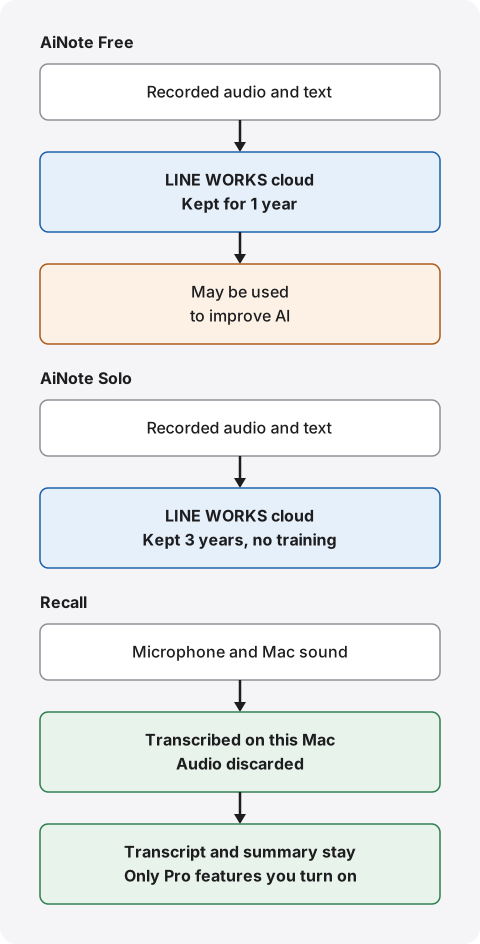
AiNote: Free may use your data for training
AiNote's price table marks Free as used for training and Solo and above as not. The audio data terms for Free (in Japanese) say both the audio you enter and the text recognized from it may be used to improve speech recognition and other AI. They say the link to your user ID is removed and the data is split into small pieces. We did not find a way to opt out; the terms say continuing to use the service counts as agreeing.
If you record work meetings, do not skip this. Whether your employer's meeting audio may be used to improve an outside AI on a free plan is often not yours alone to decide.
Data is kept for 1 year on Free, 3 years on Solo, and 5 years on business plans. We could not find the country or region where data is stored on the official pages we checked. If storage location matters, ask before you sign up. The full list of things to check is in five checks for any AI meeting notetaker.
Recall: the record stays on your Mac
Recall discards audio once it is transcribed and does not keep it. The transcript and summary are saved on this Mac and are not sent to our servers. The record leaves the Mac only when you use a Pro feature you turned on yourself (your own AI, connections to outside tools, workflow commands, and so on), or when you copy or save it and pass it on. The full list is in When records leave the Mac.
You can keep records for 7 days, 30 days, 90 days, 1 year, or forever. The default is 90 days on Free and forever on Pro. Free shows and searches the last 14 days; older records stay for the retention period and become visible with Pro. Recall keeps no copy of your record, so protecting against a broken or lost Mac is up to you.
What to tell your workplace
If you use it for work meetings, describing how the data moves, before naming a product, speeds things up with your IT staff. Item by item:
| AiNote | Recall | |
|---|---|---|
| Where text is made | Cloud | This Mac |
| Audio | Kept | Not kept |
| Used for training | Yes on Free, no on Solo and above | Not sent out |
| Kept for | 1 year on Free, 3 on Solo, 5 on business plans | 7 days to forever, your choice |
Recall's "not sent out" describes the default. If you choose your own Claude, ChatGPT, or Gemini on Pro, questions and the lines they need go to that company under its terms. With a Gemini free-tier key, what you send may be used to improve Google's services. Recall also has no way for an administrator to manage users together, so it can be hard for an organization to approve. Do not install it on your own judgment; check your rules.
Other alternatives
Besides AiNote and Recall, Notta, Rimo, and MacWhisper are also options when moving from CLOVA Note. Here they are as checked in this site's guides.
| Good for | Price | |
|---|---|---|
| LINE WORKS AiNote | Recording in-person meetings on a phone. CLOVA Note's successor | Free: 300 minutes a month. Solo: ¥1,440 a month (annual, excl. tax) |
| Notta | Cloud transcription you share. Phone and PC | Free: 120 minutes a month, 3 minutes per recording. Premium: ¥1,980 a month or ¥14,220 a year (incl. tax), 1,800 minutes a month |
| Rimo | Sharing minutes in a team and managing them as an organization | Pro ¥4,950 a month (incl. tax). Free trial |
| MacWhisper | Transcribing recorded files on the Mac | Pro: €64 one-time |
| Recall | Keeping the meetings and videos you hear on your Mac, always on | Free plan. Pro ¥980 a month (incl. tax) |
Notta suits you if you want cloud transcription on both phone and PC. Like CLOVA Note, it records in a phone app. See Notta alternatives compared.
Rimo (formerly Rimo Voice) suits organizations that build minutes as a team and want official documents showing data kept in Japan and not used for training. See Rimo vs Recall.
MacWhisper suits people who used CLOVA Note to transcribe recordings from their phone. It transcribes files on the Mac. See MacWhisper vs Recall.
Other companies' prices are as checked in each guide on its official pages (November 2, 2026). They can change, so check each official page for the latest.
What a year costs
For an individual, a year costs from ¥0 on AiNote Free or Recall Free up to ¥17,280 (excl. tax) on AiNote Solo. Team, a business plan with unlimited users, is ¥237,600 (excl. tax). We calculated from the official prices. The features differ, so price alone does not rank them.
| Product and plan | One year | How it adds up |
|---|---|---|
| AiNote Free | ¥0 | 300 minutes a month, 60 per recording. No summaries or web meeting recording |
| AiNote Solo | ¥17,280 (excl. tax) | ¥1,440 a month × 12 on an annual contract. ¥19,200 (excl. tax) monthly |
| AiNote Team | ¥237,600 (excl. tax) | ¥19,800 a month × 12 on an annual contract. Unlimited users |
| Recall Free | ¥0 | Unlimited transcription. View and search the last 14 days |
| Recall Pro | ¥9,800 (incl. tax) | Yearly. Unlimited transcription |
To estimate, count your monthly minutes and summaries first. An hour-long meeting every weekday is 1,320 minutes over 22 days. That does not fit Solo's 600 minutes, so you would add time or consider Team. Solo also has 12 summaries a month, not enough to summarize every meeting.
On the other hand, a weekly 60-minute meeting plus a weekly 30-minute one-on-one comes to 360 minutes over four weeks. That does not fit Free's 300 minutes but fits Solo's 600, and 8 summaries a month fit Solo's 12. Write down a month of your meetings and compare both minutes and counts.
Recall costs nothing on Free. If you use your own AI with an API key on Pro, that company charges you separately. If you do not have a supported Mac, count that cost too.
How to choose
If you are unsure, three questions narrow it down: the device you record on, whether a team shares minutes, and whether you can invite a bot. For finer conditions, find the line that fits you below.
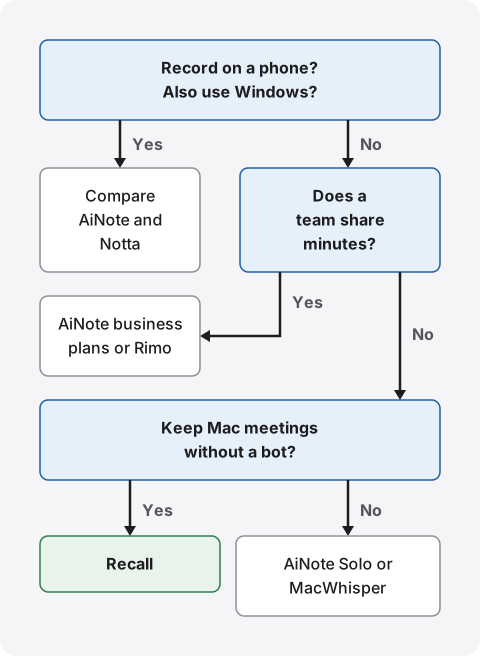
- You want to record on a phone, or use Windows: Compare AiNote and Notta. AiNote is closest to CLOVA Note.
- You want to keep meetings you hear on your Mac: If inviting a bot is fine, AiNote Solo and above work. If you do not want to invite a bot or wait for the host to admit it, use Recall.
- You want to stay free: AiNote Free is transcription only and may use your data for training. Recall Free also makes summaries on the Mac when Apple Intelligence is on, but needs a supported Mac.
- You want to share minutes with a team: AiNote's business plans or Rimo. Recall is a personal record, not a place for an organization's minutes.
- You want to transcribe recorded files: AiNote or MacWhisper. Recall cannot import files.
If you use it for work, check your company's rules before any of this. A product your rules do not allow cannot be used, however well it fits.
By situation
Lectures and seminars: If you put a phone down in a room or venue, AiNote is closest to CLOVA Note. If you watch an online seminar on your Mac, Recall listens to the Mac's sound. Either way, check with the organizer that recording is allowed.
Interviews: If you want to check exact wording against the audio, AiNote, which keeps audio, fits. Recall discards audio, so it does not.
Internal regular meetings: If producing and circulating minutes is the job, a product a team can share, such as AiNote's business plans or Rimo, fits. Recall is a personal record, not a place for an organization's minutes.
Sales calls: You will hold the other company's information. First check that a confidentiality agreement does not restrict entering it into outside services. AiNote's bot needs approval in meetings the other side hosts. For your own review only, Recall is enough.
One-on-ones and interviews with staff: Personal matters get recorded. Tell the person you are transcribing and keep records briefly. Recall lets you keep them for as little as 7 days. Note that AiNote Free keeps them for 1 year and may use them for training.
Webinars and videos: Recording with AiNote's browser version does not capture sound playing in the browser. To keep what you watch on your Mac, Recall fits.
Using both
You can keep AiNote and add Recall. Record in-person meetings and interviews with AiNote on your phone, and keep online meetings and webinars on your Mac with Recall. Here too, check your workplace rules and tell people you are transcribing.
Who each one suits
Whether you record on a phone or a Mac mostly decides whether AiNote or Recall suits you. AiNote first.
AiNote suits you if
- You want to record in-person meetings and interviews on your phone, as with CLOVA Note.
- You want to transcribe recordings and files and replay the audio.
- You also use Windows, iPhone, or Android.
- You use LINE WORKS, or want to share notes with a team.
- You do not mind inviting a bot into web meetings.
AiNote does not suit you if
- You want to keep meetings you hear on your Mac without inviting a bot. PC browser recording does not capture the other people.
- You want summaries for free. Summaries need Solo or above.
- You do not want your conversations used for AI training, but do not want a paid plan.
- You do not want to open a LINE WORKS environment.
Recall suits you if
- You want to keep the meetings you hear on your Mac with no record button and no bot.
- You do not want conversations on outside servers, or your workplace rules do not allow it.
- You want only text on your Mac, with no audio kept.
- You want summaries done on the Mac too. Summaries and to-dos need Apple Intelligence turned on.
- You want to stay free. Transcription is unlimited on Free.
Free to use · No account needed · macOS 26 or later · Mac with Apple silicon · By downloading, you agree to the Terms of Service
Recall does not suit you if
- You want to use a phone, Windows, an Intel Mac, or macOS earlier than 26. It cannot record on a phone the way CLOVA Note did.
- You want to keep the audio and replay it later.
- You want to import recorded files and transcribe them.
- You want a team to share the same minutes by link. You copy or save the transcript and pass it on yourself.
- You want to separate several people in an in-person meeting.
- You want to transcribe meetings in Chinese or Korean. Recall is built mainly for Japanese and English.
- You want to keep records even if your Mac breaks.
Recall stays running, so it uses some CPU and battery, more while people are talking.
FAQ
Can I still use CLOVA Note?
No. It ended on July 31, 2025. The official site points users to LINE WORKS AiNote, the official release.
Can I move my CLOVA Note records to AiNote?
Migration was offered while CLOVA Note was still running: from February 4, 2025, you issued a data migration key in CLOVA Note and moved the data. We could not find official guidance on migrating after the shutdown. If you need it, ask LINE WORKS support.
Is AiNote free?
There is a Free plan: 300 minutes a month, up to 60 minutes per recording, but no AI summaries or web meeting recording. The audio and text you record may be used to improve AI. Data is kept for 1 year.
How do I get summaries in AiNote?
You need Solo or another paid plan. Solo includes 12 a month and Team 120 a month. You can add more with an option.
What happens when I run out of AiNote transcription minutes?
You can still record, but nothing is transcribed. Minutes reset each month and unused time does not carry over. On Solo and above, you can buy an option that adds 100 minutes and 2 summaries.
How many devices can I use AiNote on?
One account can be used on up to two mobile devices, according to LINE WORKS. On a PC, you use the browser version.
Can individuals use AiNote?
Yes. The FAQ says individuals also need to open a LINE WORKS platform. Solo is the plan for one person (or a small group).
Can AiNote record the other people in a PC meeting?
Not with browser recording. Its help says PC recording takes only sound going directly into the microphone, and sound playing in the browser is not recognized. To keep the other people's voices, invite AiNote Bot with web meeting recording on Solo or above.
Does Recall work on a phone?
No. Recall runs only on Macs with Apple silicon on macOS 26 or later. To record on a phone, consider AiNote or Notta.
Is Recall more accurate than AiNote?
We do not know. We have not compared them on the same audio, so we cannot say which is more accurate. Accuracy depends on the speakers, the microphone, and the topic. Both have a free plan, so try them on your own meetings.
If there is no visible bot, do I still need to tell people?
Yes. The same goes for AiNote and Recall. Tell people you are transcribing, and stop if anyone objects. Do not use either where recording is prohibited or your workplace rules do not allow it.
Checked November 13, 2026. CLOVA Note and AiNote details come from the CLOVA Note site and LINE WORKS's official pages, terms, and help. Other products are as checked in each guide on the dates given under the table. Prices and features can change, so check the official pages before you sign up. This article is a general comparison, not legal advice.
Free to use · No account needed · macOS 26 or later · Mac with Apple silicon · By downloading, you agree to the Terms of Service
Get the product overview (PDF) by email →
Related articles
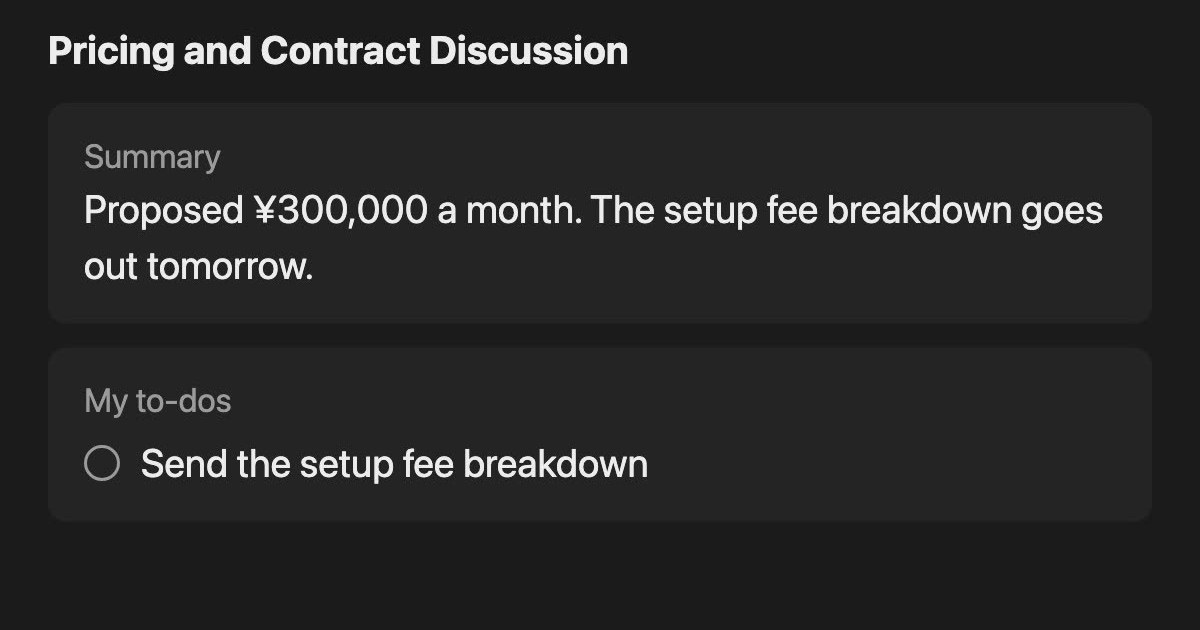
AI GIJIROKU alternatives after the shutdown: moving to Rimo, and how to choose another meeting AI
AI GIJIROKU by Alt Inc. shut down on October 31, 2025, and Rimo announced it would take its customers as the official destination. What the migration plan covers, what to check before you move, how Rimo, Notta, AiNote, YOMEL and Recall differ and what they cost, and who each one does not suit, checked against official pages on November 20, 2026.
Notta alternatives compared: choosing when you worry about data leaks
For people looking for a Notta alternative. We split the worry about leaks into three, then cover what you can do within Notta, Privacy Mode, and how five products including Recall differ, and who they do not suit.
Rimo Voice (now Rimo) vs Recall: choosing a meeting notes tool
Comparing Rimo Voice (now Rimo) and Recall: where records live, bots, sharing, and cost, with Notta and AiNote in the picture, and who each one does not suit.
Is Otter.ai safe? Five checks for any AI meeting notetaker, with official answers
Is Otter.ai safe, and is any AI notetaker? Five checks (audio storage, where processing happens, AI training, sharing, telling participants), how to verify each, and what Otter, Notta, Rimo Voice, Granola and tl;dv officially say (checked November 13, 2026).
AutoMemo pricing, features, and how it differs from Recall
Sourcenext's AutoMemo: its pricing plans, how it records, and how it handles data, checked against its official pages and compared with Recall, which runs on your Mac. Who AutoMemo suits, and who Recall suits.