 Recall
MacWhisper vs Recall: how they differ before you switch
Looking for a MacWhisper alternative? Compare audio files, always-on capture, saved audio, pricing and requirements, and see who each app fits.
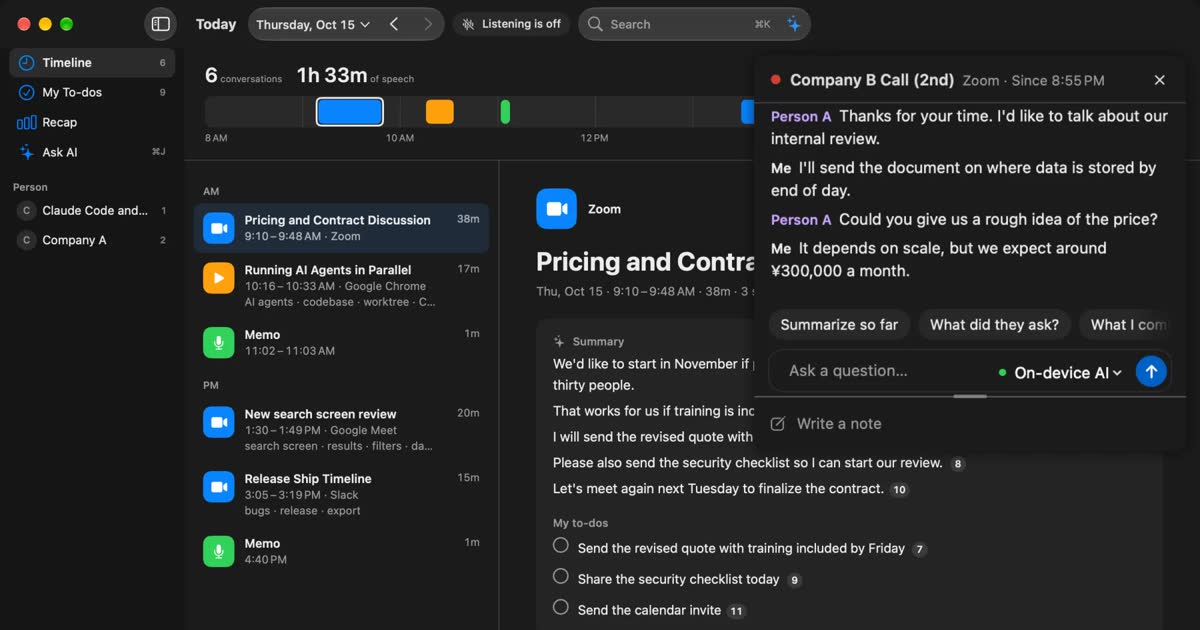
In short, MacWhisper suits people who want to transcribe audio or video files they already have, and Recall suits people who want the conversations they hear on their Mac kept even when they forget to start anything. Both can transcribe on the Mac, but they are built differently. MacWhisper is a tool that turns recordings and files into text, and you can buy it once. Recall stays in the menu bar, records conversations as text, and adds summaries and search. It does not save audio.
This article is written by KOROMO K.K., the company that makes Recall. So the details of MacWhisper are limited to what we could confirm on its official site, its official help and its App Store page, and we say plainly where MacWhisper is the better fit. We do not say which one transcribes more accurately, because we have not measured them under the same conditions.
The short answer: it depends on what you want to transcribe
The dividing line is whether the thing you want as text is audio you already have, or a conversation you have not heard yet. Start from the row closest to you.
| Your situation | What fits, and where to read next |
|---|---|
| You want to transcribe recorded audio or video | MacWhisper. See audio files and subtitles |
| You want subtitles (.srt, .vtt) for a video | MacWhisper. The free version can export them |
| You want to pay once | MacWhisper Pro. See pricing |
| You sometimes forget to record, and the meeting is lost | Recall. See how each one starts |
| You want text kept, but no audio | Recall. See what stays |
| You want to find what you promised last week | Recall. See what Recall is |
| You want to type with your voice | MacWhisper or another dictation app. Recall has no dictation |
| Neither meets your requirements | See other options |
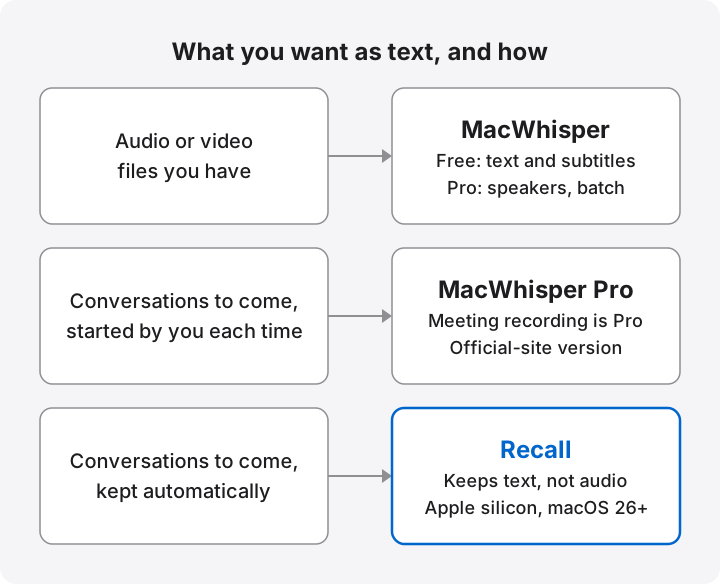
How MacWhisper and Recall differ
First, what each app is. Then the differences in one table.
What MacWhisper is
MacWhisper is an app that turns audio and video into text on your Mac. It is made by Good Snooze in the Netherlands. The basic use is to drag in a file. It takes mp3, wav, m4a, ogg, opus, mov and mp4, and the official site says it supports over 100 languages (the pricing table says “100 different languages”).
The pricing table draws a clear line between Free and Pro.
- Also in Free: recording from the Mac microphone, transcribing files, exporting .srt and .vtt subtitles, exporting .txt, and system-wide dictation.
- Only in the Pro column: automatic speaker recognition, batch transcription, transcribing YouTube and media URLs, auto cleanup, translation, meeting recording, AI through your own API keys, watched folders, and automatic upload to other services.
MacWhisper comes in two forms: MacWhisper from the official site, and Whisper Transcription on the Mac App Store. The official site says system-wide dictation and automatic meeting recording are not in the App Store version because of App Store restrictions, so check which version a claim is about before you buy. It also warns about scam sites posing as MacWhisper. Purchases go through its Gumroad page or the App Store, and the official site is www.macwhisper.com.
What Recall is
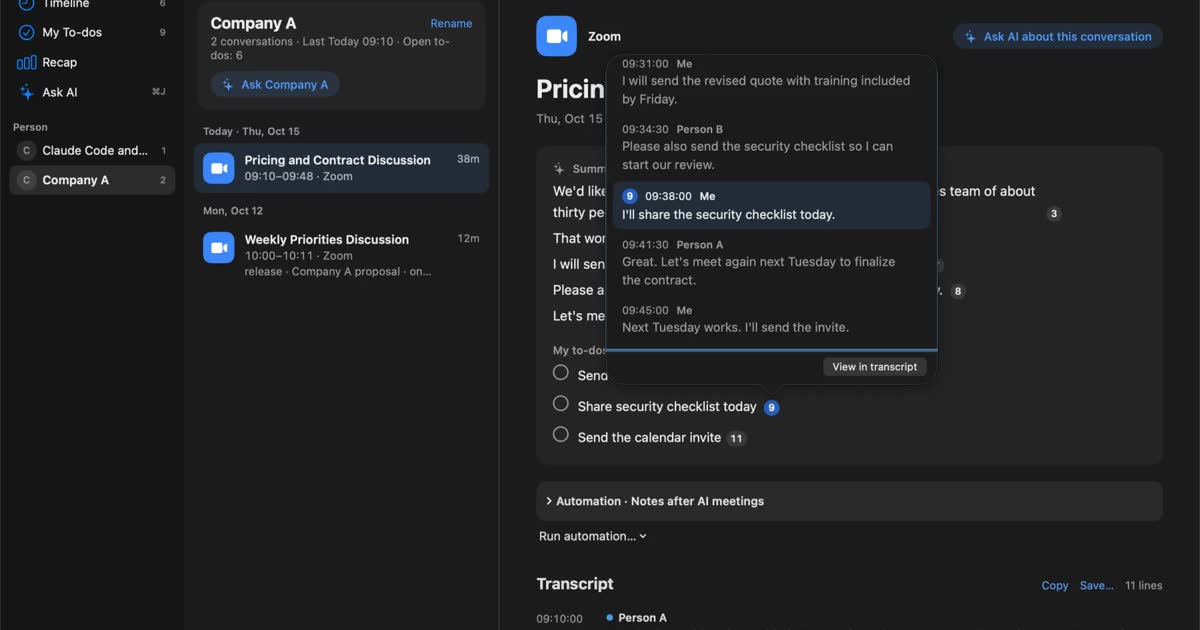
Recall is an app that stays running, turns what you hear on your Mac into text, and keeps it in a form you can search later. It has no record button. It sits in the menu bar, listens to the microphone and the sound your Mac plays, and divides what it hears into conversations.
- When a conversation ends, the on-device AI writes a summary and your to-dos.
- Each sentence of a summary carries numbers for the statements behind it, and you can press one to see the original.
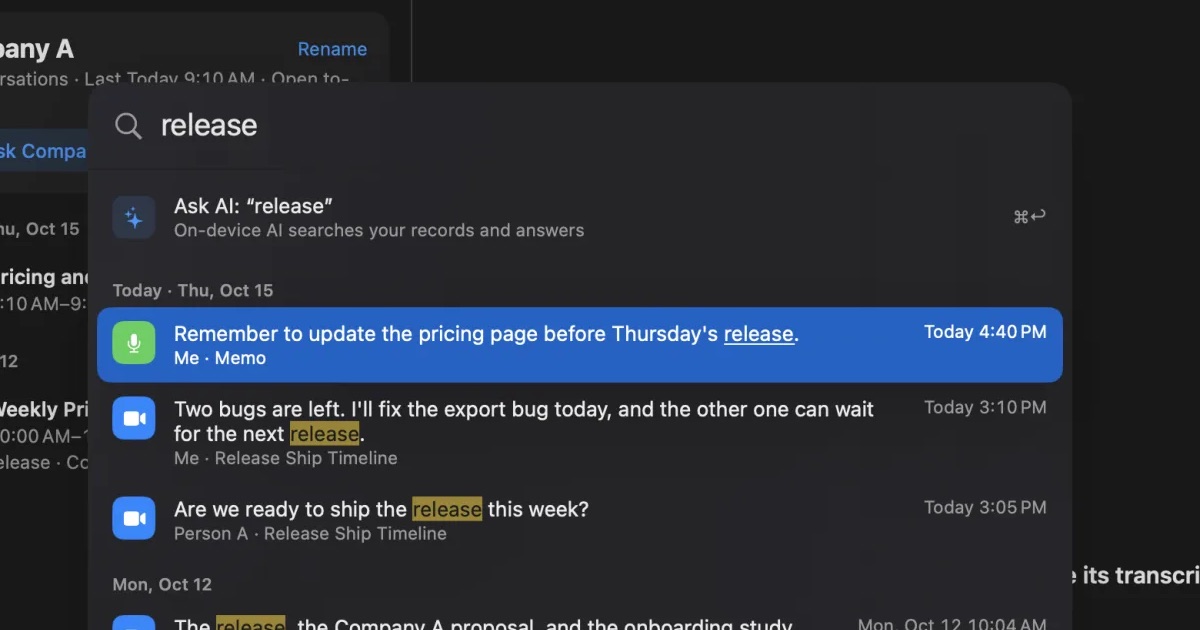
- ⌘K finds past statements by word, date, app or person.
- When you ask the AI, it searches your records first and answers with numbered references to the statements.
- During a meeting, the live panel shows captions and can summarize the conversation so far.
All of this is in Free. Pro adds viewing and search beyond 14 days, monthly and yearly reports, answers from your own Claude, ChatGPT or Gemini, and reading records from Claude Code or Codex. The full list is on the features page.
The differences at a glance
The main difference is that MacWhisper transcribes the audio you hand it, and Recall builds up a record of the conversations you hear. The details are in the table. For MacWhisper, it describes the version bought from the official site.
| MacWhisper | Recall | |
|---|---|---|
| Best at | Audio files, video, subtitles, recording meetings, dictation | Always-on capture of meetings and videos, summaries, search |
| How it starts | Hand it a file, or start a recording | Listens automatically once installed |
| Opening audio files | Yes (Free) | No |
| Saving audio | Keeps recordings inside the app | No. Audio is discarded once it becomes text |
| Speaker separation | Pro, with a compatible model | Free |
| Summaries | Pro, with AI through your own API key, Ollama, LM Studio and others | Free, with the on-device AI by default. Apple Intelligence must be on, whatever the memory |
| Picking out your to-dos | Could not confirm | Free, with the statements behind them |
| Export | Free: .txt, .srt, .vtt. Pro also .md, .pdf, .html, .docx and more | Copy one conversation's transcript or save it as .txt |
| Translation | Pro | None |
| Dictation | Yes (official-site version) | None |
| Free | €0. File transcription, subtitles and more | ¥0. Unlimited transcription; viewing and search for the last 14 days |
| Paid | Pro €64 once, lifetime updates included | Pro ¥980/month or ¥9,800/year, tax included |
| Devices | Mac, with separate versions for iPhone and iPad | Mac only |
Features: starting, speakers, files, and what comes after
Four things separate the two in daily use.
How each one starts: press a button, or leave it running
For meetings, the biggest difference is whether you have to do anything to start. MacWhisper notices a meeting and offers to record. Recall listens without being told.
Meeting recording in MacWhisper is a Pro feature in the official-site version. According to its help page (updated July 15, 2025), a “Meeting Detected” notification appears when a meeting is found, and recording starts when you press Record. The notification disappears after 10 seconds if you do nothing. The same page calls the feature a beta, warns of glitches or data loss, and recommends recording important meetings manually. FaceTime is excluded because of macOS restrictions. The pricing table says it can “automatically record meetings”, so current behavior may differ from the help page. Try it in the version you can test.
Recall has no such step. Once installed, it keeps listening to the microphone and system audio. It transcribes sound from apps shown in the Dock, whichever meeting app you use. Nothing can be forgotten, which is the point.
Always running has its own costs, though.
- It uses some CPU and battery while it listens, and more while people talk.
- It also hears conversations you would rather not keep. To stop it, pause for 15 minutes, for an hour, or until you resume.
- You need to decide which apps it should not record, such as your bank or password manager.
If you want to decide every start yourself, always-on is not for you. In some situations, an app that runs only when you record, like MacWhisper, is the more comfortable choice.
Telling speakers apart, and in-person meetings
Separating speakers is a Pro feature in MacWhisper and a Free feature in Recall. They also apply to slightly different situations.
In MacWhisper, automatic speaker recognition separates and labels the voices in a recording or file. According to its help, it works with local models that show a badge, or with cloud models from ElevenLabs and Deepgram. It does not work for dictation. Podcast transcription is a separate feature, where each speaker has their own file and each file counts as one speaker.
Recall records the microphone as Me and the sound from your Mac as the other people, and separates up to four of them by estimate as Person A, Person B and so on. Renaming a speaker applies to the whole conversation, and if one person was split in two, you can merge them. Echo cancellation keeps the other side's voice from being taken for yours when you use speakers.
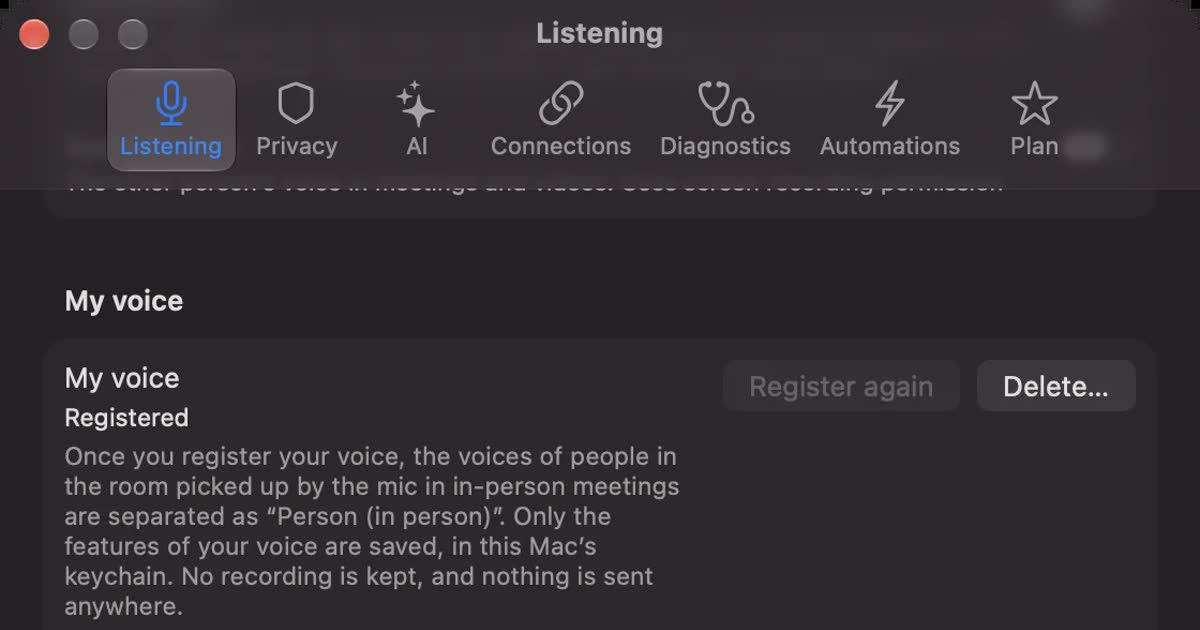
In person, the other side's voice reaches your microphone too. If you register your voice in Recall, those voices are separated as “Person (in person)”. Registering is optional, and it keeps only voice features in the Mac's keychain, not a recording. There are limits: however many people are in the room, they are recorded as one person, and statements with mixed voices may not be separated.
Both apps need macOS permissions to capture meeting audio. MacWhisper's meeting recording asks for Screen Recording and Microphone, and Recall uses the same two. On a Mac managed by your employer, you may not be able to grant them.
Audio files and subtitles: MacWhisper is the better tool
For audio and video you already have, MacWhisper is clearly the better fit. Recall has no way to open an audio file.
Interview recordings, lectures, podcasts and videos you shot can simply be handed to MacWhisper. Pro adds batch transcription and watched folders that process new files automatically (the help page calls watched folders a beta). Free can export .srt and .vtt subtitles. Pro adds an inline video player with subtitles and automatic subtitle translation.
Recall does pick up audio you play on your Mac, as Mac sound. But it takes as long as the audio plays, and it cannot export subtitles. It is no substitute for converting files, so there is no reason to choose Recall for this.
MacWhisper also suits people who build their own automation. Its command-line tool mw runs transcription on files and folders from scripts, and Pro connects to Zapier, Make.com, n8n, webhooks and Obsidian. Recall Pro can also pass records to a registered command or be read from Claude Code, but what it handles is text records, not audio.
What you do with the text afterward
MacWhisper suits finishing a transcript as a document. Recall suits searching conversations as a growing record.
MacWhisper Pro exports to .docx, .pdf, .md and more. You can set prompts and have AI through your own API key summarize or rewrite. That fits the job of polishing one recording and passing it to someone.
Recall focuses less on finishing one recording and more on finding what you need across many. Ask “Did we discuss pricing with Company A last week?” and it searches first. It is designed to give each claim a numbered reference and not to answer what is not in your records. When it finds nothing, it shows the period and conditions it searched. Conversations and open to-dos gather by person, and you get a weekly report. On the other hand, the only export is one conversation's transcript, copied or saved as .txt. It has no feature for producing a formatted minutes file.
Data: what stays, and what leaves
The two apps differ most on whether audio is kept and when records leave the Mac.
What stays: audio, or only text
MacWhisper keeps recordings, and Recall does not keep audio. This is more than a preference: it decides what you can do later.
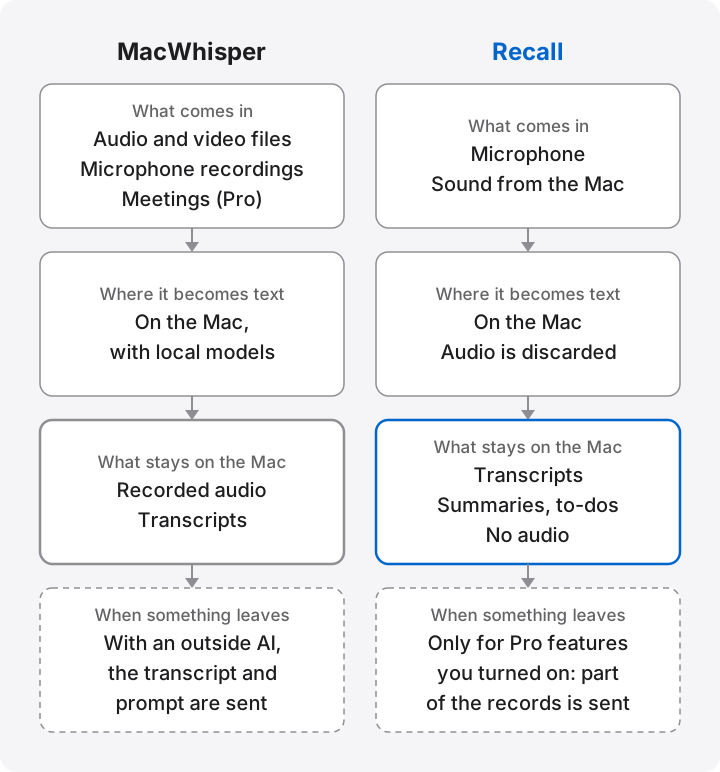
According to MacWhisper's help, meeting recordings are stored in the app and open from the Recordings tab. Transcripts go in a database under ~/Library/Application Support/MacWhisper. Because the audio stays, you can check a doubtful line against the actual voice, which is a real advantage for interviews where tone matters. The help page describes no retention period, so deleting is up to you. Audio takes storage, and the voice itself stays on a Mac you may carry around.
Recall discards audio as soon as it becomes text. What stays is transcripts, summaries, to-dos and so on, in ~/Library/Application Support/Recall/. No audio files are kept. If you turn on voice registration or similar features, voice features, not a recording, stay in the Mac's keychain. The cost is that you cannot check a mistake against the original sound. If you want to keep audio and listen again, Recall is not for you.
In Recall you can set retention to 7 days, 30 days, 90 days, 1 year or forever. The default is 90 days on Free and forever on Pro. Free shows the last 14 days; older records still within the retention period can be viewed after moving to Pro. See retention.
What “local” covers: when records leave the Mac
Both transcribe on the Mac by default, but records can leave it depending on the features you turn on. “It is a local app” does not settle the question. Compare where things go, feature by feature.
| MacWhisper | Recall | |
|---|---|---|
| Default transcription | With the default local models, says it processes on the device and sends no audio or text to external servers | Processed on the Mac. Audio is not sent out |
| Summaries and other AI | With a remote provider, the transcript and your prompt go to that company. Apple, Ollama and LM Studio process locally | The on-device AI by default. With outside AI turned on in Pro, part of the records is sent, depending on the feature |
| Cloud transcription | Providers such as Deepgram and ElevenLabs can be chosen. The App Store version's Assistant sends media to Good Snooze's servers | None |
| Connections | Pro can send to Zapier, n8n, webhooks and more | In Pro, connected AI tools can read records, and records can go to a registered command |
| Contact with the developer | Says it may send anonymous analytics about license status. The App Store label lists usage data for analytics | Records are not sent. Model downloads, license checks and update checks connect, and an IP address and similar details arrive |
MacWhisper's help advises against using Assistant's cloud transcription for sensitive material. For confidential meetings, check that you are using local models only.
In Recall, part of the records leaves only for Pro features you turned on yourself. For example, if you choose an outside AI to organize meetings, the statements of each conversation, including speakers' names and up to 60,000 characters, go once to the company you chose when the conversation ends. That is an exception to “stays on this Mac”. Recall asks before turning it on, but the other people in the conversation have not agreed to it. The full list is in when records leave the Mac.
Anything you copy or export is yours to manage in either app. And since records stay on the Mac, the Mac itself needs protecting. Recall leaves encryption to macOS FileVault, so please turn it on. For what to check, see what to check if you worry about leaks from AI meeting notes.
Pricing, requirements and accuracy
Here is what to check before you buy.
Pricing: one payment or a subscription
If you prefer to pay once, MacWhisper fits. Pro is a single payment of €64 with updates included. Recall has no one-time option: Pro is ¥980 a month or ¥9,800 a year, tax included. The longer you use it, the more a subscription adds up.
| MacWhisper | Recall | |
|---|---|---|
| Free | €0. Does not include speaker recognition, batch transcription or meeting recording | ¥0. Unlimited transcription, plus speaker separation, summaries, to-dos and the live panel. Viewing and search for the last 14 days |
| Paid | Pro €64 once | Pro ¥980/month or ¥9,800/year, tax included |
| Discounts | 25% on request for students, journalists and nonprofits; license packs | The yearly plan saves two months |
| What paying adds | Speaker recognition, batch transcription, meeting recording, outside AI, connections and more | Viewing and search beyond 14 days, outside AI, reading from external tools and more |
Whisper Transcription on the Mac App Store is free to download with in-app purchases. The official help describes weekly, monthly and yearly subscriptions, and a separate Assistant subscription. The US store lists a Pro item at $29.99 and Pro Lifetime items at $89.99 and $99.99. The page alone does not show the terms of each item, so check inside the app before you buy. License keys from the official site do not work in the App Store version.
Price alone does not settle it, because the currencies differ and so does what you are buying. MacWhisper Pro's €64 pays for transcribing files and recordings. Recall Pro pays for long records and connections to outside AI. To try them for free, give MacWhisper a file and give Recall a week of meetings. That shows each one doing what it was built for. Recall's free range is on the pricing page.
Requirements: on an older Mac, MacWhisper is the candidate
Recall does not run on Intel Macs or on Macs before macOS 26. It requires an Apple silicon Mac with macOS 26 or later.
The official FAQ says MacWhisper runs on Intel Macs. However, its help explains that Intel Macs have no dedicated machine-learning hardware, so on-device transcription is much slower. More than 8GB of memory is recommended for the Medium and Large models. The App Store version requires macOS 15.0 or later. We could not confirm the current minimum for the official-site version on its official pages. For older systems, the FAQ points to version 2.22 for Monterey and 10.9.2 for Ventura on your purchase page.
For iPhone or iPad, MacWhisper has the iOS version of Whisper Transcription. Recall is Mac only, with no Windows or phone version.
Which is more accurate for Japanese or English?
This article does not answer that, because we have no measurement of both on the same audio. What the official descriptions support is only the difference in how they work.
MacWhisper lets you choose among several models, and larger ones use more memory. On Macs with 16GB of memory or more, Recall runs Whisper large-v3-turbo on the Mac, and on Macs with less it uses macOS speech recognition. It supports Japanese and English, and you choose one under Listening language in Settings. It does not switch automatically within a meeting. It does not claim support for over 100 languages. If you work with many languages, try MacWhisper first.
Accuracy changes a lot with the speaker, the microphone and the topic. The reliable way to compare is on your own usual audio.
- Are company and product names right?
- Are amounts, dates and numbers right?
- Are words from another language right?
- Are your voice and the other side's kept apart?
- What happens where people talk over each other?
Recall cannot open a file, so to compare, play the same audio on your Mac and let it listen. Turn the microphone off in the popover to compare Mac sound only.
Which one fits you
MacWhisper fits if
- You prefer one payment to a monthly bill.
- You want to transcribe audio or video files.
- You want .srt or .vtt subtitles, or translation.
- You want to keep audio and listen again.
- You want to choose models and outside AI yourself.
- You want the app to run only when you record.
- You use an Intel Mac, a Mac before macOS 26, or an iPhone.
Recall fits if
- You have lost a meeting because you forgot to press record.
- You want what you hear kept in one place, whatever the meeting app.
- You want text kept, but no audio.
- You want to find past statements by word and ask an AI with references.
- You want speaker separation, summaries and to-dos for free.
Free to use · No account needed · macOS 26 or later · Mac with Apple silicon · By downloading, you agree to the Terms of Service
Recall is not for you if
- You want a one-time purchase.
- You want to transcribe audio files you have.
- You want the audio itself saved.
- You do not want anything always listening.
- You cannot install new apps on your work Mac, or recording is not allowed where you work.
- Your team wants to share the same minutes by link.
Choosing by situation
The same person may want different apps in different situations.
| Situation | What fits | Why |
|---|---|---|
| Turning a recorded interview into an article | MacWhisper | Opens files, and you can check against the original audio |
| Adding subtitles to a video | MacWhisper | Exports .srt and .vtt |
| Reading a foreign lecture in translation | MacWhisper Pro | Has translation. Recall does not |
| Keeping daily meetings and sales calls | Recall | No start step, and history gathers by person |
| Finding a name you heard in a webinar | Recall | Hears Mac audio and searches by word |
| Not forgetting what you agreed to do | Recall | What you said you would do gathers as to-dos, with the statement behind each |
| An interview where tone matters | MacWhisper | Keeps the audio |
| A confidential meeting | Either | Use local processing only, and check your employer's rules first |
In every situation, with either app, tell the other people that it is being transcribed.
Using both is realistic
The two overlap little, so you can use both: MacWhisper for recorded files and subtitles, Recall for daily meetings and finding things. Recall cannot open audio files, so if you still transcribe files, keeping MacWhisper is worthwhile, even on Free. If both run in the same meeting, you get two records, so decide which one you keep.
Before you move from MacWhisper to Recall
Whether to switch depends on your actual problem and on the items below.
Looking at why you want a replacement
Before you look for a MacWhisper alternative, name the actual problem. Depending on the problem, the right answer may be not to switch.
- You forget to start recording: the problem is the start itself, so an app that always runs, such as Recall, solves it. Inside MacWhisper, it depends on not missing the meeting notification.
- Transcripts pile up and you never open them: you need something to search with more than something to transcribe with. Recall puts summaries, to-dos and ⌘K search in one place.
- Pro feels expensive: for subtitles and file transcription, MacWhisper Free may be enough. If you need speaker separation, compare MacWhisper Pro, Recall Free and other apps.
- You want faster dictation: that is a different job from recording meetings, and Recall is not a candidate. See the dictation apps.
- You do not want another subscription: Recall Pro is monthly or yearly, so staying with MacWhisper or choosing another one-time app makes more sense.
- Your Mac is old: Recall may not run on it. Check the requirements first.
What to check
- Your Mac: is it Apple silicon with macOS 26 or later? If not, stay with MacWhisper.
- Audio: can you do without audio for future meetings? If contracts or interviews need it, use an app that keeps recordings.
- Past records: Recall has no way to import MacWhisper transcripts. Keep what you need in MacWhisper, or export it.
- Your employer's rules: check whether always-on transcription and outside AI are allowed.
- Telling people: decide when and how you will tell them.
- First settings: choose the apps not to record, and the retention period.
Whichever you use, tell the other people
Please tell the people in the meeting that it is being transcribed. Neither MacWhisper nor Recall puts a bot in the meeting, but the absence of a bot is no substitute for their agreement. For example: “I am transcribing this on my Mac so I can check the details later. Tell me if you would rather I stop.” Recall does not save audio, but the transcript stays. If you use a setting that sends content to an outside AI, say that too. Do not use either where recording is prohibited or where your employer's rules do not allow it. There is sample wording in the FAQ.
Other options
People look for a MacWhisper alternative for different reasons. For file transcription, consider Aiko. For dictation, VoiceInk or Handy. For recording meetings, Superwhisper, Trace or Granola. Here is what we could confirm on their official pages.
| Product | Use, price and what to know |
|---|---|
| Aiko | Transcribing files and recordings. $24 once. On-device. No live transcription yet. |
| VoiceInk | Dictation. $25–$49 once. Apple silicon with macOS 14.4 or later. Transcribes on the device. Source code is public. |
| Handy | Dictation. Free. Open source. Your voice stays on your computer. Speak with a shortcut to type. |
| Superwhisper | Dictation and meeting recording. Free and Pro; check the official site for Pro's price. Mac, Windows, iOS, Android. File transcription is Pro. |
| Trace | Recording meetings. Check the official site for the price. Apple silicon with macOS 14.4 or later. On-device. Notices meetings and offers to record. Keeps audio files too. |
| Granola | Meeting notes and team sharing. Free, Business $14/month, Enterprise $35/month, per user. Cloud processing. Free history is 30 days. |
For more, see Granola AI alternatives compared and how to choose local transcription for your Mac.
Frequently asked questions
Is Recall enough as a MacWhisper replacement?
For recording meetings, it is a candidate. For audio files and subtitles, it is not a replacement: Recall does not open files or export subtitles.
Can I use MacWhisper for free?
Yes. Free costs €0 and includes microphone recording, file transcription, and subtitle and .txt export. Speaker recognition, batch transcription and meeting recording are in the Pro column.
Can MacWhisper record Zoom meetings?
Yes, as a Pro feature of the official-site version. The pricing table names Zoom, Teams, Webex and others. The official help calls the feature a beta. It is not in the App Store version.
Does Recall save audio?
No. Audio is discarded once it becomes text. If you turn on voice registration or similar features, voice features, not a recording, are kept in the Mac's keychain.
Can I buy Recall once?
No. There is Free, and Pro at ¥980 a month or ¥9,800 a year, tax included. Transcription has no limit even on Free. If you want a one-time purchase, consider MacWhisper Pro or Aiko.
Do Recall's records stay entirely on the Mac?
By default, yes. If you turn on outside AI or connections in Pro, part of the records leaves the Mac. Anything you copy or save yourself is also yours to manage.
Which one works on an Intel Mac?
MacWhisper. The official FAQ says it runs on Intel Macs, though more slowly. Recall runs only on Apple silicon Macs.
Checked on November 2, 2026. Details of MacWhisper come from its official site and pricing table and meeting recording page, from the official help on version differences, meeting recording, file locations, AI providers, Assistant, speaker recognition, slow transcription, watched folders, integrations and the command-line tool, and from its App Store page. Prices and features may change, so please check each company's official pages. This is a general comparison, not legal advice.
macOS 26 or later · Mac with Apple silicon · By downloading, you agree to the Terms of Service
Get the product overview (PDF) by email →
Related articles
How to transcribe an audio file on a Mac: m4a and mp3 options compared
To turn an m4a or mp3 file into text on a Mac, the first question is whether the audio may leave your Mac. MacWhisper, Transcribe in Word for the web, Gemini and ChatGPT compared by format, length limit and what you pay, plus whether Notes and Voice Memos can read files and what to check when it fails.
How to transcribe locally on a Mac: keeping meetings inside your company
How to transcribe on a Mac without sending audio to the cloud. Compare Notes, MacWhisper, Aiko, whisper.cpp, Recall and more, and check the four places records can still leave.
PLAUD NOTE alternatives: choosing between a recorder and an app
Looking for a PLAUD NOTE alternative? Compare a dedicated recorder with Recall by where you talk, saved audio, cloud handling and three-year cost, and see who each suits.
Meetily vs Hyprnote vs screenpipe vs Recall: local meeting notes on a Mac
Meetily, Hyprnote (now Anarlog), screenpipe and Recall compared: open source or not, screen capture, platforms, where summaries run, and pricing, checked on the official sites in November 2026.