 Recall
Privacy and data
Recall stores your records only inside this Mac. Part of them goes outside only when you turn that on (When records leave the Mac).
What is kept and what is not
- Not kept: audio (thrown away as soon as it is transcribed).
- Kept on this Mac: transcripts, front window titles, summaries, to-dos, topics, Live Panel notes, cards from live triggers (readable in the conversation’s details, and deleted with the conversation), commitments and assistant threads (questions and answers, notices), notes and canvases, files attached to notes (in the
Attachmentsfolder inside the records folder), workflow run records (what each step received and gave out), information for search, and settings. - Keychain: API keys for Claude, ChatGPT and Gemini, the Vercel AI Gateway API key, and voice characteristics (not recordings) when you turn that on.
Where records are stored
Your records are in ~/Library/Application Support/Recall/. You can open it with “Show in Finder” in Settings › Connections. Encryption is left to macOS FileVault. We recommend keeping FileVault on.
When records leave the Mac
Part of your records leaves the Mac only when you yourself turn on one of the following (all are Pro).
- Your own AI answers with an API key: the question and excerpts of the lines, notes and attached files found for the answer are sent to Anthropic, OpenAI or Google. Recall asks you to confirm the first time you send to each company (Ask AI).
- Answer with Claude Code or Codex on this Mac: Claude Code or Codex reads the records it needs with the reading tools and sends them to Anthropic or OpenAI. It uses the same “reading your records” switch as outside AI tools below. For questions narrowed to a conversation or a person, and for the Live Panel, Recall passes only the lines it picks (the switch is not used). Recall asks you to confirm the first time (Ask AI).
- Organize meetings and recap summaries with your own AI, through AI per feature: for organizing meetings, each time a conversation ends, its lines (including speaker names, up to 60,000 characters) are sent once to the company you chose. Recall asks you to confirm when you choose it. For recap summaries, that week’s summaries and decisions are sent when you click. Recall asks you to confirm the first time. The date and time, feature, destination and number of characters sent are logged, without the content (Ask AI).
- Outside AI tools read your records: Recall asks you to confirm when you turn on the connection. While it is on, both the Claude Code and Codex answers above and other AI tools you have connected can read your records, notes and the contents of attached files. Each attachment’s name, type, size and location on this Mac are given too, so a tool that can read files can open the original file (External AI tools and live triggers).
- Workflows that send results to Slack or Discord: a workflow whose output is “Send to Slack” or “Send to Discord”, with an Incoming Webhook URL you created pasted in, sends the text of the “Write with AI” step before the output and the workflow’s name to Slack or Discord each time it runs. People in the channel can read it, and Recall can’t delete what it sent. Recall asks you to confirm each output when you publish, and asks again when the destination or the content changes. The URL is kept only in this Mac’s keychain, and the date and time, the kind of destination and the number of characters are logged, without the content or the URL (Workflows).
- Workflows that pass records to a command you registered: the AI steps are passed to a command you registered on this Mac. Whether it sends them anywhere is up to the command. Recall asks you to confirm when you publish, and asks again if the content changes (Workflows).
- Live triggers, to the AI you chose and to registered tools: when meaning is judged by something other than the on-device AI, each new line and the 60 seconds before it are sent to the AI that judges (Jev (Vercel AI Gateway), or an Anthropic, OpenAI or Google AI). When answers come from a cloud AI, the recent lines (up to 15 minutes, including speaker names), the condition and the request are sent when a trigger matches. When the way of answering is Claude Code or Codex, they are sent to Anthropic or OpenAI through it. Part of the conversation may be passed to registered tools. Recall asks you to confirm when you save, and asks again when the AI that judges or the tools change (same page).
- Memory sources and connections with outside services: what you yourself turn on in the Memory screen’s sources (meetings, Claude Code, Codex, connected outside services) sends the records needed, and what is read from outside services, to the AI you chose, to build Memory. Through Claude Code or Codex, it is sent to Anthropic or OpenAI.
Automatic processing such as summaries and to-dos is done by the on-device AI by default. Picking out commitments, follow-up drafts, workflow drafts and organizing notes are done by the on-device AI too. However, when you choose and allow an outside AI for organizing meetings under AI per feature, records go to that AI; and command workflows and live triggers that you confirmed pass records to the AI, command or tools you chose. Downloading models, checking your license and checking for updates do not send any records. The other people in the conversation have not agreed to the sending.
“Open in Mail” for follow-up drafts and workflow emails only opens a draft in your default mail app when you press it. Recall does not send it. By default a workflow’s Mac notification contains no text from your records; only when you insert {Result} into its text does it include the start of the result (a notification on this Mac, not sent anywhere).
How long records are kept
In “Keep transcripts for” in Settings › Privacy, choose from 7 days, 30 days, 90 days, 1 year or Forever. Records past that period are deleted. The default is 90 days on Free and Forever on Pro. If you never changed it, it becomes Forever when you get Pro and stays Forever after Pro ends. When you shorten it, Recall shows how many will be deleted right away and asks you to confirm.
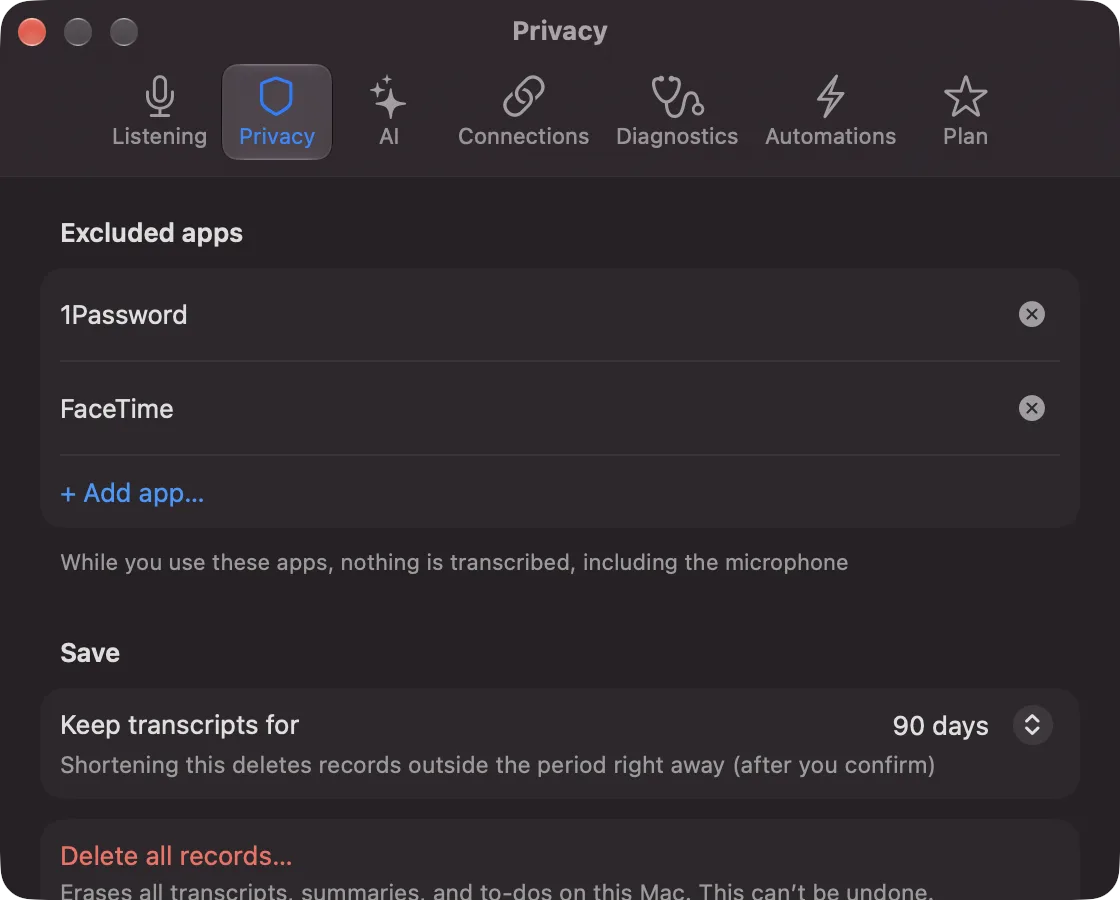
Changed in 0.1.15: Pro’s default went from 90 days to Forever. If you are on Pro and never changed the period, it becomes Forever when you update, and records past 90 days are no longer deleted automatically. If you have changed it before, it stays as it is. Free stays at 90 days by default. To shorten it, go to Settings › Privacy.
Deleting
- The last 15 minutes: “Delete the last 15 minutes of records…” in the popover
- One conversation: “Delete this conversation…” in the conversation’s details, right-click in the list, or Delete
- Everything: “Delete all records…” in Settings › Privacy
Deleting a conversation also deletes its commitments, the assistant threads tied to it and its workflow results. Delete notes and items in Notes.
Deleting cannot be undone. Deleted content is cleaned up so that it no longer appears in search and is also removed from the files.