Recall
Troubleshooting
Things to check when something does not work.
A permission was turned off
If the menu bar shows “No microphone permission” or “No screen recording permission”, open System Settings with the button in the popover and turn Recall on. For screen recording, reopen Recall after turning it on.
If Recall is in the list and on but it still says there is no permission, turn it off once, turn it back on, and reopen Recall.
The AI cannot be used
- “Preparing the on-device AI”: the model is being set up. Wait until it finishes (search still works).
- “The on-device AI can’t be used”: on a Mac with less than 16 GB of memory, turn Apple Intelligence on.
- “Restarting the on-device AI…”: it comes back automatically.
- “Invalid API key”: check the key in Settings › AI.
- “Couldn’t get an answer from [Claude]”: check your network and click “Ask again”, or click “Answer again with the on-device AI”.
When answering with Claude Code or Codex on this Mac (with Codex, the name shown is Codex):
- “Claude Code not found”: install it from “See how to install” in Settings › AI.
- “Claude Code requires login”: log in with “Log in…” in Settings › AI, then come back to Recall.
- “Reading your records is not allowed”: turn on reading your records with “Allow…” in Settings › AI.
- “Claude Code usage limit reached”: wait a while, or switch the way of answering to an API key in Settings › AI.
- “Please update Claude Code”: install the new version from “See how to install”.
- “This model may not be available on your plan” (Claude Code): choose another model with “Change model”.
- “Couldn’t use this model. Update Codex or change the model”: older versions of Codex cannot use sol or luna. Install the new version (0.160.0 or later) from “See how to install”, or choose another model in Settings › AI.
- “Stopped because the CLI on this Mac tried to use an unexpected tool”: update Claude Code or Codex to the new version. If it keeps happening, please contact us.
With AI per feature (Ask AI):
- “Made with the on-device AI ([Codex] required login)” in a conversation’s details: the outside AI could not organize it, so the on-device AI made it. Fix the reason in the parentheses (login, usage limit, key, timeout, update or change of model, conversation too long, and so on), and from the next conversation the outside AI organizes it. The row in Settings › AI also shows “Last one made with the on-device AI · [reason]”.
- “Please agree again · Review…”: the permission for organizing meetings can no longer be used (the confirmation text changed, this Mac’s key was lost, and so on). Until you confirm again with “Review…”, the on-device AI organizes meetings.
With live triggers (Live AI cards). Even if judging meaning stops, word triggers continue:
- “Stopped judging meaning (can’t reach [Jev (Vercel AI Gateway)])”: judging failed three times in a row, so judging meaning stopped for that conversation. Check your network and the key for the AI that judges meaning in Settings › Automations.
- “Check your Vercel AI Gateway key”: the key was not accepted. Enter the key again in Settings › Automations.
- “Stopped judging meaning for this conversation because it reached the limit (300 times)”: in one conversation, judging by something other than the on-device AI is limited to 300 times.
- “Couldn’t get an answer from [Claude]” (in a card): check your network and click “Try again”.
Listening stops, or nothing is recorded
- Look at the popover’s heading (Menu bar states). It may be paused, using an excluded app, or listening may be off.
- “Reconnecting” comes back automatically.
- Listening continues after waking from sleep or plugging in or removing earphones. Periods that could not be recorded show with diagonal stripes in the Timeline.
- If a summary has not appeared yet, the on-device AI is making them in order. Transcripts can be searched first. Summaries and to-dos are made when Apple Intelligence is on, whatever the memory (except when you choose an outside AI for organizing meetings on Pro).
Updates
You can check for a new version with “Check for updates…” in the popover. The second time you open it, Recall asks whether to check automatically. Updates are installed after their signature is verified.
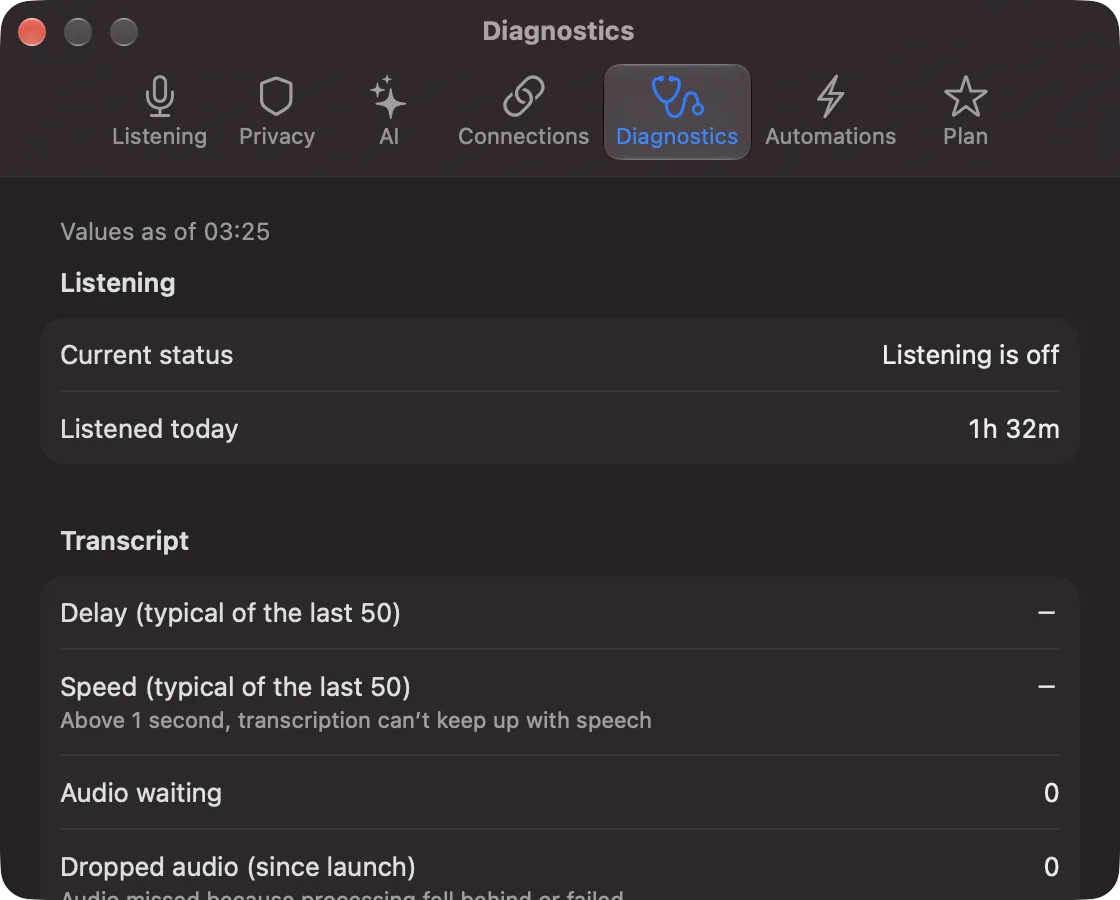
Diagnostics
Settings › Diagnostics shows numbers such as time listened, transcription delay and how many lines are waiting. It does not show what was said, names or app names. When you contact us, attach only these numbers (Contact us).