 Recall
Meetily vs Hyprnote vs screenpipe vs Recall: local meeting notes on a Mac
Meetily, Hyprnote (now Anarlog), screenpipe and Recall compared: open source or not, screen capture, platforms, where summaries run, and pricing, checked on the official sites in November 2026.
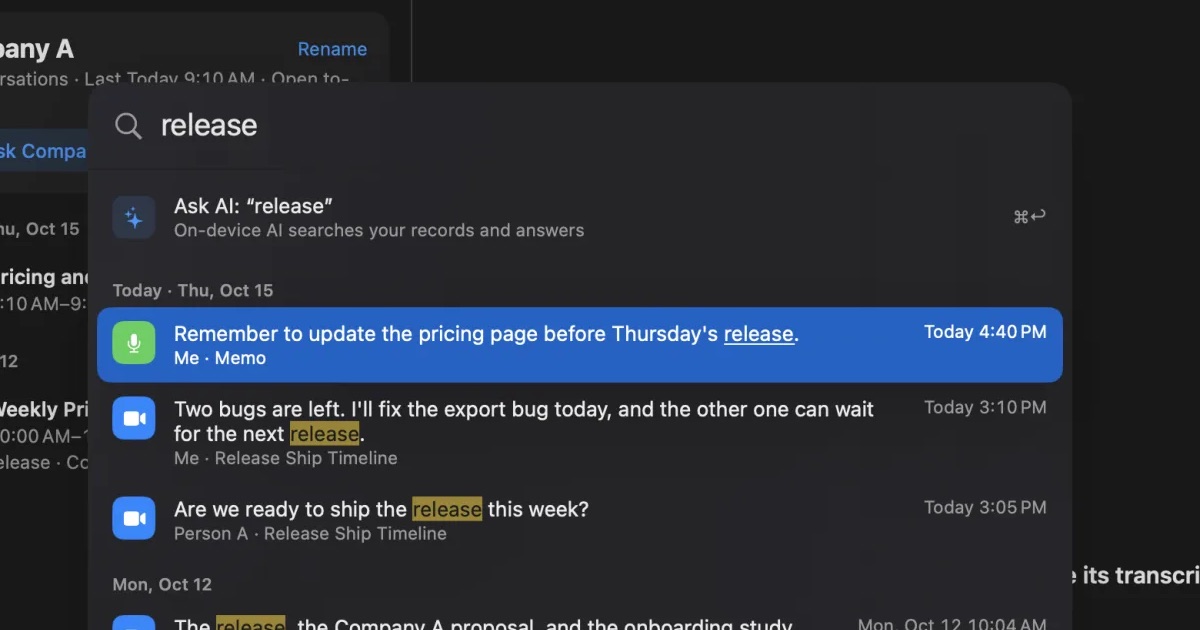
In short, screenpipe suits people who want everything on their screen kept and handed to AI, Meetily or Anarlog suits people who want open-source meeting notes that also run on Windows, and Recall suits people who want meetings kept as text, without pressing record, and searchable later. All four keep records on your own computer, but they differ in what they keep, whether the source is open, and which operating systems they run on.
A word on names first. Hyprnote was renamed Char, and then Anarlog. Opening hyprnote.com today takes you to a different product from the same company (Char). The meeting notes app is distributed at anarlog.so. This article uses its current name, Anarlog.
This article is written by KOROMO K.K., the company that makes Recall. So the details of the other three are limited to what we could confirm on their official sites and official GitHub repositories on November 13, 2026, and we say plainly where another product fits better than Recall. We do not say which one transcribes more accurately, because we have not measured them under the same conditions.
In short: it depends on what you want to keep
The deciding question is whether you want to keep everything on your screen and in your ears, the audio and text of meetings, or only the text of conversations. Start from the row closest to you.
| Your situation | What fits, and where to read next |
|---|---|
| You want to search documents and chats you saw on screen too | screenpipe. See what screenpipe is |
| You want an app whose source you can read (open source) | Meetily or Anarlog. See licenses |
| You also use Windows or Linux | Meetily, Anarlog or screenpipe. See requirements |
| You want to keep meeting audio and listen again | Meetily or Anarlog. See saving audio |
| You sometimes forget to start recording | Recall. See how each one starts |
| You want text only, with no audio or screen kept | Recall. See what stays |
| You want to find what you promised last week, with the source | Recall. See what Recall is |
| Your Mac is Intel, or older than macOS 26 | Recall does not run. On an Intel Mac, Anarlog (has an Intel build); on an Apple silicon Mac older than macOS 26, Anarlog (macOS 15 or later) or screenpipe (macOS 13 or later). See requirements |
Where the three stand now: names and licenses
All three have changed names or licenses in the past year, and many reviews in search results are out of date. So first, where they stand now.
Hyprnote became Char, then Anarlog
Hyprnote was known as an app that writes meeting notes on the Mac without sending a bot into the call. It was later renamed Char, and a post on its official blog dated May 3, 2026 announced a further rename to Anarlog. The reason was to separate the name from another product the same company makes (Char, an AI notepad that works through your to-dos).
According to that post, Anarlog is the same app as before, and local meeting history and settings carry over. The same post says the license changed from GPL to MIT, and the official GitHub repository (fastrepl/anarlog) shows MIT. Windows and Linux beta builds followed in August 2026. The post also says the team's daily focus is on the new Char, while Anarlog keeps receiving maintenance and product updates.
So reviews found under the name "Hyprnote" may describe it as GPL or macOS only. Check anarlog.so for the current details.
Meetily and Anarlog are open source
All three say you can see the source, but the terms are not the same.
- Meetily: the Community Edition is open source under the MIT License and free. Pro is an advanced version under a separate license.
- Anarlog: open source under the MIT License. The free plan has unlimited on-device transcription.
- screenpipe: the official site now calls it "source-available". The source of its capture engine is public and readable, but the license is its own Screenpipe Commercial License, not an open-source license. Older reviews that call it open source may disagree.
- Recall: the source is not public. Instead, it lists every case in which records leave the Mac, and where they are stored, on privacy and data.
If your workplace requires auditing the source, Meetily or Anarlog is the sensible choice. Recall does not meet that requirement.
How the four apps differ
First, what each app is; then a table of the differences.
What Meetily is
Meetily records meetings on your own computer, transcribes them and summarizes them. It is made by Zackriya Solutions. No bot joins the meeting; it picks up the sound of Zoom, Teams, Google Meet and others on your machine.
- Transcription: on your computer, with Whisper or Parakeet models.
- Summaries: a local model by default (Ollama is recommended). With your own API key you can also use Claude, Groq, OpenRouter or OpenAI.
- Storage: recordings, transcripts and models are stored locally.
- Distribution: apps for Windows and macOS (Apple silicon). On Linux, you build from source.
Pro adds speaker diarization and naming, automatic meeting detection, summary templates, PDF and DOCX export, integrations such as MCP and webhooks, and cloud transcription providers. In other words, the Community Edition has no speaker diarization and no automatic meeting detection.
What Anarlog (formerly Hyprnote) is
Anarlog is a notepad for meetings: you write your own notes during the call, without a bot, and AI turns them into finished notes. It is made by Fastrepl, the same company behind Char. The official site describes it as a notepad for people who still take notes, and its distinctive feature is combining your notes with the transcript in the summary.
- Transcription: unlimited on-device transcription on the free plan. On Apple silicon Macs it uses built-in models. On other machines you configure a local transcription server or a hosted provider.
- Summaries: choose an on-device model (Ollama, LM Studio), your own API keys, or Anarlog's AI (Pro).
- Storage: notes, transcripts and recordings stay on your device. Recordings can be played back, and notes exported as Markdown.
- Integrations: the free plan includes a local API, CLI, MCP and webhooks.
Speaker labeling on the free plan is manual. Pro adds better speaker identification, cloud transcription and AI, system-wide dictation, sync across devices, and team sharing.
What screenpipe is
screenpipe is not a meeting app; it keeps a history of your work on the computer. It builds a timestamped, searchable history from on-screen text, app and window context, screen images, system audio, and the microphone audio you choose. That history can be handed to AI such as Claude or Codex through MCP or a local API.
Its official FAQ answers "Is screenpipe mainly a meeting recorder?" with "No". Meetings are one source, and the point is to connect them with the documents, browser research, messages and code around them. It adds that if you only need call transcripts, a meeting-only tool may be simpler.
By default, captured data stays on your device. It leaves when you enable features such as cloud AI, sync, exports or connectors. You can redact sensitive text such as password fields before it is stored, and set apps, windows and URLs to ignore and how long to keep data.
What Recall is
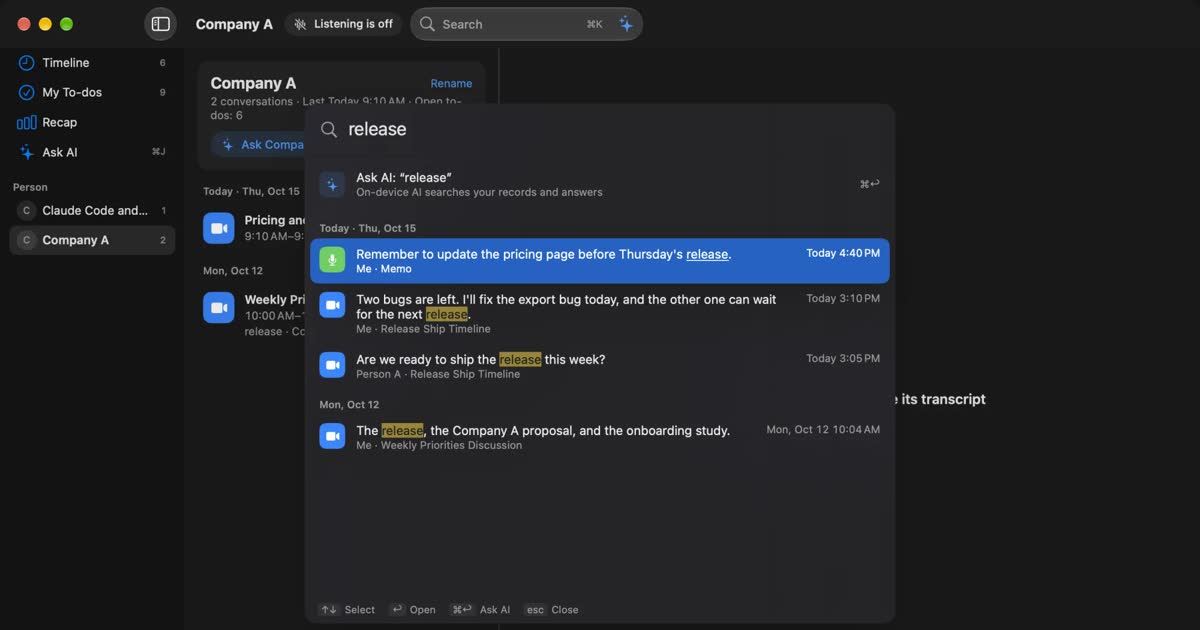
Recall is an app that stays running, turns what you hear on your Mac into text, and keeps it in a form you can search later. It has no record button. It sits in the menu bar, listens to the microphone and the sound your Mac plays, and divides what it hears into conversations. No bot joins the meeting.
- When a conversation ends, the on-device AI writes a summary and your to-dos. Summaries and to-dos are made when Apple Intelligence is on.
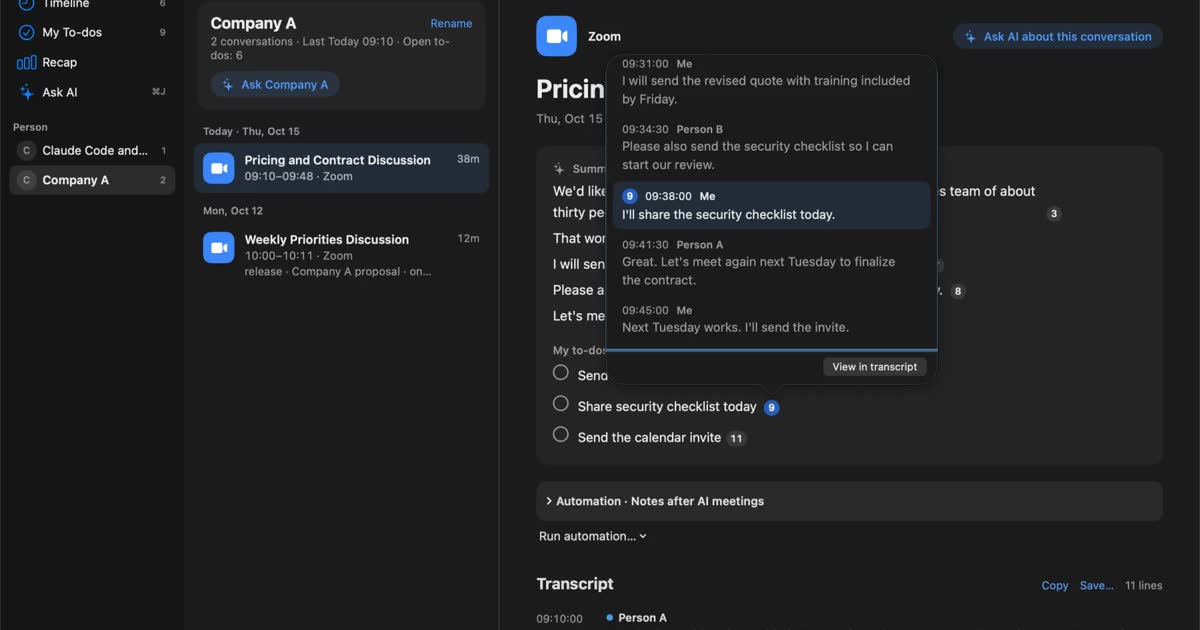
- Each sentence of a summary carries numbers for the statements behind it, and you can press one to see the original.
- ⌘K finds past statements by word, date, app or person.
- When you ask the AI, it searches your records first and answers with numbered references to the statements. On a Mac with less than 16GB of memory, Apple Intelligence must be on.
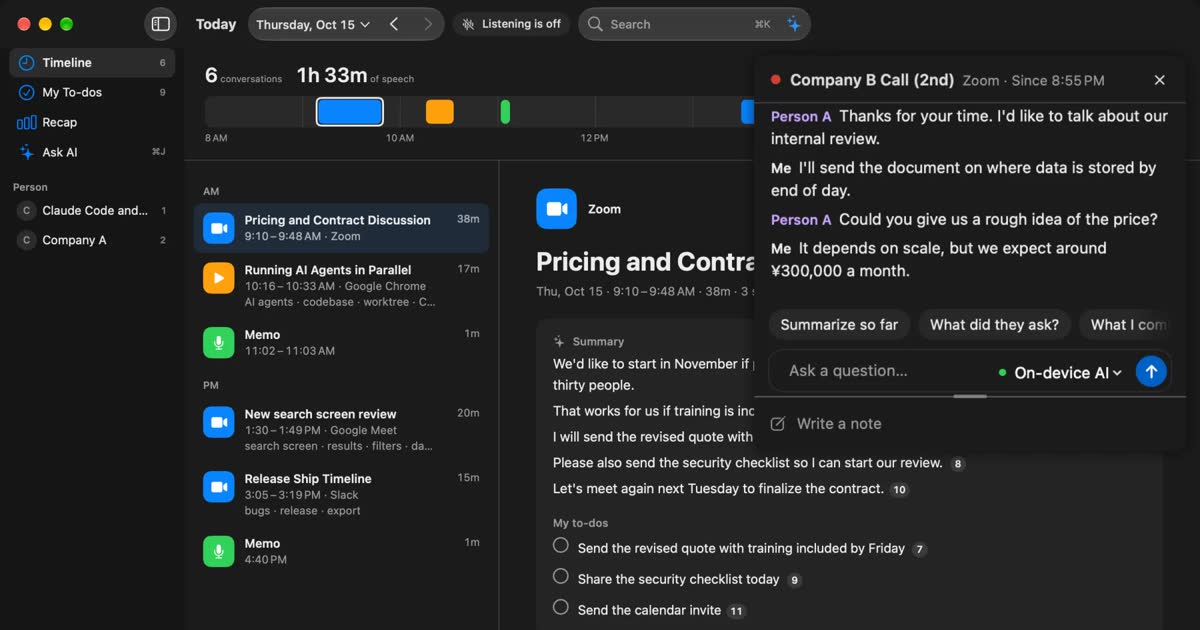
- During a meeting, the live panel shows captions and can summarize the conversation so far.
All of this is in Free. In Free you can view and search the last 14 days of records. Pro adds viewing and search beyond 14 days, monthly and yearly reports, answers from your own Claude, ChatGPT or Gemini, and reading records from Claude Code or Codex. The full list is on the features page.
The differences at a glance
The main difference is that screenpipe keeps a history of your work including the screen, Meetily and Anarlog keep a recording and notes per meeting, and Recall keeps the text of the conversations you hear. The tables below split them into the two you start per meeting and the two that keep recording once installed.
Started per meeting: Meetily and Anarlog
| Meetily | Anarlog (formerly Hyprnote) | |
|---|---|---|
| Source | MIT (Community) | MIT |
| What it keeps | Meeting audio | Meeting audio and your notes |
| How it starts | Start a recording (automatic detection is Pro) | Start a meeting note |
| Where transcription runs | Locally (cloud is Pro) | Locally (cloud is Pro) |
| Where summaries run | A local model or your own API key | A local model or your own API key (Anarlog's AI is Pro) |
| Saves audio | Yes | Yes |
| Speaker separation | Pro | Manual in Free, better identification in Pro |
| Connecting AI tools | MCP, webhooks, CLI in Pro | MCP, CLI, webhooks in Free |
| Platforms | macOS (Apple silicon), Windows. Linux from source | macOS 15 or later. Windows and Linux in beta |
| Free | Community Edition is free | Free $0, unlimited on-device transcription |
| Paid | Pro $120 per user a year ($10 a month equivalent), one device | Pro $14 per person a month or $140 a year |
Always recording once installed: screenpipe and Recall
| screenpipe | Recall | |
|---|---|---|
| Source | Public, under its own commercial license | Not public |
| What it keeps | Screen, on-screen text, audio | Conversations you hear (audio discarded once it becomes text) |
| How it starts | Always capturing | Listens automatically once installed |
| Where transcription runs | Locally | On this Mac |
| Where summaries run | The AI you choose (paid plans add AI usage and model choices) | On-device AI (when Apple Intelligence is on). Your own AI in Pro |
| Saves audio | Yes | No |
| Speaker separation | Could not confirm | Free (estimates up to 4 others) |
| Connecting AI tools | Free shares selected context with AI tools. Reusable context through MCP is Basic | Claude Code, Codex and others read records in Pro |
| Platforms | macOS 13+, Windows 10+, Linux | macOS 26 or later on Apple silicon Macs |
| Free | Free $0, limited history | ¥0. Unlimited transcription, view and search the last 14 days |
| Paid | Basic $21 a month or $250 a year; Business $42 per seat a month or $500 a year | Pro ¥980 a month or ¥9,800 a year (tax included) |
How each one starts: press, or leave it installed
The biggest practical difference for meetings is whether you have to start recording. Meetily and Anarlog start per meeting; screenpipe and Recall keep recording once installed.
Meetily Pro can detect meetings automatically; in the Community Edition you start recording yourself. Anarlog is built around opening a meeting note and writing as you go. With both, you choose which meetings to keep, and a meeting you forget to start is not kept.
Recall listens to the microphone and system audio once installed, and transcribes whatever meeting tool you use. Staying on has costs, though. It uses some CPU and battery while listening, and it hears conversations you may not want kept. To stop it, pause for 15 minutes, for an hour, or until you resume, and set apps it should not record, such as banking or password managers.
screenpipe also captures all the time, but because it keeps the screen too, the costs and the things to watch are greater. The next section covers them.
Data: audio, screen, and where summaries run
All four promise "local", but what stays on your machine differs a lot. When you compare them, look at audio, the screen and summaries separately.
What stays
Here is what each one keeps on your machine.
- Meetily: recordings, transcripts, summaries.
- Anarlog: recordings, transcripts, your notes, finished notes, attachments.
- screenpipe: screen images, on-screen text, app and window context, audio and its transcripts.
- Recall: transcripts, the title of the front window, summaries, to-dos, topics and so on. It keeps no audio and no screen images.
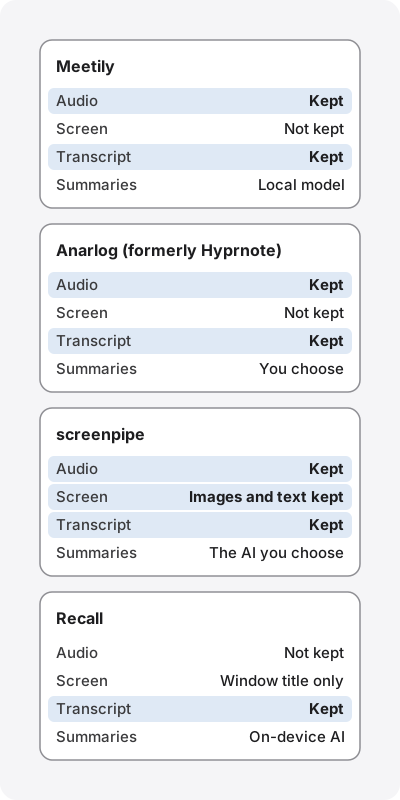
Recall stores records in ~/Library/Application Support/Recall/, and you choose how long to keep them in settings. The default is 90 days in Free and forever in Pro. Details are on privacy and data.
Saving audio: listen again, or keep none
Meetily, Anarlog and screenpipe keep audio; Recall does not. This is not a matter of taste but of what you can do later.
With audio kept, you can check a doubtful passage against the original voice. Meetily says you can re-transcribe a meeting with a different model or language (in beta). That is a real advantage for interviews and for meetings where the exact wording matters. In exchange, audio takes space, and the voices themselves stay on the laptop you carry around.
Recall discards audio as soon as it becomes text, so you cannot check a mishearing against the original voice. Recall does not suit people who want to keep audio and listen again.
Keeping the screen: only screenpipe does
Only screenpipe records the screen. Its strength is that you can search documents, chats and pages you saw, and hand the context around a meeting to AI.
The costs and cautions are larger too. The system requirements on its pricing page list 600 MB to 4 GB of memory depending on settings, and about 30 GB of storage a month (retention is configurable). Its FAQ also says that always-on capture uses CPU, battery and disk, and the cost is not zero. The screen also shows the other side's documents, other people's messages and password entry. Decide which apps and windows to ignore first, and check your workplace rules before you use it. The official site itself says a company rollout needs employee consent and a clear policy, and that screenpipe should not be used for covert surveillance.
Recall also asks for the "Screen & System Audio Recording" permission, but uses it to hear the sound your Mac plays and to record which app a conversation was in. It keeps only the front window's title, not screen images or on-screen text.
Where summaries are made
Even when transcription is local, summaries can leave the machine. Each app lets you choose the AI for summaries.
- Meetily: a local model (Ollama) by default. If you choose Claude or another provider with your own API key, the transcript is sent to that company.
- Anarlog: an on-device model, your own API keys, or Anarlog's AI (Pro). The official site warns that installing the app alone does not make every AI feature offline.
- screenpipe: capture is local, but when you ask AI, the parts it needs go to the model you chose. The official site says local-first does not mean every optional feature runs locally.
- Recall: the on-device AI by default, and summaries and to-dos are made when Apple Intelligence is on. If you choose an outside AI for organizing meetings in Pro, each time a conversation ends Recall sends that conversation's statements (with speakers' names, up to 60,000 characters) to the company you chose. The full list is in when records leave the Mac.
To keep summaries local, Meetily and Anarlog need a local model set up, and Recall needs Apple Intelligence turned on. Which local models you can use depends on your computer's memory and speed.
Pricing and requirements
Here are the conditions worth checking before you pay. Prices were checked on the official sites on November 13, 2026; check each company's checkout for taxes on dollar prices.
Pricing: how far the free plans go
All four can be started for free. What the free plan covers differs.
| Product | Free | Paid |
|---|---|---|
| Meetily | The Community Edition is free (no speaker diarization) | Pro at $120 per user a year ($10 a month equivalent). One device per license. 14-day trial and 30-day refund |
| Anarlog | Free $0. Unlimited on-device transcription, recordings, your own keys, MCP and more | Pro at $14 per person a month or $140 a year. 30-day trial |
| screenpipe | Free $0. One device, limited searchable history | Basic $21 a month or $250 a year; Business $42 per seat a month or $500 a year. Existing lifetime licenses keep working |
| Recall | ¥0. Unlimited transcription, plus summaries and to-dos (when Apple Intelligence is on), ⌘K and the on-device AI. View and search the last 14 days | Pro ¥980 a month or ¥9,800 a year (tax included) |
Price alone does not tell you which is the better deal, because you are paying for different things. Meetily and Anarlog Pro pay for cloud transcription and speaker identification, screenpipe's paid plans for longer history and AI usage, and Recall Pro for long records and connecting outside AI. If you try them free, record a week of your usual meetings and see whether what you want to find is there. Recall's free plan is on the pricing page.
Requirements: Recall is the narrowest
Recall runs only on Apple silicon Macs with macOS 26 or later. It does not run on Windows, Linux, Intel Macs or earlier macOS.
- Meetily: apps for macOS (Apple silicon) and Windows. Windows needs an x64 CPU with AVX2. On Linux, build from source.
- Anarlog: builds for macOS 15 or later on Apple silicon and Intel Macs, Windows and Linux. Windows and Linux are in beta, and the official site says macOS is the most mature. Built-in transcription needs an Apple silicon Mac. iPhone and Android versions are announced but not yet available.
- screenpipe: macOS 13 or later, Windows 10 or later, Linux. It says it runs on older computers too if you adjust capture settings and retention.
If you switch between a Windows PC and a Mac, or your work Mac is older, choose from the other three.
Which is most accurate in Japanese or English?
This article does not say, because we have no measurement of them on the same audio. We can only describe how they work.
Meetily uses Whisper or Parakeet, and Anarlog uses built-in models or the transcription provider you configure. Anarlog says in its rename announcement that it supports more than 45 languages. Recall runs Whisper large-v3-turbo on the Mac on Macs with 16GB of memory or more, and uses macOS speech recognition on Macs with less. It supports Japanese and English, and you choose one in the "Listening language" setting. If many of your meetings are in other languages, try the others first.
To compare, check these points on your own usual meetings.
- Are proper nouns such as company and product names right?
- Are amounts, dates and numbers right?
- Are words from another language mixed into speech right?
- Does it ever mix up the other side's voice with yours?
Which one fits
Meetily suits people who
- Want MIT-licensed open source that records and summarizes meetings entirely on their machine.
- Want the same app on both Windows and Mac.
- Want to keep audio and re-transcribe later with another model.
- Can set up a local model such as Ollama themselves.
Anarlog suits people who
- Write their own notes during meetings and want AI to finish them.
- Want to connect records to their own tools through MCP or a CLI on the free plan.
- Used Hyprnote and want to keep going (records and settings carry over).
screenpipe suits people who
- Want to search not only meetings but also documents and chats they saw on screen.
- Want to hand their work history to AI agents and find repeated work.
- Can accept tens of gigabytes a month and the cost of always-on capture.
Recall suits people who
- Want meetings and videos they hear on the Mac kept without pressing record.
- Want text only, with no audio or screen kept.
- Want to find "what did I promise company A last week" with the statements behind it.
- Want summaries from Apple Intelligence without setting up a local model.
Recall does not suit people who
- Must use apps whose source they can read.
- Use Windows, Linux or an Intel Mac.
- Want to keep audio and listen again, or transcribe recorded audio files.
- Want to search what they saw on screen.
- Have many meetings in languages other than Japanese and English.
What to check when you try them free
All four can be started for free, so the surest way to decide is to try them on your usual meetings for about a week. When you do, check these five points.
- What was kept, and how much: see how much storage grew in a week. Apps that keep audio grow with the length of your meetings. screenpipe's official guideline is about 30 GB a month. Recall keeps text only, so it grows less than apps that keep audio, and you decide when records are deleted with the retention setting.
- Where summaries were made: check in settings that the summary AI is a local model. In Meetily and Anarlog, check that you installed a model such as Ollama and did not enter your own API key. In Recall, check that Apple Intelligence is on and that you did not choose an outside AI for organizing meetings in Pro.
- Meetings missed, conversations kept by mistake: with apps you start per meeting, count meetings you forgot to record. With always-on apps, check the reverse: conversations or screens you did not want kept.
- Whether you can find what you need: search for things you actually want to find, such as "the date decided in last week's meeting". If you cannot find it, the app does not fit your purpose.
- Whether your work Mac allows the permissions: to pick up meeting audio, every app asks for macOS permissions for the microphone and for the sound your Mac plays. screenpipe also needs screen recording permission. Managed Macs may not allow them, so check this first.
Before you switch to Recall
If you are moving to Recall from one of the three, check these first.
- Mac requirements: is it an Apple silicon Mac with macOS 26 or later? If not, stay with your current app.
- Need for audio: can you do without audio for future meetings?
- Past records: Recall cannot import transcripts or recordings from other apps. Keep what you need in the old app, or export it.
- Summary conditions: summaries and to-dos are made when Apple Intelligence is on. Check that you can turn it on on your work Mac.
- Workplace rules: check whether always-on transcription and outside AI are allowed.
- First settings: decide which apps not to record and how long to keep records.
Whichever you use, tell the other people
Tell the people in the meeting that you are transcribing. None of the four sends a bot into the meeting, but the absence of a bot is not a substitute for their consent. For example: "I'm transcribing this on my Mac so I can check details later. Let me know if you'd rather I didn't." Even with Recall, which saves no audio, the transcript remains. If you keep the screen too, as with screenpipe, think about the documents and messages that appear on it. Do not use any of them where recording is prohibited or your workplace rules do not allow it. There is sample wording in the FAQ.
Other options
There are other tools that transcribe locally. For a different job, a different tool fits better.
- Transcribing recorded audio files: MacWhisper is a candidate. See MacWhisper vs Recall.
- Sharing in the cloud: cloud services such as Notta fit better. See Notta alternatives compared.
- Comparing local transcription in general: how to transcribe locally on a Mac also covers Notes and whisper.cpp.
FAQ
Is Meetily free?
Yes. The Community Edition is open source under the MIT License and free. Speaker diarization, automatic meeting detection and cloud transcription are in Pro ($120 a year).
What happened to Hyprnote?
It was renamed Char, and then Anarlog. The meeting notes app is distributed at anarlog.so, and records and settings carry over. Today's "Char" is a different product from the same company.
Is screenpipe open source?
The official site now calls it "source-available". You can read the source, but the license is its own Screenpipe Commercial License, not an open-source license.
Can Recall replace screenpipe?
If your goal is keeping and searching conversations from meetings and videos, it is a candidate. If your goal is searching documents and chats you saw on screen, it is not. Recall keeps no screen images or on-screen text.
Which ones run on Windows?
Meetily, Anarlog (beta) and screenpipe. Recall runs only on Apple silicon Macs with macOS 26 or later.
Do they work offline?
Meetily and Anarlog can transcribe and summarize on your machine once you set up local models. Anarlog notes that installing the app alone does not make every AI feature offline. Recall can search records offline; preparing models at first, purchase and license checks, and update checks need a connection.
How much storage does screenpipe use?
The system requirements on its pricing page list about 30 GB a month (retention is configurable) and 600 MB to 4 GB of memory depending on settings. Setting apps to ignore and a retention period at the start keeps it down.
Is Recall open source?
No. The source is not public. It lists when records leave the Mac, and where they are stored, on privacy and data.
Does Recall save audio?
No. Audio is discarded once it becomes text. If you turn on features such as registering your own voice, voice characteristics (not a recording) are kept in the Mac's keychain.
Checked on November 13, 2026. Details of Meetily come from its official site, pricing and GitHub; details of Anarlog from its official site and pricing, download page, rename announcement and GitHub; details of screenpipe from its official site and FAQ and pricing and requirements. Prices and features may change, so please check each company's official pages. This is a general comparison, not legal advice.
macOS 26 or later · Mac with Apple silicon · By downloading, you agree to the Terms of Service
Get the product overview (PDF) by email →
Related articles
How to transcribe locally on a Mac: keeping meetings inside your company
How to transcribe on a Mac without sending audio to the cloud. Compare Notes, MacWhisper, Aiko, whisper.cpp, Recall and more, and check the four places records can still leave.
MacWhisper vs Recall: how they differ before you switch
Looking for a MacWhisper alternative? Compare audio files, always-on capture, saved audio, pricing and requirements, and see who each app fits.
Notta alternatives compared: choosing when you worry about data leaks
For people looking for a Notta alternative. We split the worry about leaks into three, then cover what you can do within Notta, Privacy Mode, and how five products including Recall differ, and who they do not suit.