 Recall
Notta alternatives compared: choosing when you worry about data leaks
For people looking for a Notta alternative. We split the worry about leaks into three, then cover what you can do within Notta, Privacy Mode, and how five products including Recall differ, and who they do not suit.
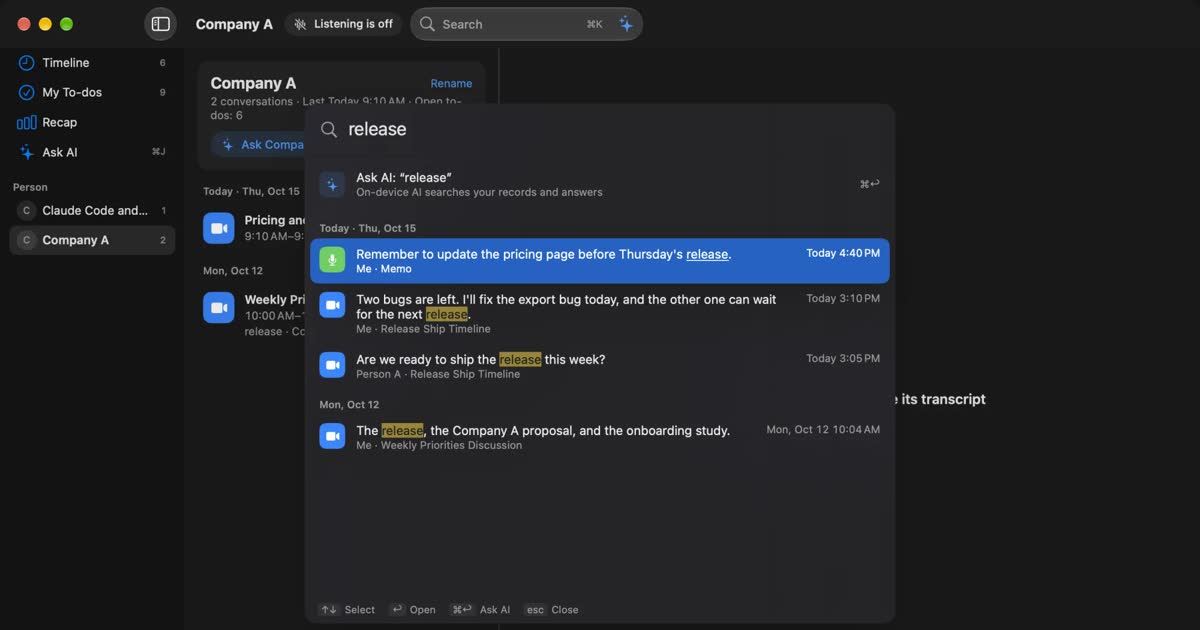
In short, worrying about leaks from Notta does not always mean you have to switch. Some worries go away by reviewing share links, moving to a plan that stops speech recognition training, or using Privacy Mode, which transcribes on your device. Switching is worth comparing when that is not enough: when you want an always-on app that keeps no audio, summaries that stay on the device too, or long meetings transcribed for free.
This article is written by KOROMO K.K., the company that develops the Mac transcription app Recall. Our own product is in the comparison, so read with that in mind. We checked the details for Notta and the other products on each company's official pages on November 2, 2026. Most of Notta's help pages are in Japanese. We also say who Recall does not suit.
Where to start
Where to read depends on what is bothering you. Start from the row that fits.
| Your situation | Read next |
|---|---|
| You first want to know whether Notta is risky | Has Notta had a data leak? |
| You want to know where conversations stay | Where a conversation goes |
| You would rather keep using Notta | What you can do without leaving Notta |
| You are looking for another Mac app | How Notta and Recall differ |
| The free tier or price does not fit | Other alternatives |
| You have already decided to switch | What to check when you switch |
Why people look for a Notta alternative
There are roughly four reasons. Some of them can be solved without switching.
The free tier is too small: Notta Free gives 120 minutes a month, with a limit of 3 minutes per session. That works for short memos, not for keeping whole meetings. Premium raises this to 1,800 minutes a month and 5 hours per session. Count your hours first. If Premium covers them, there is less reason to switch. If you want long meetings transcribed at no cost, alternatives are worth a look.
You do not want a bot in the meeting: This can be solved within Notta. Bot-free recording is a desktop app feature. It captures the microphone and the computer's sound directly, so no bot appears in the participant list. Where the audio is processed is a separate matter, which we cover below.
You forget to start recording: Notta Desktop detects a meeting and shows a notification, and you can start from there or from a calendar event. You still have to start it. Recall stays in the menu bar and listens, so there is nothing to start. Webinars and videos are transcribed too unless you pause it. You can name apps not to record and pause for 15 minutes or an hour.
You are unsure how your data is handled: This is the center of this article. The next sections go through it using the official explanations.
Has Notta had a data leak?
As far as we could find on Notta's official pages and through search on November 2, 2026, there is no official announcement of a leak of Notta users' data. Not finding one does not prove there has never been an incident. Rather than calling it safe or dangerous, it is easier to decide by separating what you are worried about.
These measures can be confirmed from official sources.
- Third-party certification: Notta's business FAQ says it holds ISO 27001 and SOC 2 Type 2. Reports are available after signing an NDA.
- Storage: Data is stored in the AWS Tokyo region.
- Encryption: Data is protected by HTTPS and TLS in transit, and at rest with keys managed by AWS KMS.
- Operator: Its company page lists a Japanese company located in Chiyoda, Tokyo.
A certification means a third party has checked how a company manages information. It does not decide who can see what from your meeting. So split the worry into three.
- Leaving at all: Keeping conversations on an outside server does not fit your work or your employer's rules.
- Training: You want to know whether what was said is used to train AI.
- Human error: You worry about a share link sent to the wrong person, a stolen account, or access left behind after someone leaves.
The first cannot be solved while using a cloud product. You need processing on the device. The second can sometimes be solved by a plan. The third stays whichever product you use. With a local app, a file sent by mistake is the same problem. The full list of things to check is in What to check if you worry about leaks from AI meeting notes.
Is cloud or local safer?
Neither can be called safer outright, because they protect against different things.
With a cloud product, the company monitors the servers and handles backups and permissions. Your records survive a lost device, and an organization can disable a departing employee's account. In exchange, you hand conversations to an outside company and have to trust it and its subcontractors.
With a local product, you do not hand conversations to anyone. If a company's servers are attacked, your records are not there. In exchange, managing the device is entirely on you. A Mac with a weak password, an unencrypted disk, or files in a folder anyone can open can be riskier than the cloud. Recall leaves encryption to macOS FileVault, so we recommend keeping FileVault on.
If an organization wants central control of permissions and activity logs, a cloud product with admin features may fit better. Choose local because not handing conversations to anyone meets your conditions, not because local is automatically safe.
Where a conversation goes in Notta
In normal use, Notta sends audio and transcripts to the cloud and keeps them until you delete them. Bot-free recording is the same: where the audio is processed does not change.
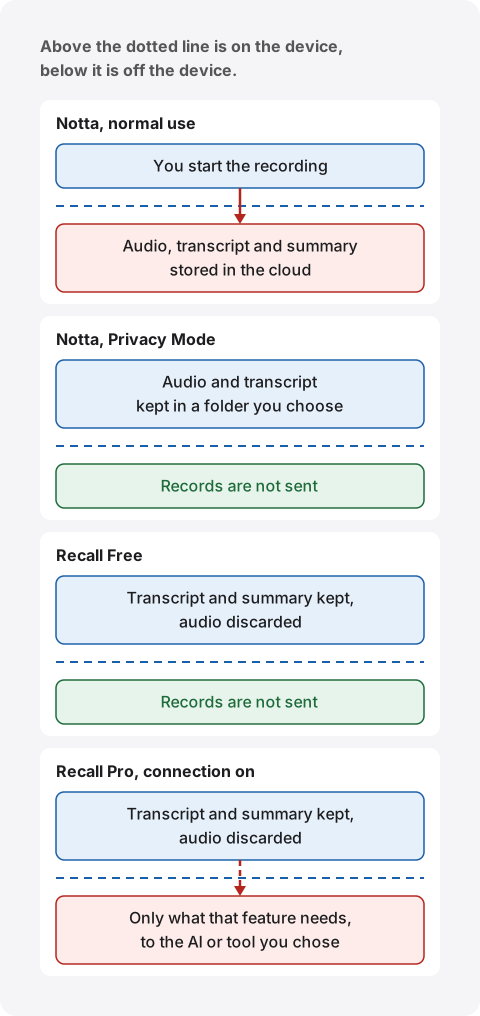
Where it is kept, and for how long
Storage is the AWS Tokyo region, as above. According to Notta's help on retention, data is not deleted automatically unless you delete it by hand or delete the workspace or the account. Being able to look back for a long time and data staying around are two sides of the same thing. Scheduled automatic deletion appears under Enterprise in the feature list by plan.
Check what happens after deletion too. The business FAQ says data is backed up once a day, for 35 generations, for up to 180 days. We could not find an official explanation of when deleted data leaves those backups. If you have strict requirements, ask Notta directly.
Bot-free recording does not change where it is processed
Bot-free recording changes how you join a meeting, not where the data goes. The desktop app captures the computer's sound, so nothing appears in the participant list, but unless you are in Privacy Mode, transcription and summaries run through standard online processing. Thinking that no bot means nothing leaves would lead you to the wrong decision.
What is used for training
Training is handled differently for speech recognition and for summaries.
For speech recognition, see Notta's help on AI training. A partner company in Japan that provides the speech engine uses only randomly picked audio and recognition results to train that engine. Notta says the meaning created by combinations of words is not what is learned. With AI training on, audio is held for a time in a data center in Japan after recognition.
The no-training option is offered on Enterprise and Business Plus, and on a special plan for licensed professionals. The Business Plus page lists speech recognition training as on for the Business plan. Free and Premium have no no-training option listed.
For summaries, see Notta's page on large language models. AI summaries use Anthropic's Claude 3 models, and Notta says user data is not used for model training. The AI training help also says that on every plan, data is not provided for training AI features other than speech recognition.
So, by Notta's account, what is learned serves speech accuracy rather than the knowledge in your meetings. If an outside partner keeping and handling audio does not fit your employer's rules, that is still a reason to check your plan.
What you can do without leaving Notta
If the worry is human error or training, you can solve it while staying on Notta. Switching takes effort, so check these three first.
Review share links and permissions
Share links can have an expiry and a password. You can limit what is shared to the transcript or the AI summary, and hide the video.
For teams, there is a setting to turn off external sharing. It needs Business or higher, and the owner sets it. IP restriction is also listed under Business. SAML single sign-on and activity logs are Enterprise features.
One point to check: the business FAQ we read on November 2, 2026 says multi-factor and two-step authentication are not currently supported. Sign-up also offers Google, Microsoft and Apple accounts. In an organization, also consider Enterprise SSO.
Move to a plan that stops speech training
If training is the only problem, Business Plus or Enterprise is an option. According to the business page, Business Plus is ¥64,800 a year before tax, or ¥5,400 a month before tax, paid for 12 months at once. The AI training help says that with no training, audio and recognition results are not saved on the partner's servers or storage. They are processed in memory and disappear.
That applies to the speech recognition partner. Your records are still kept in Notta's cloud, so this does not answer the worry about conversations leaving at all.
Use Privacy Mode
Notta has Privacy Mode, which finishes transcription on the device. It is a feature of Notta Desktop, the Windows and Mac app announced on July 8, 2026. Saying that Notta is cloud only is no longer accurate.
| What to check | Details |
|---|---|
| Who can use it | Premium, Business and Enterprise. Invoice customers ask sales |
| Devices | Desktop app on Windows and Mac |
| Where data stays | Recordings and transcripts stay only in a local folder you choose |
| What works | Record, then transcribe when recording ends. Import files, export |
| What stops | Cloud transcription, AI summaries, sync between devices, team sharing |
| Languages | Japanese, English and some others. Fewer than the usual 58 |
| Network use | Sign-in, plan check, updates, model download. A license check about once a month |
| Status | Beta |
This is from the Privacy Mode help and the desktop page. Because a model installed on the device does the work, Notta says content is not sent to cloud speech recognition and is not used for training.
Three cautions. First, the mode applies to the whole desktop app and cannot be chosen per recording. Second, bot-free recording and Privacy Mode are separate features. The official page says bot-free recordings use standard online processing unless you are in Privacy Mode. No bot in the meeting and nothing leaving are not the same thing. Third, audio stays in the local folder, so how that folder is handled depends on your backup and sharing settings.
If you already pay for Notta and do not need a summary every time, this may be enough. There is no extra charge.
How Notta and Recall differ
Notta suits team sharing and use on phones or Windows. Recall suits keeping records on a Mac with an always-on app. We have not compared accuracy on the same audio, so we make no claim about it.
| Notta | Recall | |
|---|---|---|
| Where it transcribes | Cloud. On the device in Privacy Mode | On this Mac |
| Where it summarizes | Cloud. Not available in Privacy Mode | On this Mac by default. Pro can use outside AI |
| Audio | Saved, and the original can be exported | Discarded once transcribed. You cannot listen again |
| Where records stay | AWS Tokyo region, until deleted | This Mac. Not sent to our servers |
| Retention | Until deleted by hand | Default 90 days on Free, forever on Pro. From 7 days |
| How listening starts | Invite the bot, start recording, or start from meeting detection | Stays running and listens automatically |
| Devices | Web, phones, Windows, Mac | Apple silicon Macs on macOS 26 or later |
| Sharing with others | Share links, team workspaces | You copy or save the transcript and pass it on |
| Languages | 58 languages, with translation | Built mainly for Japanese and English. No translation |
| Free tier | 120 minutes a month, 3 minutes per session, 10 AI summaries a month | No transcription limit. View and search the last 14 days |
| Paid | Premium ¥1,980 a month or ¥14,220 a year. Business ¥4,180 a month or ¥30,096 a year per account | Pro ¥980 a month or ¥9,800 a year |
Prices include tax. Notta's details are from its pricing page and plan explanation. Prices can differ through app stores. Recall's details are on the pricing and features pages.
Some points the table does not show.
Recall's records can leave your Mac. That happens when you turn on Pro features such as using your own Claude, ChatGPT or Gemini, letting outside tools like Claude Code read records, or passing records to a command through a workflow. What a feature needs goes to the destination you chose. Text you copy or save yourself is also yours to manage after that. Everything sent and where it goes is listed in When records leave the Mac. The first model download, Pro license checks and update checks also use the network, and information such as your IP address reaches those services. No records are included.
The free tiers also work differently. Notta Free stops at 3 minutes per session, so a 30-minute meeting does not fit. Recall Free has no transcription limit, but the app shows only the last 14 days. Older records stay saved during the retention period (90 days by default) and appear if you move to Pro. Records past that period are deleted.
Where Notta is stronger
Notta's strength is the work after the meeting. Share links, team workspaces, comments, and CRM and Slack connections do not exist in Recall. In Recall you copy or save a transcript and pass it on. It is not built for a team to grow one shared record. For an organization, Notta also has what IT teams look for: certifications, SSO, activity logs and invoice billing. A memory aid for one person, or a record base for a team: this is the main dividing line.
What is free in Recall
Features that run on the Mac are free: transcription, ⌘K search, questions and summaries with On-device AI, the Live Panel, the assistant (commitments and due dates) and the weekly Recap. Pro adds viewing and searching records older than 14 days, monthly and yearly Recaps, and connections to your own AI and outside tools.
Every feature that sends records out is a Pro feature. On Free, records leave only when you copy or save them and pass them on yourself. No account is needed. Buying Pro uses your email address and card on Stripe's page. Details are in Plans and licenses.
Privacy Mode or Recall?
If you want transcription inside a Mac, Notta's Privacy Mode and Recall are close options. The differences are whether audio stays and whether summaries also stay on the device.
| Privacy Mode | Recall | |
|---|---|---|
| What you need | A paid Notta plan and an account | No account. Free to use |
| Devices | Windows and Mac | Apple silicon Macs on macOS 26 or later |
| Starting | Turn on the mode and start recording | Stays running and listens automatically |
| When text appears | After recording ends | While people talk |
| What stays | Audio and transcript | Transcript and summary. No audio |
| Summaries | Not available | Made by On-device AI |
| Finding things later | View and manage on the same device | Search by word, date, app or person. AI answers with the source lines |
Privacy Mode suits people who want to listen again, use Windows, or already pay for Notta. Recall suits people who want no recording step, no saved audio, and summaries inside the Mac.
Other alternatives
The right alternative depends on what you want to solve. Besides Recall, we checked four products that go in different directions on their official pages. Prices are as shown on the check date.
| Processing and storage | Price | |
|---|---|---|
| Rimo | Cloud. Stored in Japan, states no AI training | Pro ¥4,950 a month, Team ¥6,600 per account a month (monthly, tax included) |
| LINE WORKS AiNote | Cloud | Free 300 minutes a month. Solo ¥1,440 a month (annual, before tax) |
| Granola | Cloud. Audio not saved. Notes in US AWS | Basic free (30 days of history). Business $14 per user a month |
| MacWhisper | On the device. Outside AI can be chosen | Free version. Pro is a one-time €64 |
| Recall | On the Mac by default. Pro features you turn on send data out | Free version. Pro ¥980 a month |
Recall does not run on Windows or phones. The other four are as follows.
Rimo is a candidate for an organization that wants cloud meeting notes with storage in Japan and no training. Its pricing page lists ISO 27001 and ISO 27017, storage in Japan and no AI training on data. It says you can start for free, but we could not confirm the limits of that. Like Notta, it stores records in the cloud, and it does not suit people who want a low personal cost.
LINE WORKS AiNote is a candidate if free minutes matter most. Its pricing explanation says Free gives 300 minutes a month, without AI summaries or web meeting recording, with data kept for one year. The product page says the no-training promise is for paid plans, and that Free users agree recorded audio may be used. If training is your worry, do not skip this. It does not suit you if you want summaries or web meeting recording for free.
Granola is a candidate if you want no bot and accept cloud summaries. Its security page says it does not store audio, but transcription and summaries run in the cloud and notes are stored in AWS in the US. On training, it says it does not allow outside companies such as OpenAI or Anthropic to train on your data, and that Granola itself trains on anonymized data. You can turn that off in settings, and it is off by default on Enterprise. Prices are on its pricing page. It does not suit you if storage in Japan is required. We cover the differences in Granola AI alternatives compared.
MacWhisper is a candidate for transcribing existing files on the device. Its official page says local models can do the work, and that meetings in apps like Zoom and Teams can be recorded without a bot. It suits people who prefer a one-time purchase, but not team sharing. Recall stays in the menu bar and keeps conversations automatically, and importing audio files is not among its features. For choosing an app that works inside the Mac, see How to choose local transcription for your Mac.
What one year costs
We worked out the cost for one person over one year from the official prices. The features differ, so the amounts alone do not make a ranking. Tax treatment and currencies also differ, so the rows are not in price order.
| Product and plan | One year | Basis and conditions |
|---|---|---|
| Notta Premium | ¥14,220 (tax included) | Annual plan. 1,800 minutes a month |
| Notta Business | ¥30,096 (tax included) | Annual plan. Unlimited time |
| Notta Business Plus | ¥64,800 (before tax) | Annual. No speech training |
| Rimo Pro | ¥59,400 (tax included) | ¥4,950 × 12 months on monthly billing. ¥39,600 on annual billing |
| AiNote Solo | ¥17,280 (before tax) | ¥1,440 × 12 months. 600 minutes a month |
| Granola Business | $168 | $14 × 12 months |
| MacWhisper Pro | €64 | One-time purchase |
| Recall Pro | ¥9,800 (tax included) | Annual. No transcription limit |
Count your monthly time first. A one-hour meeting every weekday is 1,320 minutes over 22 days. That fits Notta Premium's 1,800 minutes but not AiNote Solo's 600. Check summary counts too: Notta Premium has 100 a month and AiNote Solo has 12.
Recall costs nothing on Free. If you use your own AI through an API key on Pro, that company's charges are separate. If you would need a new Mac, include that cost.
How to choose
If you are unsure, decide in this order: whether you need sharing, whether conversations may leave the device, and which device you use. Comparing prices last avoids most wrong turns.
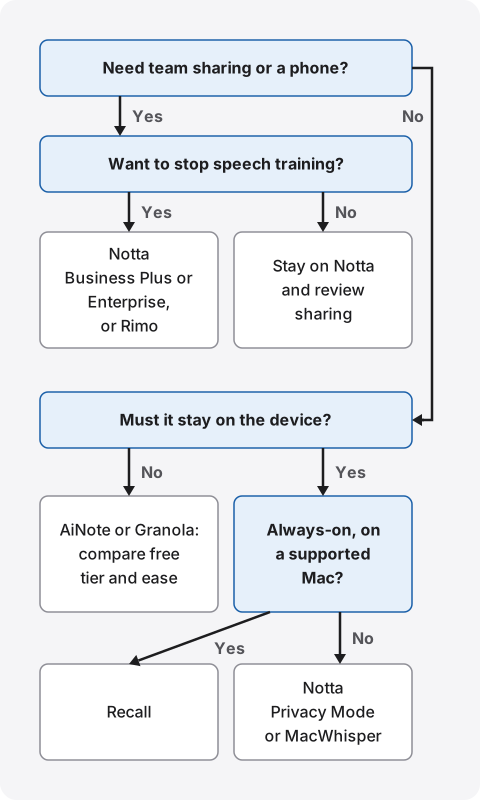
The first question is sharing. If a team needs the same record, or you use a phone, cloud products remain. If you also want to stop speech training, look at Notta Business Plus or Enterprise, or Rimo. If not, stay on Notta and review your sharing settings.
If you do not need sharing, ask whether the conversation must stay on the device. If it may leave, compare AiNote and Granola on free tier and ease of use. If it must stay, your device decides. For an always-on app on an Apple silicon Mac with macOS 26 or later, choose Recall. On other devices, or if you record and transcribe by hand, look at Notta's Privacy Mode or MacWhisper. Check MacWhisper's requirements on its official page.
The diagram is only a guide. At work, check your employer's rules before any of this. A product your rules do not allow cannot be used, however well it fits.
What to look at when you try one
Once two candidates remain, try them in situations close to real meetings. What happens with your own conversations tells you more than the numbers in product pages. Tell the other people that it is being transcribed before you try.
- Proper nouns: how correctly company, product and people's names come out.
- Speaker separation: check online and in-person meetings separately. Results can differ.
- Gaps in summaries: whether decisions and requests are missing, and whether you can go back to the original lines.
- Finding things: whether you can find a line a week later from a word or a person.
- Load: products that process on the device depend on the Mac's performance and battery. Run them next to your usual work.
By situation
What to check changes with the content of the meeting. These are situations worth pausing on before you pick a product.
HR interviews and 1:1s: Personal matters stay on record. Tell the person it is being transcribed, and keep it for a short time. Recall lets you choose a period from 7 days. Notta's automatic deletion is an Enterprise feature, and on other plans you delete by hand.
Sales calls: You are holding the other company's information. Check first whether a confidentiality agreement limits putting it into outside services. If you want records in a CRM, Notta Business connections suit that. If you only need them at hand, Recall is enough.
Licensed professionals and medical work: Notta has special plans for licensed professionals and for medical staff, and the medical plan has a dedicated speech engine. Recall has no plan for these uses. With any product, check your organization's rules and guidelines.
Interviews and reporting: If you want to confirm the exact wording of a quote by listening, choose a product that keeps audio. Recall discards audio, so it does not suit this. Notta and MacWhisper are candidates.
Meetings across countries: For many languages or translation, Notta with 58 languages or Rimo, which states more than 60, suits better.
Events and meetings with many outside people: Check the organizer's notice first. Where recording or note-taking is prohibited, do not use any of these products. A method with no bot does not change that. If you cannot tell everyone, not recording is also an option.
Solo learning and webinars: If you do not need sharing and want to find what you heard later, always-on Recall or file-based MacWhisper fits.
Who each one suits
The same worry has different answers depending on how you work. We start with people who should not switch.
Stay with Notta if
- Your team works from the same records, with comments and share links.
- You record on a phone or Windows, or listen to audio again.
- You have many meetings in languages beyond Japanese and English, or need translation. Notta handles 58 languages.
- Connections to Salesforce, Slack and the like are built into your work.
- Your worry is training and sharing settings, and a plan or a setting solves it.
Recall suits you if
- You do not want conversations on an outside server, or your employer's rules do not allow it.
- You want an always-on app with no record button, so that forgetting to start is no longer a problem.
- You want no audio kept, only text on your Mac.
- You want summaries on the device too. Even on Free, On-device AI handles summaries and questions. Summaries and to-dos need Apple Intelligence on. Answers to questions need it only on Macs with less than 16 GB of memory.
- You work alone and also want to search what you heard in webinars and videos.
Free to use · No account needed · macOS 26 or later · Mac with Apple silicon · By downloading, you agree to the Terms of Service
Recall does not suit you if
- You want to use Windows, a phone, an Intel Mac, or a Mac on a version before macOS 26.
- You want to keep the audio itself and listen again.
- You want a team to share the same notes through a link. You copy or save the transcript and pass it on.
- You want to import recorded files and transcribe them.
- You want to separate several people in an in-person meeting. Even with your voice registered, they are recorded as one “Person (in person)”, however many there are.
- You want records to survive a broken Mac. We keep no copy, so preparing for a failure or loss is up to you.
With Recall too, you need to manage exported files and protect the Mac with FileVault or similar. It runs all the time, so it uses some CPU and battery, and the load rises while people talk.
What to check when you switch
What gets missed most is past records and data left in the old place. Once you decide to switch, check these.
- Export what you want to keep: Download is a Premium or higher feature. You can choose text, Word, PDF and more, with up to 10 notes at a time. Do this before you cancel.
- Check whether the new product can take them: Recall cannot import past records. Keep exported files separately.
- Delete old data: Cancelling alone does not delete Notta records. Delete them by hand, or delete the workspace or account. Get agreement before deleting team records.
- Stop share links: Turn off external sharing on notes you gave out.
- Remove calendar connections: If you used the bot's automatic joining, check that setting too.
- Get approval at work: Tell your IT team where processing happens, where data is stored, and whether anything is sent out.
- Decide how you will tell people: Without a visible bot, people are less likely to notice. Please tell them it is being transcribed. Example wording for Recall is in the FAQ.
What to ask a provider before signing
If an organization is adopting a product, confirm these in writing. Keep any unclear answers as material for your internal decision. Notta's business FAQ says it publishes a security checklist that follows guidance from Japan's Ministry of Economy, Trade and Industry.
- In which country, and on whose servers, are audio and transcripts kept?
- Who are the subcontractors for speech recognition and summaries, and does data stay with them?
- Which sentence in which contract says data is not used for training?
- When does deleted data leave backups?
- Can an admin stop share links? Is there multi-factor authentication or SSO?
- What happens to the data if the service ends?
With Recall, records do not reach our servers. What to check moves to whether you turn on Pro connections and how the Mac is managed.
Frequently asked questions
Is there a free alternative to Notta?
Yes. Recall Free has no transcription limit and shows the last 14 days. LINE WORKS AiNote Free gives 300 minutes a month. MacWhisper and Granola also have free versions. The conditions differ, so check the comparison table.
Can Notta's AI training be turned off?
Yes. No speech recognition training is offered on Business Plus, Enterprise and the special plan for licensed professionals. AI summary data is said not to be used for training on any plan. Transcripts in Privacy Mode are not used for training either.
Are records deleted when I cancel Notta?
Not automatically. The help says they stay unless you delete them by hand or delete the workspace or account. If you want them gone, export what you need and then delete them yourself.
If no bot is visible, do I still need to tell people?
Yes, please tell them. Notta's help also says participants are not notified during bot-free recording and that consent is the user's responsibility. The same goes for Recall. Do not use these where recording or note-taking is prohibited, or where your workplace rules do not allow it.
Do Recall's records ever leave the Mac?
They can. Records leave when you use Pro features you turned on, and when you copy or save them yourself. Model downloads and license checks also use the network, and information such as your IP address reaches those services. No records are included in that.
Is Recall more accurate than Notta?
We do not know. We have not compared them on the same audio, so we cannot say which is higher. Accuracy changes with speakers, microphones and topics. Recall is free to try, so check it on your own meetings.
Do they work without the internet?
Once its models are ready, Recall can listen, transcribe and use On-device AI offline. On Pro, if the license cannot be checked for 14 days, Pro features stop and records older than 14 days are hidden. Listening and transcription continue as on Free. Notta works on the device in Privacy Mode, with a license check about once a month that needs a connection. Normal use needs a connection.
Is there an alternative for Windows?
Recall does not run on Windows. To transcribe on a Windows device, Notta Desktop's Privacy Mode is a candidate. If the cloud is fine, Rimo, LINE WORKS AiNote and Granola are also candidates.
Checked on November 2, 2026. Details for other companies are from their official pages and help. Some of Notta's pages were published at different times and do not fully agree. Prices and features can change, so check the official pages before you sign up or adopt a product. This article is a general comparison and is not legal advice.
The differences between Recall Free and Pro are in Plans and licenses.
macOS 26 or later · Mac with Apple silicon · By downloading, you agree to the Terms of Service
Get the product overview (PDF) by email →
Related articles
Free AI note takers compared: 8 tools, what the free plans really cover
Free AI note takers stop in one of four places: monthly minutes, counts, how long you can see notes, or features. We checked the free plans of Notta, Otter, AiNote, tl;dv, Fireflies, Fathom, Granola, and Recall on their official pages on November 13, 2026, and worked out which can handle five meetings a week.
Rimo Voice (now Rimo) vs Recall: choosing a meeting notes tool
Comparing Rimo Voice (now Rimo) and Recall: where records live, bots, sharing, and cost, with Notta and AiNote in the picture, and who each one does not suit.
Otter.ai alternatives compared: 8 options for English meetings, and when to stay on Otter
Looking for an Otter.ai alternative? We compare Recall, Fireflies, Fathom, Granola, Notta, MacWhisper, tl;dv and Tactiq on bots, where data lives, languages and free limits, and say when Otter is still the better choice.
How to transcribe locally on a Mac: keeping meetings inside your company
How to transcribe on a Mac without sending audio to the cloud. Compare Notes, MacWhisper, Aiko, whisper.cpp, Recall and more, and check the four places records can still leave.
CLOVA Note alternatives after the shutdown: AiNote, Recall, and how to choose
CLOVA Note shut down on July 31, 2025, and its successor is LINE WORKS AiNote. What changes on AiNote's Free and Solo plans, what to watch for with PC meetings, other options including Recall, and who each one does not suit.