 Recall
Rimo Voice (now Rimo) vs Recall: choosing a meeting notes tool
Comparing Rimo Voice (now Rimo) and Recall: where records live, bots, sharing, and cost, with Notta and AiNote in the picture, and who each one does not suit.
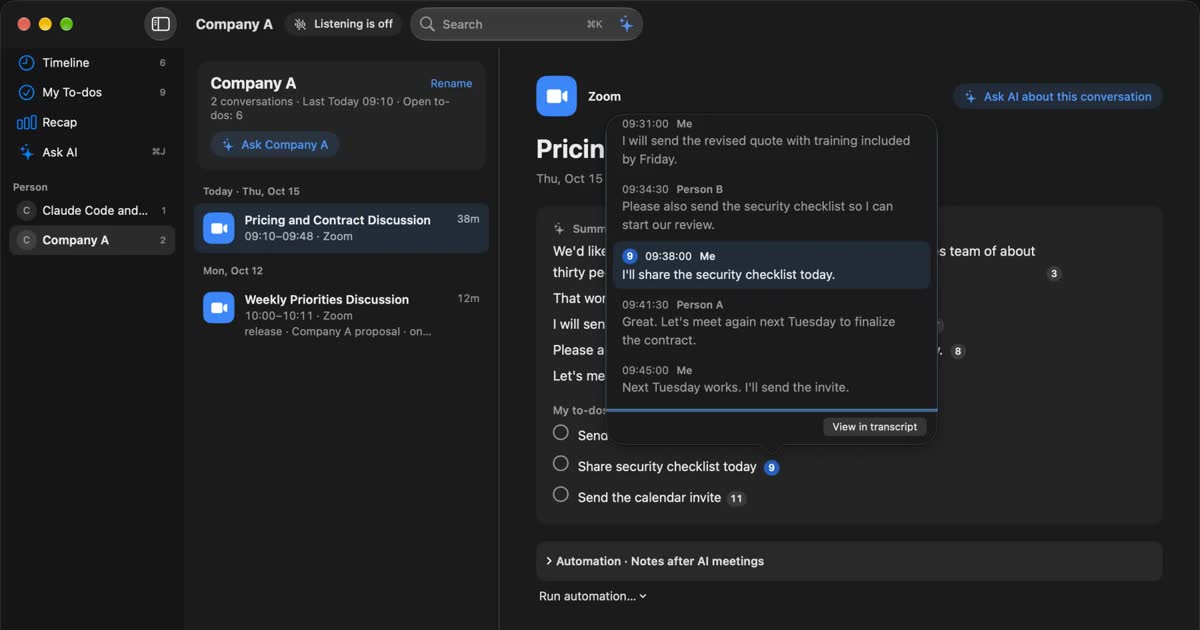
The short answer: Rimo for team minutes, Recall for keeping your own record on a Mac
Choose Rimo if a team shares minutes, reviews recordings, and manages them as a company. Choose Recall if you want a personal record on your Mac, kept off outside servers, with no record button to press. The two can look like the same kind of product, but they differ in where the record lives and who it is for. For most company minutes, Rimo is the better fit.
Rimo Voice is today's Rimo. The announcement dated October 1, 2026 changed the name to Rimo. It says features, pricing structure, accounts, and saved data do not change. The old and new names can appear side by side in Rimo's screens and help pages. From here on, this article says Rimo.
This article is written by KOROMO K.K., the developer of Recall, a transcription app for Mac. We are comparing our own product, so please read with that in mind. Details of Rimo and other products were checked on their official pages on November 2, 2026. We have not compared accuracy on the same audio, so we do not say which is more accurate.
| Your situation | Where to read next |
|---|---|
| You want the differences at a glance | How Rimo and Recall differ |
| You want to know where conversations are kept | Where the conversation goes |
| You do not want a bot in the meeting | Capturing each kind of meeting |
| You are also looking at Notta or AiNote | Other meeting tools |
| You need a budget | Cost over one year |
How Rimo and Recall differ
Rimo is a cloud minutes service for teams, and Recall is a personal record app that runs on your Mac. These are the main differences.
| Rimo | Recall | |
|---|---|---|
| Where it runs | Browsers on computers and phones, plus iOS and Android apps | An app for Macs with Apple silicon on macOS 26 or later |
| How it starts | Invite a bot, record with the microphone, or upload a file | Stays in the menu bar and listens automatically |
| Transcription | In the cloud | On this Mac |
| Summaries | In the cloud, including outside AI APIs | On this Mac by default. Pro can use outside AI |
| Audio and video | Kept. You can jump from text to the audio | Audio is discarded once transcribed. No playback |
| Where records live | Data centers in Japan | This Mac. Not sent to our servers |
| Retention | Varies by plan. See below | Default 90 days on Free, unlimited on Pro. From 7 days |
| Sharing | Links, team folders, co-editing | Copy or save the transcript and pass it on yourself |
| Languages | 60+ stated, plus translation | Built mainly for Japanese and English. No translation |
| Trying it | Free trial | Free, with no end date |
| Price (monthly, tax included) | Pro ¥4,950. Transcription only ¥1,650. Team ¥6,600 per account | Free ¥0, Pro ¥980 |
Rimo details come from its plans page, features page, and help center. Recall details are on our pricing and features pages. On languages, Rimo's official pages say 60 or more, while its individual plan guide says transcription language switching covers more than 20. If you need a specific language, test it in the trial.
Where Rimo is stronger
Rimo's strength is turning minutes into an asset for the organization. A team can edit the same note, share it inside and outside the company with permissions, and jump from text back to audio or video. Recall has none of this.
- Polished minutes: It removes noise and filler sounds automatically. The business plan adds a custom vocabulary and custom summary templates.
- Meeting tool links: A bot joins Zoom, Microsoft Teams, Google Meet, and Webex. With Google or Outlook calendar links, recording can be scheduled automatically.
- Using the record: AI search works across past minutes, and the business plan connects to Salesforce and Dynamics 365. CLI and MCP let AI agents read it too.
- Administration: The business plan has usage logs, IP address limits, single sign-on, and invoice billing. Rimo LLC holds ISO 27001 and ISO 27017 certification and has announced a listing on the Digital Agency's Digital Marketplace in Japan.
Having this material ready for IT reviewers matters in company rollouts. If you need internal approval, that alone can be a reason to choose Rimo.
Where Recall is stronger
Recall's strength is that what you hear is kept with no setup. It stays in the menu bar and listens to the microphone and Mac audio, so there is no meeting to invite it to and no recording to start. Webinars and videos are transcribed too, unless you pause.
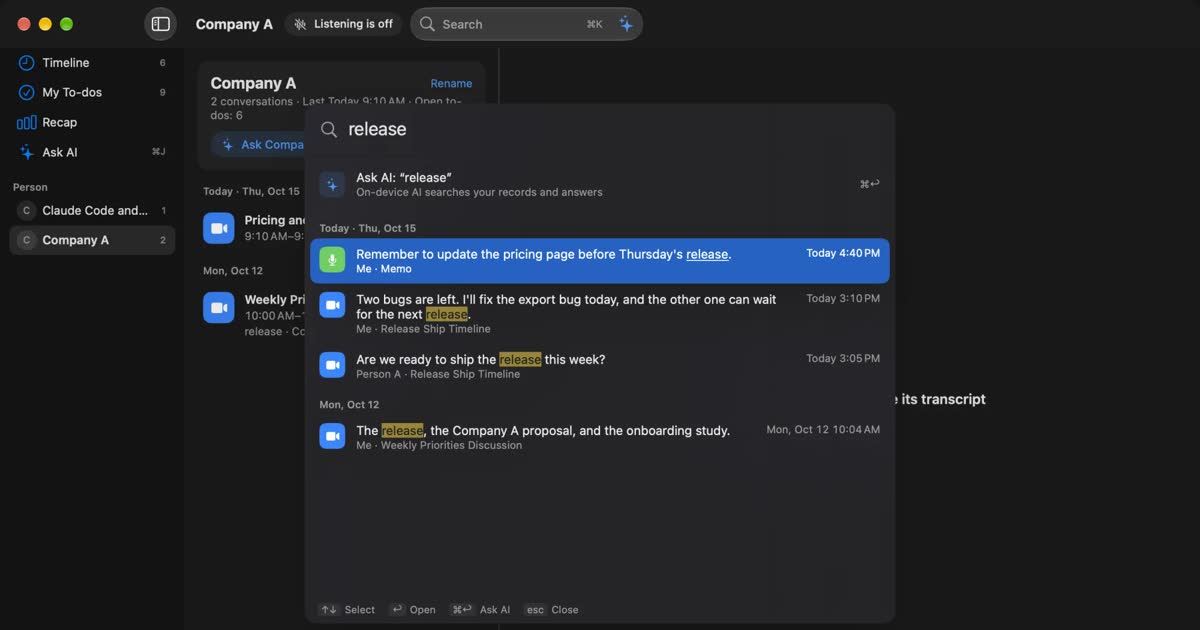
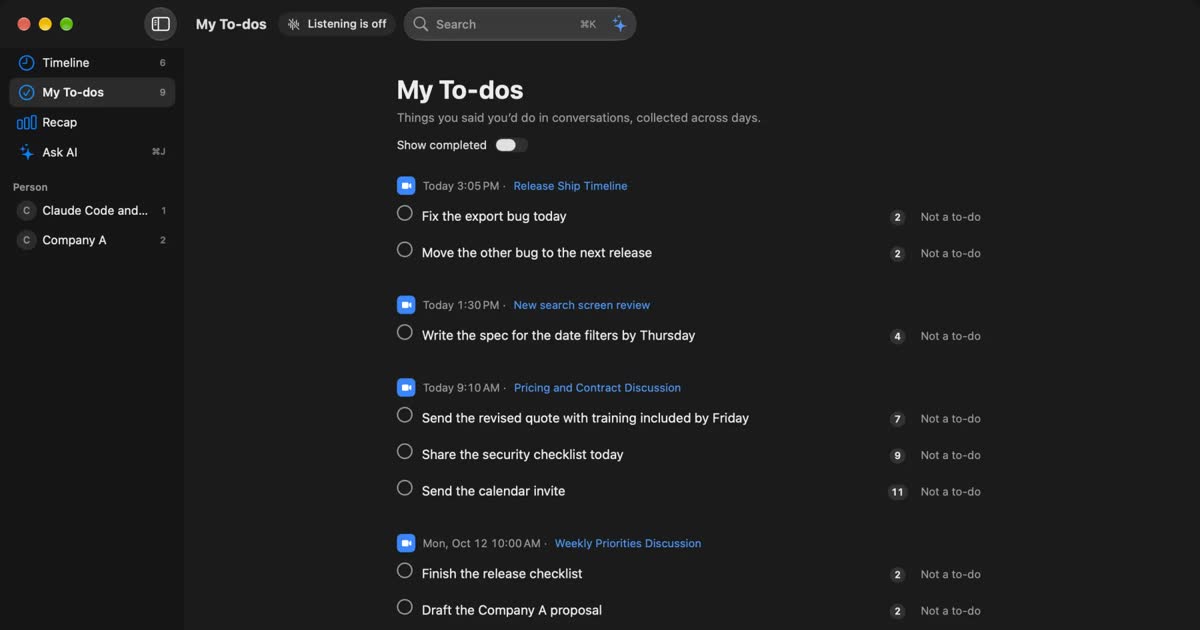
What it keeps is shaped for one person to use later. You can search with ⌘K, and Ask AI answers with numbered links to the source speech. Things you agreed to do collect in your To-dos, and you can follow the history with each person. You can also exclude apps such as banking apps.
Summaries and questions run with on-device AI even on Free. Summaries and to-dos need Apple Intelligence on. Answers to questions need it only on Macs with less than 16 GB of memory. Pro adds viewing and searching records older than 14 days, monthly and yearly reviews, and connections to your own AI and outside tools. See Plans and license.
How each uses AI on your records
Both have AI you can ask about your records, but they point in different directions. Rimo's AI moves team work forward. Recall's AI checks your own memory.
Rimo has AI chat during and after meetings. Rimo Actions proposes tasks after a meeting and, once you review and run them, goes as far as creating documents and operating outside apps. It is on the business, Team, and Pro plans. AI features use credits, as explained in the cost section.
Recall's Ask AI searches your records before it answers, and it does not answer from outside them. Every claim carries a number linking to the source speech. By default on-device AI answers, so neither the question nor the record leaves the Mac. If you choose your own Claude, ChatGPT, or Gemini on Pro, the question and the speech it needs go to that company. Reading records from tools such as Claude Code is also a Pro feature, and it is read-only. Recall has no feature where AI proposes tasks after a meeting and carries them through to execution. On Pro, a workflow can pass the AI steps of a set procedure to a command you have registered.
Where the conversation goes
In Rimo, audio and transcripts are kept in a cloud in Japan, and transcripts go to outside AI for summaries. By default, Recall keeps transcripts and summaries on this Mac. When you use a Pro feature you turned on, that part of the record leaves the Mac.
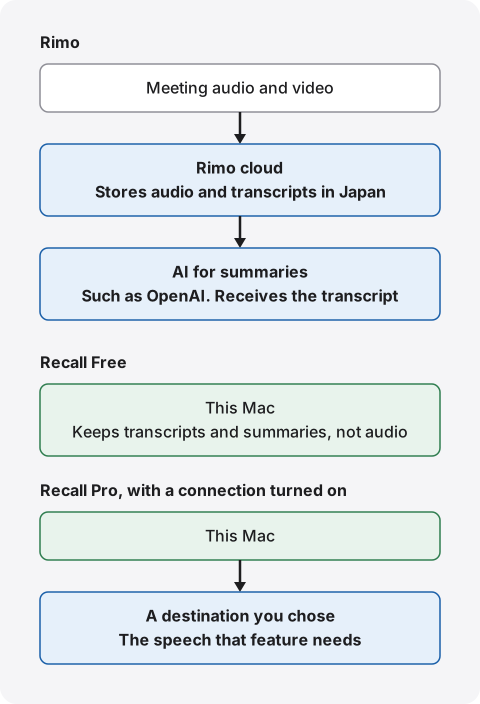
"Stored in Japan, no training" is not the same as "not with an outside company"
Rimo's storage in Japan and no-training position can be checked in official documents. Its privacy policy says data is kept in data centers in Japan and traffic is encrypted with TLS. Its terms say data is not used for AI training without prior written consent. Its individual plan guide also states no training on the Pro and Transcription plans.
If your employer's conditions are storage in Japan and no training, Rimo can meet them on paper. You do not need to look for a local product.
If the condition is not leaving conversations with an outside company, the answer changes. A cloud in Japan is still an outside server. Meeting that condition means moving to on-device processing. Knowing which condition applies saves comparison work. See what to check when you worry about AI notetakers and leaks.
Summaries send the transcript to outside AI
Rimo's security help page (dated April 23, 2026) says summaries use the OpenAI API, so transcript content goes to OpenAI's servers. It adds that Anthropic's Claude and Google's Gemini may also be used. The same page says the setup excludes retraining and that sent data is retained for up to 30 days.
This is not a warning. It just adds one more party to check. If an internal review only hears "stored in Japan", the processors get missed. Rimo describes model selection for the business plan and a paid Azure OpenAI option. Organizations that need to fix where summaries are processed should confirm this before signing.
How long records stay, and deleting them
Rimo's retention depends on the plan. According to the individual plan guide:
- Transcription plan: 30 days. After day 31, transcripts and audio are deleted automatically.
- Pro plan: No automatic deletion for now. Rimo may add a storage limit and says it would give at least one month's notice.
- Business plan: Unlimited storage.
You can delete Rimo notes yourself, and deletion cannot be undone. Audio and transcripts go, while details needed for billing, such as title and audio length, remain. If the service ever had to end, Rimo says it would give at least one month to download data after notice.
In Recall, you choose how long to keep records: 7 days, 30 days, 90 days, 1 year, or unlimited. The default is 90 days on Free and unlimited on Pro. Free shows the last 14 days. Older records stay within the retention period and become visible on Pro. Encryption on the Mac relies on FileVault, so we recommend turning it on. We hold no copy of your records, so protecting against a broken or lost Mac is up to you.
Laying it out for your employer
If you talk to your IT team, these points get to the answer quickly. Show how data moves before naming products.
| Rimo | Recall | |
|---|---|---|
| Processing | In the cloud | On this Mac |
| Storage | Data centers in Japan | This Mac's disk |
| Outside recipients | OpenAI and others for summaries | None by default. With Pro features you turn on, the company you chose |
| Training | States no training on all plans | On-device AI sends nothing out. Outside AI follows each company's terms |
| Deleting | Delete notes. Automatic deletion depends on plan | By conversation, the last 15 minutes, or everything. Retention is selectable |
| Admin control | Usage logs, IP limits, and SSO on the business plan | No organization management |
The last row is Recall's weak point at work. Administrators cannot see who uses it, so an organization may find it hard to approve. Do not install it on your own judgment, and check the rules first. Also, a free-tier Gemini key on Recall Pro may let Google use what you send to improve its services.
Is cloud or local safer?
Neither can be called safer outright, because they protect against different things. With a cloud service, the provider handles monitoring and backups, and an organization can disable a leaver's account. With a local product, nothing goes to a provider, but securing the device is entirely on you. Choose local because keeping conversations away from outside companies fits your conditions, not because it is simply safer.
Capturing each kind of meeting
For online meetings, Rimo invites a bot and Recall listens to Mac audio. In person, both use the microphone. The kind of meeting changes what is kept and how much effort it takes.
| Rimo | Recall | |
|---|---|---|
| Online meetings | A bot joins, records, and transcribes. Speakers come from meeting account details | Listens to the microphone and Mac audio. Up to four others are estimated as Person A, Person B |
| In person | Start the microphone on screen. Label some speakers and AI estimates the rest | Listens by microphone. With your voice registered, others become one "Person (in person)" |
| Recorded files | Audio and video can be uploaded. .m4a and .mp4 are recommended | No file import |
| Phone recording | iOS and Android apps | Not available |
With a bot, or without one
The method Rimo recommends for online meetings is the bot. It joins as a participant, so a host may need to admit it. That can be extra work in meetings hosted by others or in organizations that restrict outside accounts. In return, it shows in the participant list, so others can see that a record is being made. The bot is on Pro and above.
Without a bot, Rimo's route is to upload a file recorded by the meeting tool. There is a guide for Zoom. We could not find official guidance on capturing computer audio directly. Rimo describes itself as used through browsers on computers and phones, and through mobile apps.
Recall puts nothing into the meeting. It listens to Mac audio from the menu bar, so it works with any meeting tool and does not appear in the participant list. Being invisible in the meeting does not mean recording is allowed.
Tell people you are transcribing
With either product, tell the people you are talking to that you are transcribing. Even with Rimo's visible bot, its name alone may not explain what is happening, and microphone recording shows nothing at all. Recall cannot be seen by others, so telling them is up to you. Our FAQ has sample wording. Do not use either product where recording is prohibited or your employer's rules do not allow it.
Forgetting to record, and things you would rather not keep
With calendar links, Rimo's bot joins scheduled meetings, which prevents forgetting. Hallway talks and sudden calls are not captured. The bot also has time conditions, such as ending after 20 minutes in a waiting room, and Google Meet removes it after 10 minutes. Deciding who admits it makes this reliable.
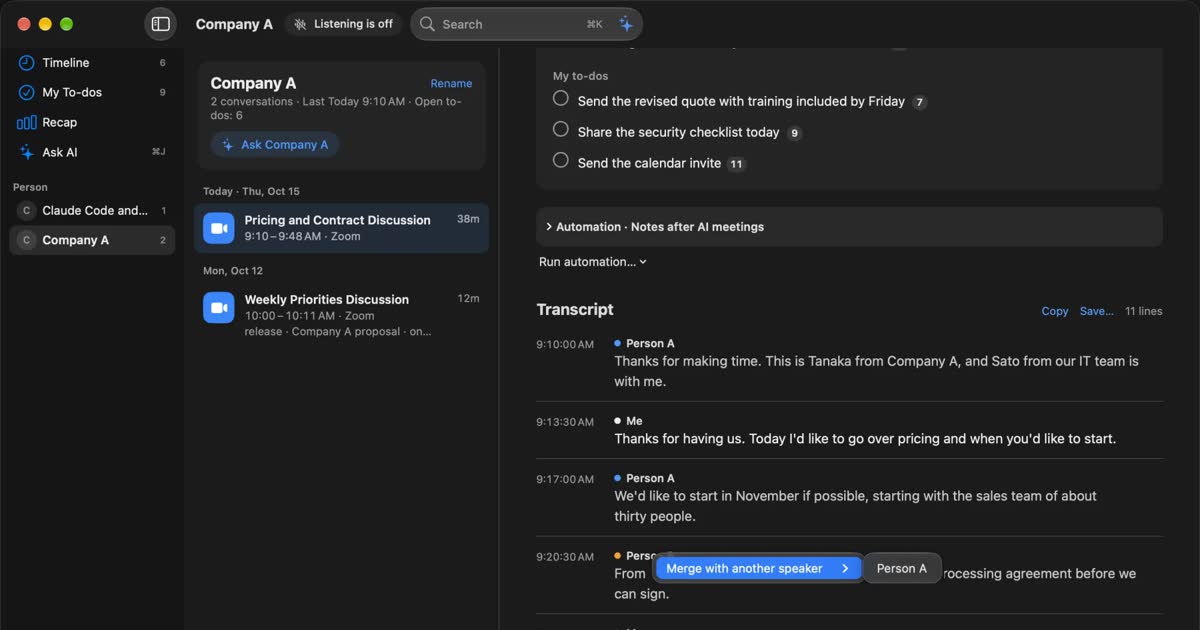
Recall always listens, so unscheduled conversations are kept too. That is useful, but it also means things you would rather not keep become text. There are three ways to stop it. You can pause for 15 minutes, 1 hour, or until you resume. After speaking, you can delete the last 15 minutes. You can list apps such as banking or password managers as apps not to record. This works per app, so you cannot exclude only a browser's private window.
When you test in the same meeting
Rimo's guide to phone microphone recording says real-time accuracy is slightly lower than for uploaded files, and recommends recording first and uploading when accuracy matters. In a trial, test the method you plan to use.
Recall has a limit in person: even with your voice registered, however many people are present, they are recorded as one "Person (in person)". If you need several in-person speakers kept apart, Rimo is the better fit.
Other meeting tools
You do not have to pick only between Rimo and Recall. We checked products often considered in Japan, plus some that take a different direction, on their official pages. Prices are as displayed on the check date.
| Where records live, and training | Price | |
|---|---|---|
| Rimo | Cloud in Japan. States no training on all plans | Pro ¥4,950 a month, or ¥3,300 billed yearly (tax included) |
| Notta | Cloud. The desktop app has Privacy Mode | Free 120 minutes a month. Premium ¥14,220 a year (tax included) |
| LINE WORKS AiNote | Cloud. States paid plans are not used for training | Free 300 minutes a month. Solo ¥1,440 a month (annual contract) |
| Granola | Cloud processing. Audio not stored. Notes on AWS in the US | Basic free (30 days of history) |
| MacWhisper | On the device. Remote models can be chosen | Pro one-time €64 |
| Recall | On the Mac by default. Pro features you turn on send data out | Free available. Pro ¥980 a month (tax included) |
Notta suits individuals who want a cloud service for less than Rimo. On its pricing page, Premium has 1,800 minutes and 100 AI summaries a month. The desktop app offers bot-free recording and Privacy Mode, which transcribes on the device. Speech recognition training varies by plan. See Notta alternatives compared.
LINE WORKS AiNote suits people who value free minutes. Its pricing explainer shows Free at 300 minutes a month, without AI summaries or web meeting recording. Its product page limits the no-training statement to paid plans, and on Free you agree that recorded audio may be used. If training is your concern, do not skip this.
Granola suits people who want to record without a bot and accept cloud summaries. Its security page says audio is not stored, while notes are stored on AWS in the US. It does not fit a storage-in-Japan condition. See Granola AI alternatives compared.
MacWhisper suits people who want to transcribe recorded files on the Mac. It covers something close to Rimo's upload on the device itself. Its official site says it can also record meetings in Zoom, Teams, and others with no bot. It does not suit team sharing. See MacWhisper vs Recall.
Cost over one year
One person's cost for a year ranges from ¥0 on Recall Free to about ¥80,000 on Rimo Team. We calculated this from official prices. Features differ, so price alone gives no ranking.
| Product and plan | One year | Basis |
|---|---|---|
| Rimo Transcription | ¥13,200 (tax included) | Yearly. 2,100 minutes a month. No summaries or bot |
| Rimo Pro | ¥39,600 (tax included) | Yearly. ¥59,400 if paid monthly |
| Rimo Team | ¥59,400 (tax included) | Yearly at ¥4,950 × 12. ¥79,200 if paid monthly |
| Notta Premium | ¥14,220 (tax included) | Annual plan. 1,800 minutes a month |
| Notta Business | ¥30,096 (tax included) | Annual plan. Unlimited minutes |
| AiNote Solo | ¥17,280 | Annual contract at ¥1,440 × 12. 600 minutes a month |
| MacWhisper Pro | €64 | One-time purchase |
| Recall Pro | ¥9,800 (tax included) | Yearly. Unlimited transcription |
Rimo's yearly figures come from Plans and pricing and the individual plan guide. Its business plan is by quote, from 11 accounts.
When estimating, count monthly time and summaries first. A one-hour meeting every weekday comes to 1,320 minutes over 22 days. That fits Rimo Transcription's 2,100 minutes and Notta Premium's 1,800, but not AiNote Solo's 600. Summaries are a separate allowance. Rimo Pro gives 1,000 credits a month at 10 credits a note, so 100 notes. Beyond that, 10 credits cost ¥300. AiNote Solo allows 12 summaries a month.
Rimo's Transcription plan looks cheap, but it has no summaries, bot, or real-time recording, and it keeps data for 30 days. If you want minutes done for you, compare Pro instead. Recall Free costs nothing. If you use your own AI with an API key on Pro, that company charges separately. If you do not have a supported Mac, include that cost too.
What to compare as an individual
As an individual, do not decide only on the gap between Rimo Pro at ¥39,600 a year and Recall Pro at ¥9,800. Rimo's price includes stored recordings, the bot, sharing, and real-time translation. If you use those, the gap has a reason. If you do not, and you only need transcripts and summaries kept close, the least wasteful order is to start with Recall Free and consider Pro when you need records older than 14 days.
How to choose
If you are unsure, decide in this order: whether you need sharing, whether outside servers are acceptable, and what device you use. Compare price last.
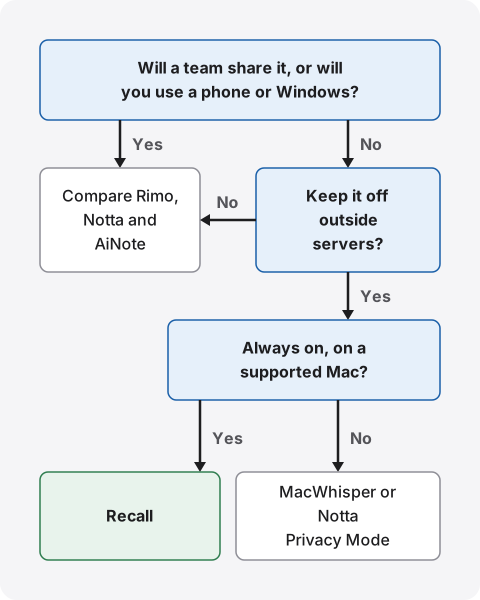
The first question is sharing. If a team sees the same record, or you also use a phone or Windows, compare Rimo, Notta, and AiNote. If you want storage in Japan and no training confirmed in official documents, Rimo comes first.
If you do not need sharing, ask whether you want to keep conversations off outside servers. If not, compare the same three on price and free limits. If so, your device decides. On a Mac with Apple silicon and macOS 26 or later, with always-on capture, that is Recall. Otherwise look at MacWhisper or Notta Privacy Mode, and check MacWhisper's requirements on its site.
This is a guide only. For work use, check your employer's rules first. A product the rules do not allow cannot be used, however well it fits.
Thinking through each situation
Board meetings and team check-ins: Producing and circulating minutes is the job, so a team product such as Rimo fits. Recall is a personal record, not a home for organizational minutes.
Sales calls: You are holding another company's information. Check first whether confidentiality terms limit entering it into outside services. To send records to a CRM, Rimo's business plan fits. For your own review, Recall is enough.
HR interviews and 1:1s: Personal matters stay on record. Tell the person you are transcribing and keep records for a short time. Recall can keep them for as little as 7 days. With Rimo, set a practice of deleting them yourself.
Interviews for articles: If you need to check quotes against audio, Rimo fits because audio stays. Recall discards it.
Meetings with overseas teams: If you need translation, consider Rimo. Its October 8, 2026 notice announced two-way real-time translation in 60 languages at no extra charge.
Solo learning and webinars: If you need no sharing and just want to find what you heard later, always-on Recall fits.
Using both, or switching
You can keep Rimo and add Recall. Team minutes stay in Rimo, and what you hear in solo work or learning stays in Recall. Check your employer's rules and how you tell people in the same way.
If you leave Rimo, export first. Rimo offers downloads such as CSV, Excel, and PDF. Recall cannot import past records, so keep the exported files separately. Get the owner's agreement before deleting team folders.
What to check in a trial and before signing
Rimo's overview says Pro and Team have a one-week free trial, and the Transcription plan has a trial of 60 minutes of audio, with no credit card needed. Check these points in your own meetings.
- Proper nouns: how well company, product, and people's names come out.
- Speaker separation: look at online and in-person meetings separately.
- Gaps in summaries: whether decisions and requests are missing, and whether you can return to the source.
- Finding things: whether you can find a remark a week later by words or person.
For company use, confirm these in writing.
- Which AI providers handle summaries, and how long do they retain data?
- Which sentence of which contract says data is not used for training?
- When does deleted data leave backups?
- After cancellation, how long does data remain, and until when can it be downloaded?
Rimo publishes a white paper on its security help page. For the last two questions, we could not find specific timing in this check. With Recall, records do not reach our servers, so what you check shifts to whether to turn on Pro connections and how the Mac is managed.
Who each one suits
Whether one person or several use it nearly settles the answer. We start with who should choose Rimo.
Rimo suits you if
- A team edits and shares the same minutes.
- You want recordings kept so you can listen again from the text.
- You also use Windows or a phone, or transcribe recorded files.
- Storage in Japan and no training are conditions, and you need material for internal approval.
- You need SSO, IP limits, usage logs, or invoice billing.
- You have many multilingual meetings or need translation.
Recall suits you if
- You do not want conversations on outside servers, or your employer's rules forbid it.
- You want always-on capture with no record button and no bot to invite.
- You want only text on your Mac, with no audio kept.
- You want summaries done on the Mac too. Summaries and to-dos need Apple Intelligence on. Answers to questions need it only on Macs with less than 16 GB of memory.
- You work alone and want to find things from meetings, webinars, and videos later.
- You want to keep costs down. Transcription on Free has no limit.
Free to use · No account needed · macOS 26 or later · Mac with Apple silicon · By downloading, you agree to the Terms of Service
Recall does not suit you if
- You want to use Windows, a phone, an Intel Mac, or a Mac older than macOS 26.
- You want the audio itself kept to listen again.
- You want to share and co-edit the same minutes by link. You copy or save the transcript and pass it on yourself.
- You want to import and transcribe recorded files.
- You need to separate several in-person speakers.
- An administrator needs to manage users and activity logs in one place.
- You want records to survive a broken Mac.
Recall stays running, so it uses some CPU and battery, more while people are talking. On Pro, if the license cannot be checked for 14 days, Pro features stop until it can be checked again.
FAQ
Are Rimo Voice and Rimo different services?
They are the same service. The name changed to Rimo on October 1, 2026. Rimo says features, pricing structure, accounts, and saved data do not change. Old and new names can appear together during the changeover.
Is Rimo free?
You can try it free. The pricing page lists paid plans, with a one-week trial for Pro and Team and 60 minutes of audio for Transcription. To keep using something at no cost, consider Recall Free or AiNote Free. Conditions differ by product.
Does Rimo use my data for AI training?
It says it does not. Its terms say data is not used for training without prior written consent. Transcripts go to OpenAI and others for summaries, and Rimo says this is set up so they are not used for retraining.
Do Recall's records ever leave the Mac?
They can. Records leave when you use a Pro feature you turned on, and when you copy or save them yourself. Downloading models and checking the license also use the network and reveal details such as your IP address, but do not include records. See the full list.
Is Recall more accurate than Rimo?
We do not know. We have not compared them on the same audio, so we cannot say. Accuracy changes with speakers, microphones, and topics. You can try Rimo's free trial and Recall Free in your own meetings.
If no bot is visible, do I still need to tell people?
Yes, please tell them. This is the same for Rimo and Recall. Say you are transcribing, and stop if anyone objects. Do not use either where recording is prohibited or your employer's rules do not allow it.
Which one works on Windows or a phone?
Rimo. It works in browsers and in iOS and Android apps. Recall runs only on Macs with Apple silicon on macOS 26 or later. To transcribe on the device on Windows, consider Notta Privacy Mode.
Do they work without the internet?
Rimo is a cloud service and assumes a connection. Its app's power-saving recording keeps audio on the device to upload later. Once models are ready, Recall keeps listening, transcribing, and running on-device AI without a connection.
Checked on November 2, 2026. Details of Rimo and other products come from their official pages, terms, and help centers. Rimo's help center includes text from before the name change and pages updated at different times. Prices and features can change, so check official pages before signing up or rolling out. This article is a general comparison, not legal advice.
Free to use · No account needed · macOS 26 or later · Mac with Apple silicon · By downloading, you agree to the Terms of Service
Get the product overview (PDF) by email →
Related articles
AI GIJIROKU alternatives after the shutdown: moving to Rimo, and how to choose another meeting AI
AI GIJIROKU by Alt Inc. shut down on October 31, 2025, and Rimo announced it would take its customers as the official destination. What the migration plan covers, what to check before you move, how Rimo, Notta, AiNote, YOMEL and Recall differ and what they cost, and who each one does not suit, checked against official pages on November 20, 2026.
Notta alternatives compared: choosing when you worry about data leaks
For people looking for a Notta alternative. We split the worry about leaks into three, then cover what you can do within Notta, Privacy Mode, and how five products including Recall differ, and who they do not suit.
tl;dv alternatives compared: when you do not want a bot in the meeting
For people looking for a tl;dv alternative. We compare the bot and bot-free recording, where the record goes, free limits and pricing, and who should stay on tl;dv and who fits Recall.
How to automate sales call notes: what to keep, what to say, and your CRM
A guide for sales and customer success. What to keep in call notes, phrases for telling the other side, how notes relate to your CRM, and how to choose among tools such as Notta and amptalk.
CLOVA Note alternatives after the shutdown: AiNote, Recall, and how to choose
CLOVA Note shut down on July 31, 2025, and its successor is LINE WORKS AiNote. What changes on AiNote's Free and Solo plans, what to watch for with PC meetings, other options including Recall, and who each one does not suit.
YOMEL pricing, features, and how it differs from Recall
YOMEL's pricing plans, how it listens without a bot, how it separates speakers, and how it handles data, checked against its official pages and compared with Recall, a personal Mac app. Which organizations YOMEL suits, and who Recall suits.