 Recall
How to automate sales call notes: what to keep, what to say, and your CRM
A guide for sales and customer success. What to keep in call notes, phrases for telling the other side, how notes relate to your CRM, and how to choose among tools such as Notta and amptalk.
The short answer: what can be automated, and what stays with you
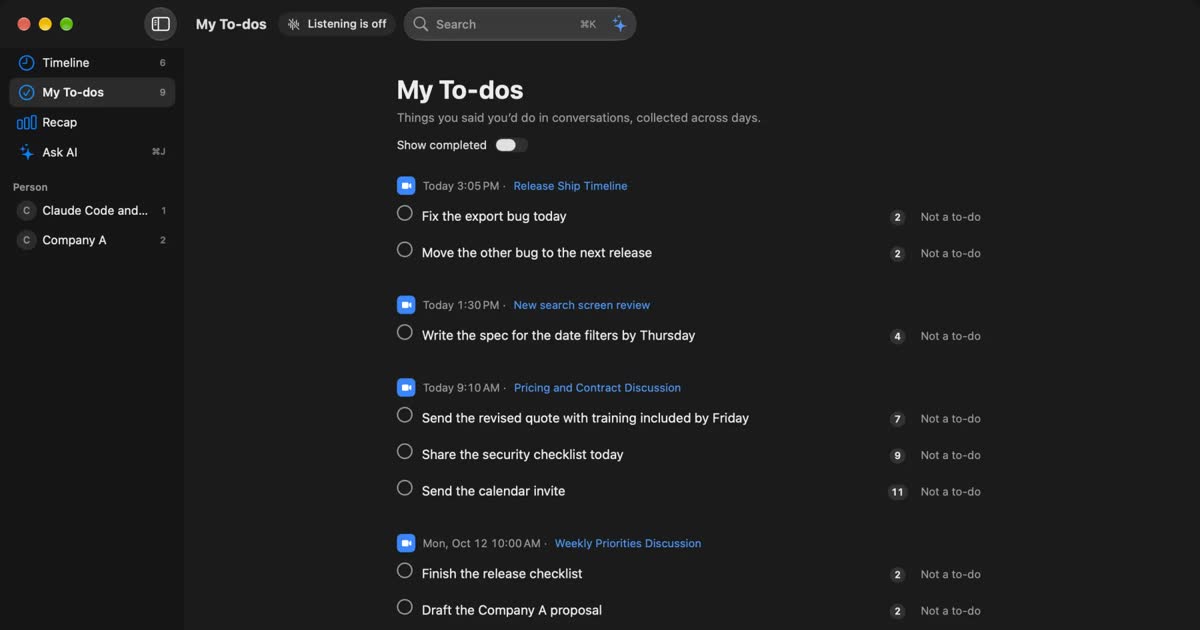
You can automate sales call notes up to the transcript and the summary with tools that exist today. What stays with people is checking amounts, dates and promises, and telling the other side. Before you automate, decide three things: what to keep, how to tell people, and where it goes in your CRM. That prevents most failures.
For tools, think in this order. If you need CRM fields updated for a team, look at sales call analysis tools. If a summary on the CRM activity is enough, look at note tools with CRM sync. If you first want to keep your own record, look at a local transcription app.
This article is written by KOROMO K.K., the company that makes Recall, a transcription app for Mac. Recall has no CRM integration, so it is not the answer if your organization wants to update a CRM automatically. We wrote this so people in sales and customer success can choose with that in mind. Other companies’ details were checked on their official pages on November 2, 2026. We do not list results from adopting these tools. How to measure them is in Count the effect yourself.
What to keep in sales call notes
Keep what you need to prepare for the next call and to hand the deal to someone else. You do not need to write up the whole conversation. If a transcript exists, the notes only have to let a later reader make a decision.
| What to keep | How to check | |
|---|---|---|
| Basics | Date, company, attendees and roles, your own attendees | Look for misspelled names |
| Their problem | What hurts, how they work today, why now | The summary is often fine |
| Budget and amounts | Whether a budget exists, amounts mentioned, tax included or not | Always check the original words |
| Who decides | The approver, the internal process, affected teams | Do not record a guess as fact |
| Timing | Decision deadline, target start | Always check the original words |
| Alternatives | Current product, vendors they compare | Look for misheard company names |
| Concerns | What worries them, reasons against | Keep their wording |
| Decisions | What was agreed, and what was not | Always check the original words |
| Next steps | Who does what by when | Check every promise you made |
Many sales teams use BANT: budget, authority, need, timing. If your team already has a set of questions, do not invent a new format. Build your summary template from those questions.
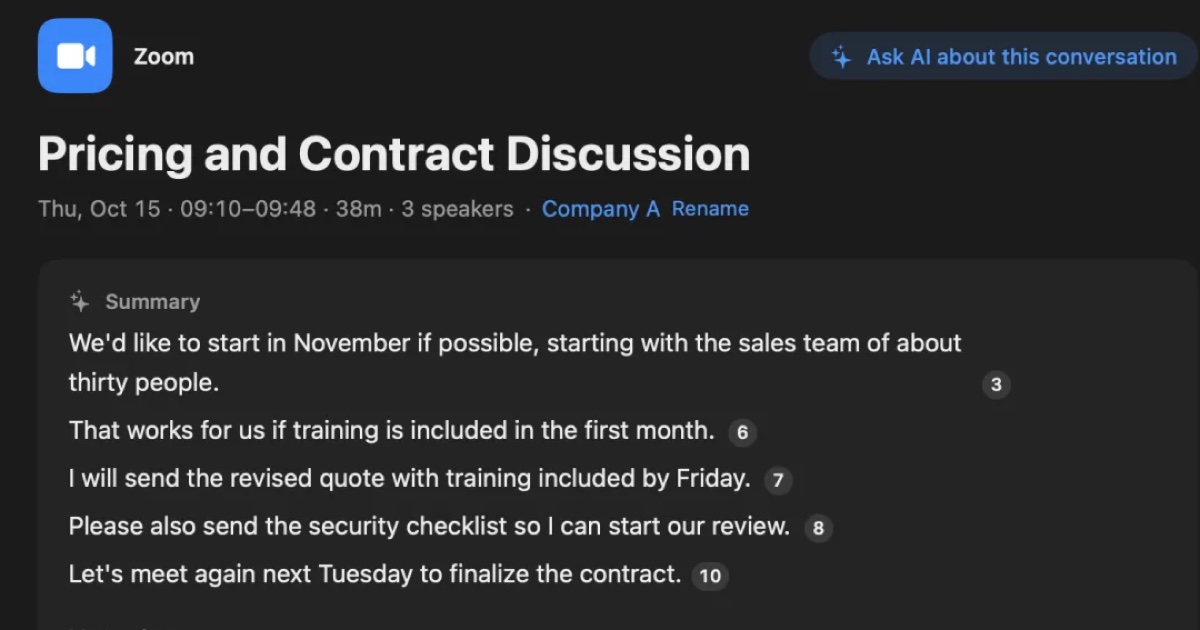
The right column matters. AI summaries are good at the flow of a conversation, but they can miss the weight of words, such as the gap between “we’ll consider it” and “we’ll go ahead.” Mistakes in amounts, dates and agreements feed straight into the next quote or contract. Check those three against the original words. Whether a product lets you go from the summary back to the original words is also a good selection criterion.
How to build a summary template
Many products let you set the shape of the summary. Use the rows of the table above as headings. Notta’s CRM automation uses a default template named Sales Pitch, and Google Meet’s notes let you pick sections such as decisions and next steps. Give three instructions when you build one.
- If a topic did not come up, write “not discussed.” Do not fill it in by guessing.
- Write amounts, dates and company names as they were said.
- Separate your next steps from theirs, with an owner and a due date.
“Not discussed” tells you what to ask on the next call. Not letting AI fill the blanks is what makes the notes useful for preparation.
What customer success adds
After the contract, the focus moves from selling to keeping promises. Replace budget and alternatives in the table with these.
- Usage: which team uses it, for what, and why others do not.
- Problems: including complaints that never became a support ticket.
- Requests: in their words, with who needs it for which work.
- Your promises: what you said you would look into, by when, and who owns it.
- Contract: renewal timing, seat changes, any mention of cancelling.
- Their team: a new contact, new people getting involved.
Customer success talks to the same people for a long time. Being able to trace past promises by customer matters more than the quality of a single set of notes. When you choose a product, check whether you can search past records by person or company.
What to pass on at handover
When the owner changes after a deal closes, a full transcript may go unread. Write these four things briefly and link to the original record.
- Why they bought: the problem and what decided it.
- What was promised, and what was not.
- The start deadline, and the reason for it.
- What still worried them at the end.
Words to keep as spoken
Summaries round off language, and the unrounded words are often what you need later. Keep reasons against, product requests, your own promises, and the phrases they use to explain the purchase internally. If the transcript line has a time on it, the notes only need that time.
What to leave out
Automatic notes keep things nobody meant to keep. Do not copy family or health talk from small talk, comments about their colleagues, or anything prefaced with “between us” into the notes. If it should not stay in the transcript either, delete that part. If they ask you to take something off the record, stop right away and delete it. Learn how to pause and delete before you start.
How to tell the other side
Tell people at the start of the call that it is being transcribed. This applies whether or not a bot appears on screen. Do not use any of these tools to record people without their knowledge.
Four things to say
You do not need a long explanation. Put these four in the invitation and say them again at the start, and you will not forget.
- What: the call is transcribed. Say so if audio or video is kept too.
- Why: to check details, prepare for the next call, share internally.
- Where and who: your device, an internal system, or an outside service, and who reads it.
- Stopping: you will stop if they prefer.
Phrases you can use
Adapt these to your product. “Where it stays” must match your actual settings. Do not say “recording” if nothing is recorded, and do not say “only on my device” if you send it to an outside service.
In the invitation:
To check the details, we will transcribe the conversation and keep it in our internal records, with an AI summary. If you would rather we did not, let us know before or during the call and we won’t use it.
At the start of an online call:
One quick request before we start. May we transcribe this meeting for our internal records so we can check the details later? We will stop if you prefer.
In person, after introductions:
So I don’t miss anything, may I transcribe our conversation on this device? It stays within our company. Just tell me if there is something you’d like me to stop for.
When keeping it on your Mac with Recall: the Recall FAQ suggests this.
I’m transcribing this on my Mac so I can check the details later. No audio is saved, but the transcript stays on my Mac. Let me know if you’d rather I stop.
Tell anyone who joins late. Sending the notes to the other side also lets them see what was kept.
Phone calls and extra attendees
On the phone, say it in your first sentence: “I’m transcribing this call to check the details. Is that all right?” Wait for a yes before you start.
A manager or someone from another team may not have seen the invitation. When more people attend, say it again at the start. If a partner or reseller joins, assume their company has its own rules.
If they say no
Stop on the spot and take notes by hand. Do not ask why. Their company may have rules about recording or outside services, so it may have nothing to do with the person in front of you.
That means you need to be able to stop quickly. Check how to remove the bot, or how to pause a background app, before the call. They may also ask you to delete what came before. Check that you can do that right away too.
Do not rely on the product’s notice
Notices differ by product, and a notice does not explain the purpose or where the record stays.
- Microsoft Teams: the support page says everyone is notified when recording starts, and that some regions may require everyone’s permission first.
- Google Meet: the Take notes for me help says participants are told and a pencil icon appears. Admins can require explicit consent from all participants. That setting is off by default.
- Notta desktop: the bot-free recording help (in Japanese) says no bot appears and other participants are not notified, and that getting the needed consent is the user’s responsibility.
- Granola: the pricing page lists a feature to let people know you are using it. It is per user on Basic and Business, and admin-enforceable on Enterprise.
- HubSpot Notetaker: the help page says you are responsible for the legal basis, disclosures and consent.
- Recall: there is no automatic notice to the other side. Tell them yourself.
Contracts and company rules
Read your non-disclosure agreement before the call. If it limits recording, copying or entering information into outside services, the agreement comes before any product setting. Check your own company’s rules on putting customer conversations into outside services too.
In Japan, the Personal Information Protection Commission published a notice on generative AI services (in Japanese) on June 2, 2023. It asks businesses to confirm that entering personal information is within the purpose of use, and to confirm that the provider does not use the personal data for machine learning. Call records contain names and titles, so this is relevant. The notice is from 2023, and rules differ by country, so check what applies to you now.
This article does not judge whether recording or note-taking is lawful. If you need that judgment, ask your legal team or a specialist. A fuller checklist is in What to check if you worry about leaks from AI meeting notes.
How notes relate to your CRM
A CRM or sales force automation system (SFA) is where you count deals and manage next actions. It is not where you store conversations. Split your notes into fields to report on, a summary to read, and a full transcript to consult when needed.
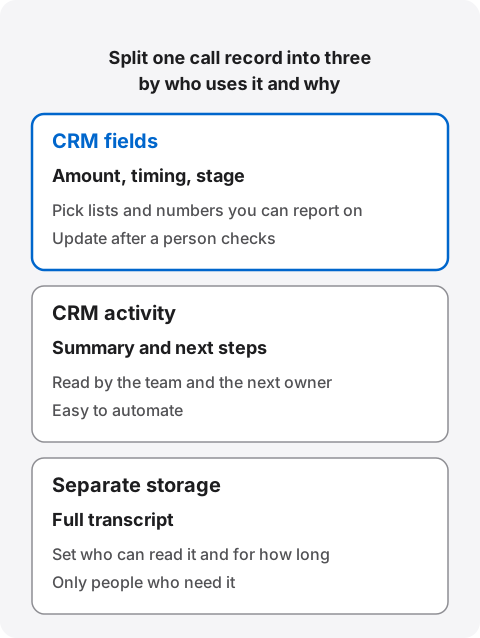
Fields are for reporting and forecasting: amount, expected close date, stage. Enter them as pick lists or numbers, not free text. Activities are the record of each call: the summary and next steps, read by the team and the next owner. The full transcript is the source you return to for exact wording. It holds what the other side said verbatim, so limit who can read it and how long it stays. Avoid pasting it where everyone in the CRM can see it.
“CRM integration” means different things
Where the data lands varies by product. Official descriptions fall into two groups.
A summary on the activity: Notta, for example. Its Salesforce help (in Japanese) lists the title, date, note URL, recording length and AI summary as what can be sent, as a logged activity or a task. That is enough for reading back and handover, but it does not update amount or date fields.
Fields updated: amptalk analysis says AI extracts information from the call and the rep confirms it and updates Salesforce fields in one click. ACES Meet says it reflects call content in Salesforce fields automatically.
If you run your numbers in the CRM, do not stop at “integrates with CRM.” Ask which of your fields get updated.
Where integrations get stuck
Automatic sync usually breaks at matching the customer. Notta’s CRM sync help is a good example. It takes email addresses from the calendar event’s guest list and looks up contacts in the CRM. So:
- Meetings not started from a calendar event are not covered.
- If the customer is not a guest, it cannot sync.
- If the CRM has no matching contact, nothing syncs.
- If a contact has several deals, the most recently updated one is chosen, which may be the wrong deal.
Check the same points for any product that matches deals automatically. When you test, deliberately include a customer with two deals and an unscheduled phone call.
Permissions are the other problem. The same Salesforce help says that since a Salesforce change in September 2025, users may not be able to finish connecting until an admin installs the app. Bring your CRM admin in from the start.
Write automatically, or review first?
We suggest a person confirms amounts, dates and stages before they are written. These feed forecasts and meeting decks. If AI enters an amount under discussion as an agreed amount, the error can blend into your numbers unnoticed.
Logging summaries and next steps as activities does little harm and reduces gaps. A safe start is to automate activities only, keep fields on review, and widen it once you have seen the accuracy.
Decide how long transcripts stay
The longer a transcript stays, the easier it is to trace history, and the wider the impact if something goes wrong. Neither is simply right, so set a period. For example, keep it while the deal is open, review it after the handover summary is written, and delete lost deals after a set time. Match the period to your sales cycle and your agreements with customers.
Automatic deletion can depend on the plan, so check. Copied files and text pasted into the CRM stay after you delete the original, so include those when you plan what to delete.
If you do not use a CRM
Solo sellers and small teams without a CRM do not need an integration. The fields in the first table work in a spreadsheet or a note per deal. Make a summary from the transcript and copy over the next steps. Settling what you keep first also makes it easier if you adopt a CRM later.
Four kinds of automation and the main tools
Sales call note tools fall into four kinds by how far they reach: built-in web meeting features, note tools with CRM sync, sales call analysis tools, and local transcription apps.
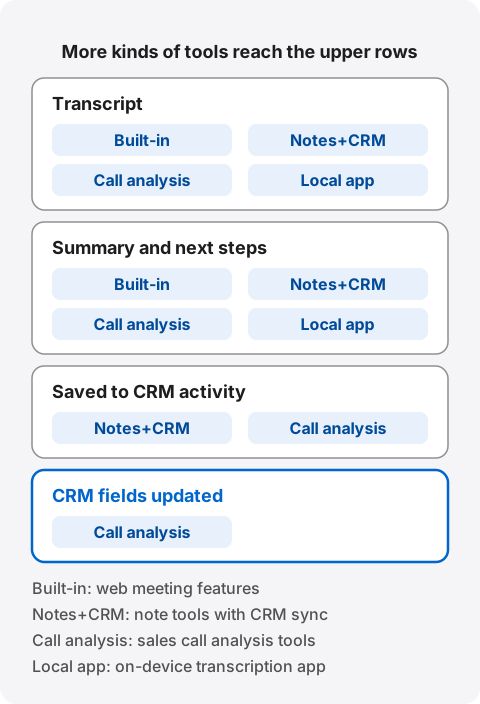
| Conversations covered | How it reaches the CRM | |
|---|---|---|
| Zoom AI summary | Zoom meetings | By default, shares a summary after the meeting |
| Google Meet notes | Meet calls, recommended for 15 minutes to 8 hours | By default, kept in Google Docs |
| Notta | Web meetings, desktop, mobile | AI summary to Salesforce and HubSpot activities. Business and up |
| Granola | Computer meetings, in person on mobile. Started by hand | HubSpot on Business and up, Salesforce on Enterprise |
| HubSpot Notetaker | Meet, Teams, Zoom. A bot joins | Creates meeting records inside HubSpot |
| amptalk analysis | Mobile calls, web meetings, in person | Review, then update Salesforce fields. Also works with HubSpot |
| ailead | Web meetings, IP phones, in person on a phone | Automatic output to Salesforce and others |
| ACES Meet | Web meetings, in person with its phone app | Automatic update of Salesforce fields. Has an API |
| Knowledge Work’s AI sales call records | In person, online, phone | Automatic entry to activity history and Salesforce fields |
| Recall | What the Mac’s mic and audio can hear | No integration. Copy or save the transcript |
Sources: Zoom support, Google Meet help, Notta pricing, Granola pricing, HubSpot help, amptalk pricing, ailead pricing, ACES Meet, Knowledge Work products and its May 15, 2025 announcement. The Japanese products are built for Japanese sales teams, and their pages are in Japanese. The Zoom and Meet rows describe built-in features. Other products may connect to them.
Pricing and how easy it is to start
Many sales call analysis tools do not publish prices and have minimum seats. Small teams can narrow the list here.
| Published price | Conditions to start | |
|---|---|---|
| Notta Business | ¥30,096 a year (tax included, per account) | CRM sync needs Business or higher |
| Granola | See the official pricing page | HubSpot needs a Google Workspace or Microsoft 365 account |
| HubSpot Notetaker | Depends on your HubSpot plan | Core seat on Starter, Sales or Service seat on higher plans |
| amptalk analysis | On request | Annual contract paid up front. Minimum 10 users |
| ailead | On request | From 15 people |
| ACES Meet | Not listed on the official page | Accepts free trial requests |
| Knowledge Work’s AI sales call records | ¥5,000 per user a month as announced in May 2025. Current price not confirmed | On request |
| Recall | Free ¥0. Pro ¥980 a month or ¥9,800 a year (tax included) | No account needed. macOS 26 or later on Apple silicon |
Strengths and limits of each kind
Built-in web meeting features add no new product. If your plan already includes them, try them first. Zoom’s AI summary needs an eligible plan, and Meet’s notes need an eligible edition or plan. In-person calls and other meeting tools end up managed elsewhere. When a customer hosts the meeting, you may not be able to use them: Meet depends on the organizer’s edition, and in Teams people from another organization cannot start a recording.
Note tools with CRM sync cover internal meetings and sales calls in one product, with visible prices. Notta has sharing and team features and works for small teams. It does not fit if you need CRM fields updated. More detail is in Notta alternatives compared. Granola needs no bot, but its official page says notes are stored on AWS in the US, and you start it by hand.
Sales call analysis tools cover phone and in-person calls, update fields and support coaching. Metrics like talk ratio and shared recordings help when you develop a team. ailead also describes audit logs and access control. They do not fit one or a few people, because of seat minimums and setup effort. Many keep recordings or audio in the company, so you need to decide what stays.
Local transcription apps keep records off outside servers. They have no team sharing or automatic CRM entry. Recall is one. More on choosing is in How to choose local transcription for your Mac.
How to choose a tool
Decide in this order: where you talk, which CRM fields matter, how many people use it, and where records stay. Starting from feature counts or price means reviewing products that never fit.
| Your situation | Start with |
|---|---|
| One meeting tool, and a summary is enough | Built-in web meeting features |
| A small team that wants summaries on CRM activities | Note tools with CRM sync: Notta, Granola |
| You use HubSpot and do not want another product | HubSpot Notetaker |
| You need Salesforce fields updated, with 10 or more people | Sales call analysis tools: amptalk, ailead, ACES Meet, Knowledge Work |
| Many calls on mobile phones | An analysis tool that covers calls. amptalk’s carrier link is a separate option |
| Many in-person visits | Products that record in person on a phone |
| You work alone on a Mac and want records off outside servers | A local transcription app: Recall |
Questions for vendors
Use these as they are. If the answer is not in their documents, ask for it in writing.
- Which of our CRM fields receive what? Does it work with custom fields?
- If a deal cannot be matched, where does the record go, and who is told?
- Can a person review before anything is written?
- Which provider in which country holds audio, video and transcripts?
- Which sentence in which contract says our data is not used for training?
- What happens to records when an owner leaves?
- If a customer asks us to delete something, can we delete just that part?
- What are the minimum seats, contract length and rules for changing seats?
What to look at in a trial
Tell the other side, then include hard calls. Tidy conversations do not show differences.
- Names: your product, their company, industry terms. Can you add a dictionary?
- Amounts and dates: are numbers right? Did “considering” become “decided”?
- Speakers: test online and in person separately, including three or more people in a room.
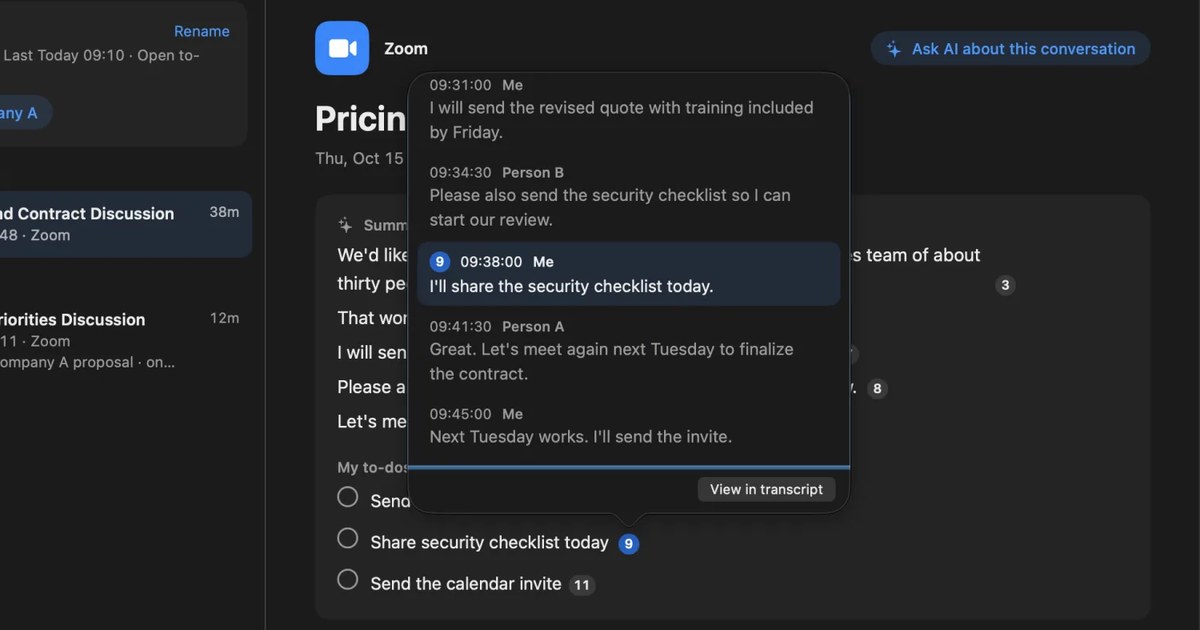
- Evidence: can you get from a summary line to the original words?
- Stopping: can you stop at once when asked, and delete part of it later?
- Exceptions: a customer with two deals, an unscheduled call.
Count the effect yourself
Reduction figures on product pages are measured under the vendor’s conditions and may not apply to you. Use your own numbers.
Three are enough: minutes spent on records after each call, gaps in CRM activities, and how many corrections people make when reviewing. Have a few people log their usual minutes before you start, then measure the same way afterward. If review takes too long, either you automated too much or the product does not suit your conversations.
Where to start
Decide what to keep, then try it with a few people before rolling it out. Rework usually comes from adopting a product before settling the fields.
- Decide what to keep. The sales lead and a few reps choose fields from the table here and map them to CRM fields.
- Check company rules. Ask IT and legal about processing location, storage and retention, and how to handle NDAs.
- Decide how to tell people. Settle the invitation text, the opening words, and what to do if someone says no.
- Try it with a few people. Two or three people try different kinds of calls and compare amounts, dates and agreements with the original words.
- Automate activities first. Automate summaries and next steps. Keep fields on review.
- Review. Move fields that keep needing correction back to manual. Add people once you see an effect.
If you work alone, steps 1 and 3 are enough to begin. If you use it for work calls at a company, do not skip step 2.
Habits during the call
Even with tools, how you talk changes the record. These also align you with the other side, so they are worth doing without automation.
- Say amounts and dates aloud at the end: “So I’ll send the quote by next Wednesday.” That leaves the promise in the transcript.
- Use attendees’ names at the start. It helps when you fix speaker names.
- In the last minute, say what was decided and what happens next.
- Use earphones or a microphone, and avoid talking over each other. Overlapping voices are hard for any product.
Who Recall suits, and who it does not
Recall keeps your own calls on your own Mac. It is not a product for updating a team’s CRM automatically. If you are choosing for an organization, look at the analysis tools and note tools above first.
Recall suits you if
- You are self-employed or in a small company and take sales calls over web meetings on a Mac.
- You want to stop forgetting to start recording. Recall stays in the menu bar and listens.
- You want no audio kept, with the transcript and summary on your Mac. Audio is discarded once it becomes text.
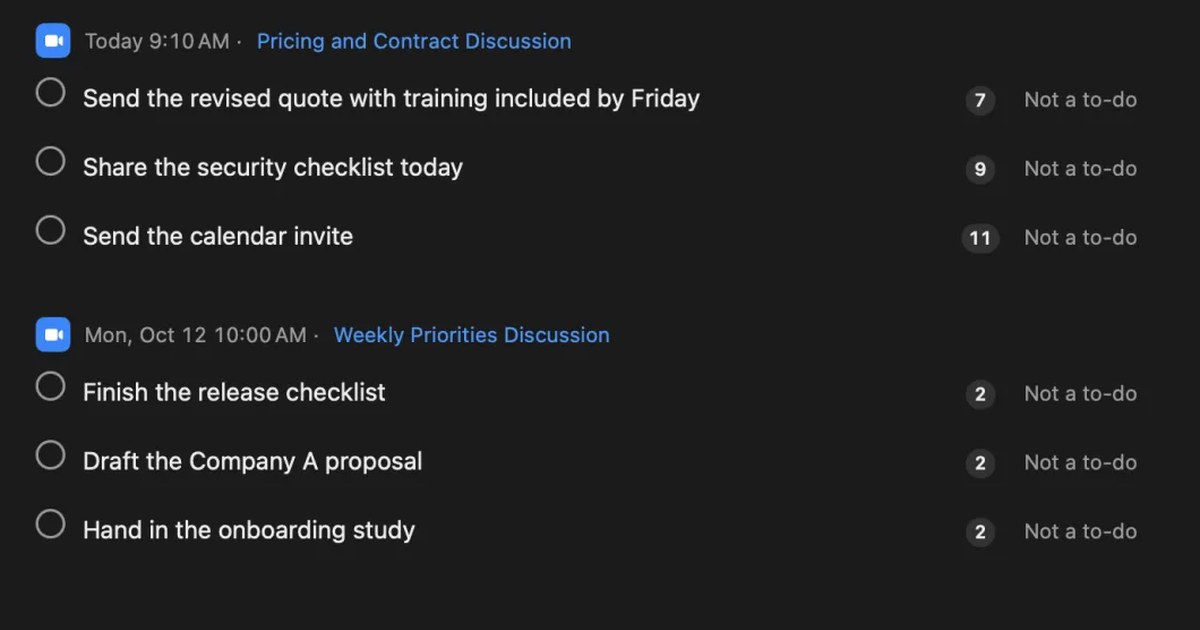
- You want to collect your own promises. Recall gathers what you agreed to do, with the original words.
- In customer success, you want to follow history by customer. People groups conversations, open promises and questions.
- You enter the CRM yourself. You can copy or save the transcript. The summary is not included.
Free to use · No account needed · macOS 26 or later · Mac with Apple silicon · By downloading, you agree to the Terms of Service
Recall’s conditions
On Free, transcription has no limit and the on-device AI handles summaries and questions. Viewing and search cover the last 14 days, which is short for a long sales cycle, so following older history needs Pro (¥980 a month or ¥9,800 a year, tax included). Default retention is 90 days on Free and forever on Pro. On Pro, if the license cannot be checked for 14 days, Pro features stop. Summaries and to-dos are made when Apple Intelligence is on, whatever the memory (except when you choose an outside AI for organizing meetings on Pro). Answers to questions need Apple Intelligence on only on Macs with less than 16 GB of memory.
Records leave your Mac when you use a Pro feature you turned on, or when you copy or save something and pass it on. Workflows can pass a transcript to a registered command. Sending it to a CRM means writing and maintaining that command yourself, and it is not a CRM integration. The other side’s words go too, so check their agreement and your company rules first. Destinations and contents are in When records leave the Mac.
Recall does not suit you if
- You want CRM activities or fields updated automatically. Recall has no integration.
- Your team shares call records and coaches from recordings.
- You want to keep audio or video and listen again.
- You use Windows, a phone, an Intel Mac, or a Mac older than macOS 26.
- Many of your calls are on a mobile phone, or you visit customers without opening a Mac. Conversations the Mac cannot hear are not kept.
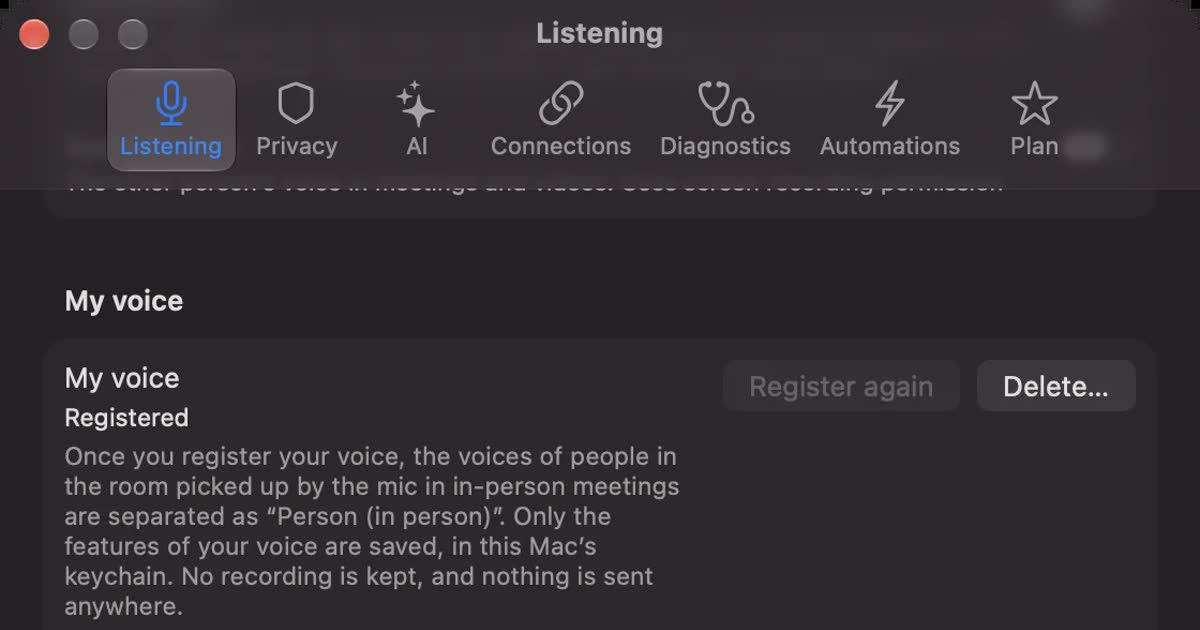
- You need to separate several people in the room. In person, everyone on the other side is recorded as one person, and this needs your own voice registered.
- Your employer does not allow customer conversations on a personal Mac. You also need to agree on what happens to records when you leave or replace the device.
FAQ
Can I automate sales call notes for free?
Up to the summary, some products have a free tier. Recall Free has no transcription limit, with viewing and search for the last 14 days. Notta Free gives 120 minutes a month and 3 minutes per session. CRM sync was a paid feature in the products we checked.
Can I transcribe without telling the other side?
No, please tell them, even with products that show no bot. At the start, say it is transcribed, why, where it stays, and that you can stop. If you need a judgment on legality, ask your legal team or a specialist.
Can I put AI summaries straight into the CRM?
For activities that people will read, automating is reasonable. Have a person check amounts, dates and agreements against the original words first. Summaries round off language, so something under discussion can read like a decision.
Can in-person calls be automated too?
Yes. Notta, amptalk, ailead, ACES Meet and Knowledge Work describe in-person capture on a phone or similar. Speaker separation differs, so test with three or more people. If you register your voice, Recall records the other side in the room as one person. Without registering, everything on the microphone stays as you.
Can I keep a record without a bot?
Yes. Notta desktop’s bot-free recording, Granola and Recall use no bot. Tell people anyway. Whether a bot appears and whether the record goes to an outside server are separate questions.
Can Recall send notes to my CRM automatically?
There is no integration. You copy or save the transcript and paste it yourself. Pro workflows can pass it to a command, but you write and maintain the script. If you want automatic updates, choose a sales call analysis tool or similar.
Which kind suits a small team?
Try the built-in web meeting features first, then note tools with CRM sync if that is not enough. Some analysis tools have minimums, such as 10 users for amptalk and 15 people for ailead. Conditions can change, so check official pages.
Checked on November 2, 2026. Other companies’ details come from their official pages, help and announcements. The Knowledge Work price is as announced in May 2025. Prices and features can change, so check official pages before you sign up. We have not tested these products on the same audio, so we make no accuracy comparison. This is a general guide, not legal advice.
The differences between Free and Pro are in Plans and licenses.
Free to use · No account needed · macOS 26 or later · Mac with Apple silicon · By downloading, you agree to the Terms of Service
Get the product overview (PDF) by email →
Related articles
How to transcribe Zoom meetings: built-in, cloud services, or on your Mac
Three ways to transcribe a Zoom meeting: built-in features, cloud services and apps on your Mac. Covers the plans each needs, the May 2026 captions change, and how to choose.
PLAUD NOTE alternatives: choosing between a recorder and an app
Looking for a PLAUD NOTE alternative? Compare a dedicated recorder with Recall by where you talk, saved audio, cloud handling and three-year cost, and see who each suits.
How to turn a transcript into meeting minutes: what to keep, examples, and asking AI
Pasting a transcript is not the same as writing minutes. The difference between verbatim, clean transcripts, summaries and minutes, what to keep with example lines, how to pick out decisions and action items, and how to ask AI for a draft and what a person should check.
YOMEL pricing, features, and how it differs from Recall
YOMEL's pricing plans, how it listens without a bot, how it separates speakers, and how it handles data, checked against its official pages and compared with Recall, a personal Mac app. Which organizations YOMEL suits, and who Recall suits.
What are action items? How to write them in meetings, with examples, and follow them through
An action item is a task agreed in a meeting, with who does what by when. How it differs from next steps and decisions, how to write one with examples, how not to miss them during the meeting, how to see them through afterwards, and what to watch when Zoom, Teams or Google Meet AI picks them up.