 Recall
How to turn a transcript into meeting minutes: what to keep, examples, and asking AI
Pasting a transcript is not the same as writing minutes. The difference between verbatim, clean transcripts, summaries and minutes, what to keep with example lines, how to pick out decisions and action items, and how to ask AI for a draft and what a person should check.
The short answer: a transcript is raw material; minutes record what was decided and who does what
To turn a transcript into minutes, do not tidy up the whole text. Pick out what was decided, what needs doing (with an owner and a due date) and what was left open, and rewrite those as short lines. A transcript lists what people said; the people reading the minutes want the outcome and the next steps.
There are four steps: put real names on the speakers, mark the decisions and action items, check numbers and names against the original lines, then write it up in a fixed format and ask the attendees to check it. Having AI summarize it is faster, but a person should check owners, due dates and numbers against the transcript before sending it.
This article is written by KOROMO K.K., which develops Recall, a transcription app for the Mac. We include our own product later on, so weigh what we say with that in mind. We checked how meeting tools save transcripts on November 12, 2026, in the official help pages of Zoom, Google and Microsoft.
| Your situation | Where to read next |
|---|---|
| You have a transcript but don’t know what to keep | What to keep, with examples |
| A long transcript and no idea where to start | The steps |
| You want ChatGPT or another AI to write it up | How to ask and what to check |
| You have not captured a transcript yet | Notes for each way of getting one |
| You want sales call notes in your sales tools | How to automate sales call notes |
Verbatim, clean transcript, summary and minutes
A transcript can be tidied to different degrees, and minutes are the shortest form, with the most human judgment in them. How far you go changes both the effort and what is kept.
- Verbatim transcript: exactly what was said, including “um” and “uh”. What meeting tools and transcription apps produce is close to this
- Clean transcript: fillers and restarts removed, and spoken language turned into readable sentences. The order and content of what was said stay the same
- Summary: a short version of how the discussion went. Who said what is mostly lost
- Minutes: what was decided, what needs doing and what is still open, written so that a reader can act on it. The outcome matters more than the flow of the discussion
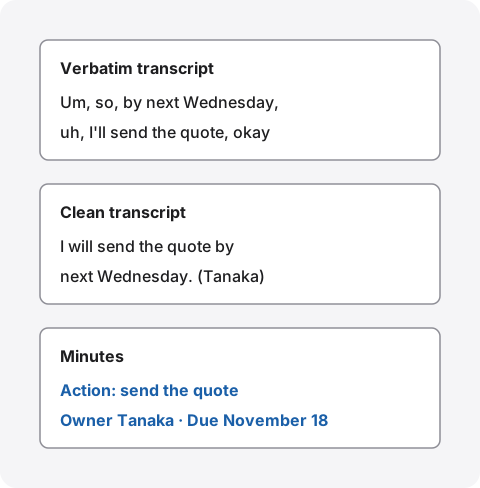
For everyday internal meetings, minutes do not need a clean transcript. A clean transcript helps when the words themselves matter, as in an interview, or when people may later disagree about who said what. Even then, write the minutes separately and attach the clean transcript as the record of what was said, so readers are not confused.
If your company’s rules or the law set a format for certain minutes, follow that format. This article covers minutes for everyday meetings and regular team meetings.
What to keep in minutes, with examples
Minutes keep four things: the basics of the meeting, the decisions, the action items and the open questions. It is enough if someone who missed the meeting can read it and know what happens next.
| What to write | Example | |
|---|---|---|
| Basics | Date and time, meeting name, attendees | Thursday, November 12, 2026, 10:00–10:45, new website weekly meeting. Attendees: Tanaka, Sato, Suzuki |
| Decisions | One outcome per line, stated plainly | Launch date is December 1. Use option B for the home page photo |
| Action items | What, who, and by when | Send the quote (Tanaka, by November 18) |
| Open questions | What was not decided, and what happens next | How to take inquiries is on hold. Decide at the next weekly meeting |
| Discussion | A short reason behind each decision | Two people said the photo in option A was too dark |
The names and dates in the examples are made up for illustration.
Keep decisions and action items apart
Put decisions and action items under separate headings. If you mix them, readers cannot tell whether “December 1” is a decided launch date or a deadline for something. Every action item gets an owner’s name and a due date. An action item with no owner goes under open questions.
Tips for writing the lines
- One thing per line: “We decided A and B, and C is on hold” becomes three lines
- Be definite: for “we’re leaning towards…” or “maybe…”, check whether it was decided or not, and put it under the right heading
- Write dates as dates: turn “next week” or “end of the month” into “November 18”, counting from the meeting date
- Fix spoken language: drop “like” and “you know” and keep only the content
- Name speakers only when it matters: write whose opinion it was only when that affects the decision
Turning a transcript into minutes
Tidying a transcript from the top takes longer the longer the meeting was. Fix the speakers first and mark what to pick out before you write, and there is far less to read.
1. Put real names on the speakers
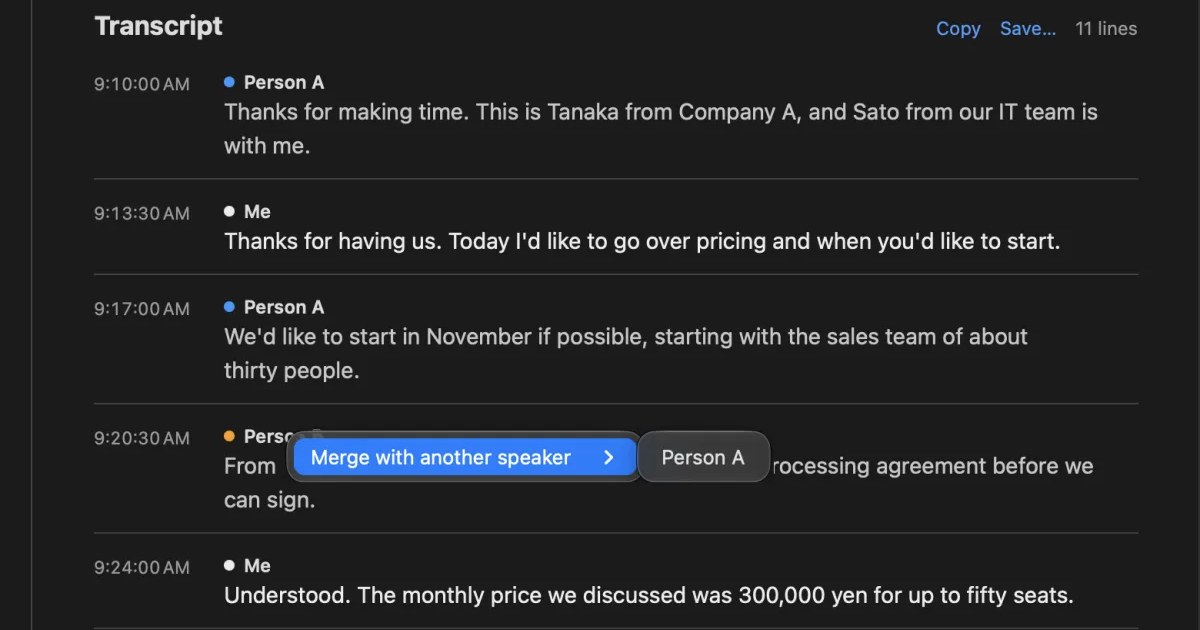
If the transcript shows speakers as “Speaker 1” or “Person A”, first replace them with real names. Without names you cannot tell who took on what, and you will get owners wrong. If one person was split into two speakers, merge them now.
2. Mark the decisions and action items
Next, read through the transcript once and mark the lines that go into the minutes. These phrases are good signs.
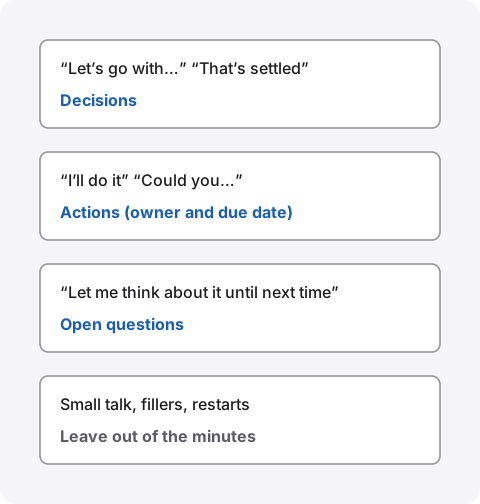
The person who says “I’ll do it” and the person who is asked “Could you…” can be mixed up when you assign owners. When you mark a line, write down the name of the person who took the task on.
3. Check numbers and names against the original lines
Transcripts most often get numbers, dates, names of people and companies, product names and technical terms wrong. Mix-ups between words that sound alike, such as “fifteen” and “fifty”, are hard to spot from the text alone. Reread the lines around every number and name you put in the minutes, and ask someone who was there when in doubt.
4. Write it in a fixed format and ask attendees to check
Rewrite the marked lines in the format of what to keep. Before sending, ask the attendees to look at it once. Even just checking that owners and due dates are right prevents disagreements later. For a regular meeting, use the same headings every time so writers and readers get used to them.
Asking AI for a summary, and what a person checks
Giving a transcript to an AI such as ChatGPT or Claude produces a draft quickly. But AI can mix up owners and due dates, or write something undecided as if it were decided, so do not send it as it is; check it against the original lines.
An example request
Tell it what to write and in what format. Just “summarize this” gives you a summary of the discussion, not minutes.
Write a draft of meeting minutes from the transcript below. Use three headings: Decisions, Action items and Open questions. Give each action item an owner and a due date. Do not add anything that is not in the transcript, and write “unknown” where the owner or due date is unclear. Add the time of the line each item comes from.
Asking it not to add anything and to write “unknown” when unclear reduces the chance that the AI fills gaps by making things up. Asking for the time of the source line tells you where to look in the transcript when you check.
What a person must check
- Owners and due dates: the person who took a task and the person who asked for it are not swapped
- Decisions: something someone only said they would “look into” has not become a decision
- Numbers and names: mistakes in the transcript have not gone straight into the minutes
- Gaps: decisions near the end of the meeting have not been dropped
Before giving a transcript to AI
Pasting a transcript into a cloud AI sends the meeting’s content to that company. If the meeting includes client names or figures that must not leave the company, first check whether your employer’s rules allow that AI. We list what to check in What to check if you worry about leaks from AI meeting notes.
Notes for each way of getting a transcript
How you captured the transcript also changes the work. Check three things: whether speakers have names, whether you can get it out as a file, and who can get it out.
| How you get it out | What to watch for | |
|---|---|---|
| Zoom in-meeting transcript | Save transcript at the bottom of the panel saves a TXT file | On a Mac it goes to the Zoom folder in Documents |
| Google Meet transcript | Saved to the “Google Meet” folder in the organizer’s Drive | A link is emailed to the host, co-hosts and the person who turned it on |
| Teams transcript | The organizer decides who can view or download it | Even attendees may not be able to download it |
| A recording put into a transcription app | Export from the app | Also decide when to delete the recording |
| An app that transcribes what your Mac hears | Copy or save from the app | Only what your Mac heard is kept |
Zoom’s help page on in-meeting transcripts says that clicking Save transcript at the bottom of the panel saves a TXT file, which on a Mac goes to the Zoom folder in Documents. Google Meet’s help page on transcripts says transcripts are saved to the “Google Meet” folder in the organizer’s Google Drive, and a link is emailed to the host, any co-hosts and the person who turned on transcripts. Microsoft’s help page on editing and deleting Teams transcripts says the organizer manages who can view, edit and download them.
For which tool to use and what to do when your plan or settings do not allow it, see How to transcribe Zoom meetings and How to transcribe Google Meet.
Drafting minutes with Recall
Recall is an app that sits in the menu bar and transcribes your microphone and the sound your Mac plays. It does not invite a bot to the meeting, and there is no record button. It transcribes on the Mac and discards the audio right after. When a conversation ends, the on-device AI writes a summary, topics, decisions and “my to-dos”.
How it fits the steps above
- Speaker names: speakers appear as “Me”, “Person A” and so on. Click a speaker’s name to change it, and the change applies to every line in that conversation. If one person was split into two speakers, you can merge them
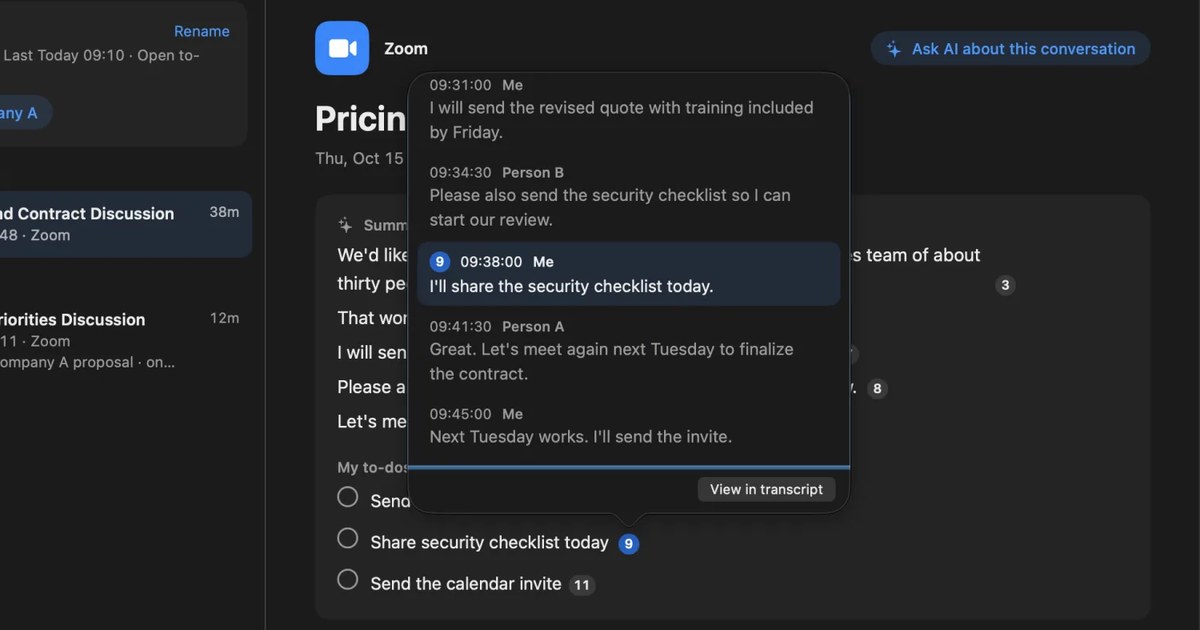
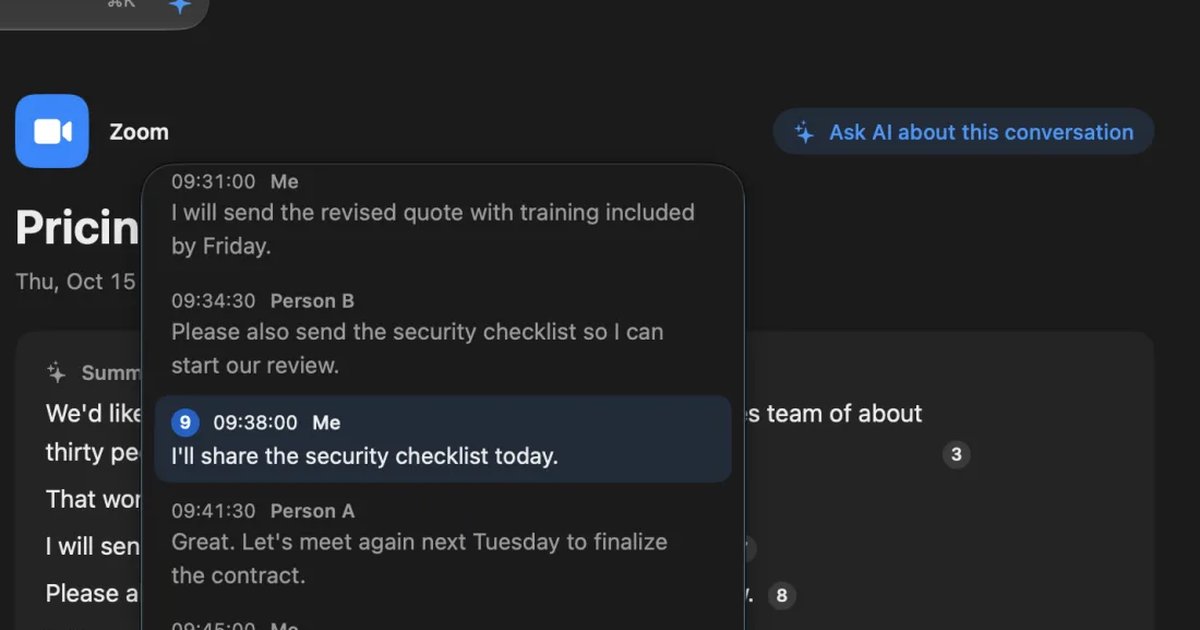
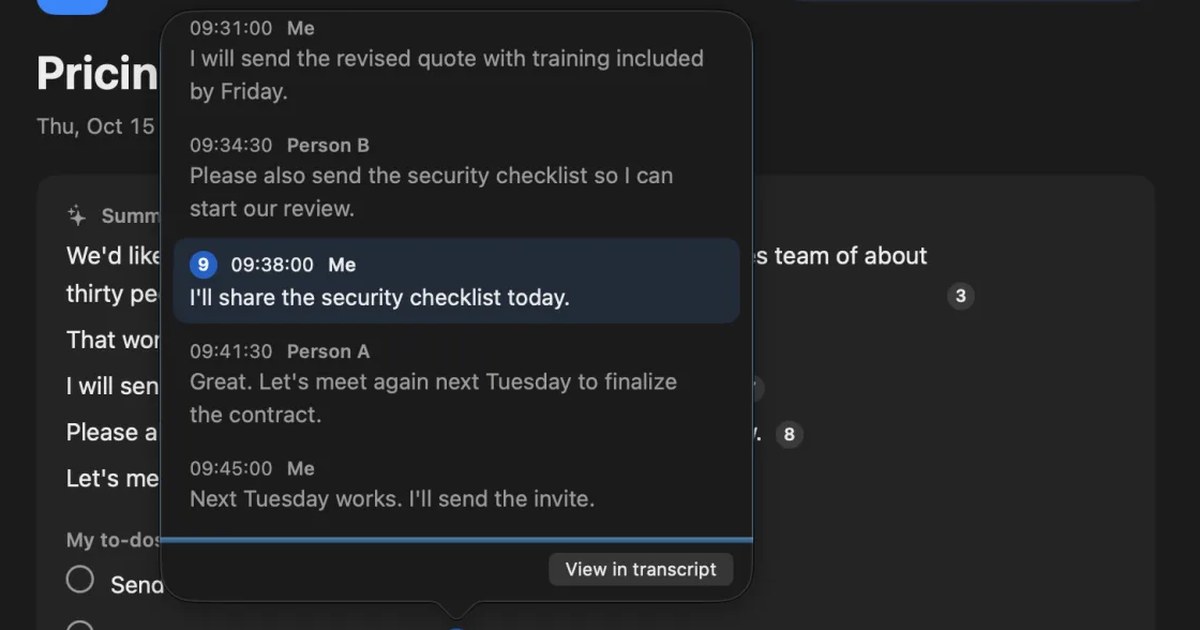
- A first pass at picking things out: sentences in the summary and “my to-dos” carry the number of the line they come from. Click a number to see that line and the lines around it, with times and speakers, so you can do step 3 on the spot
- Getting the transcript out: the conversation’s Copy or Save… for the transcript gives you the title and date, then one line per remark as “time speaker: text”. It works on Free. The summary is not included
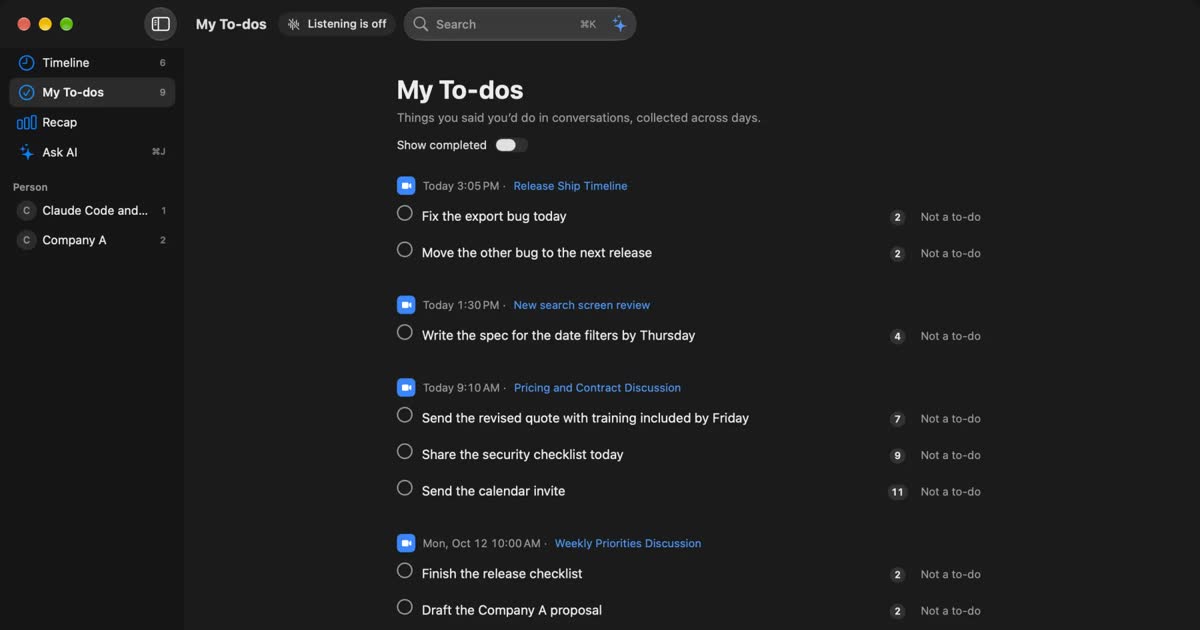
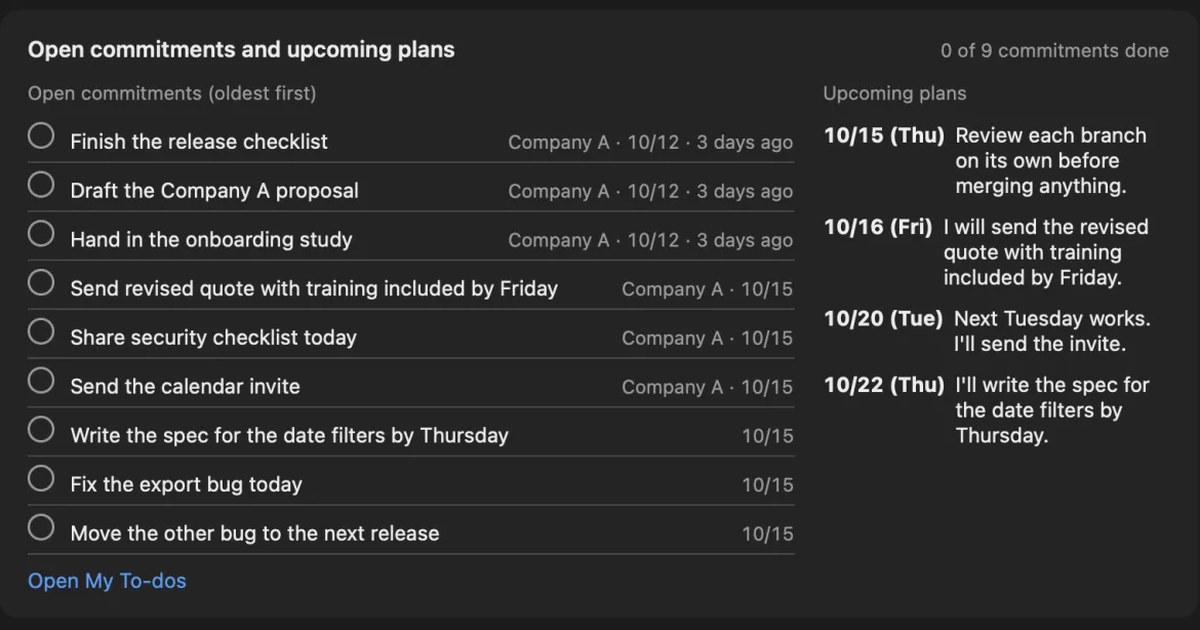
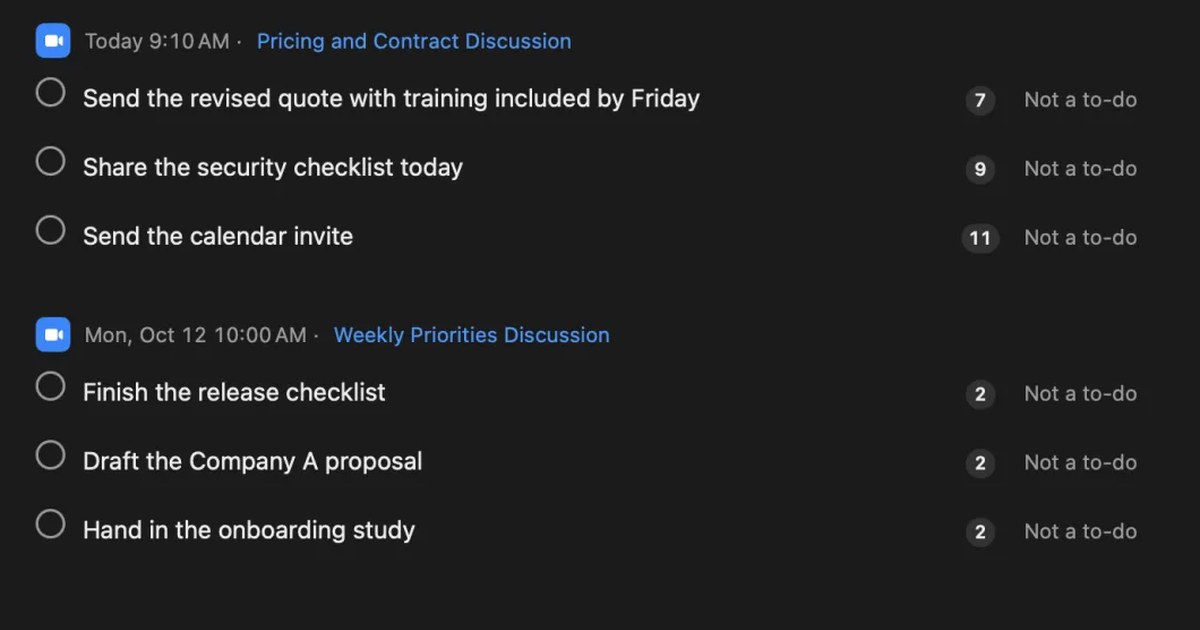
“My to-dos” is what you took on in the conversation and “Their to-dos” is what one other person took on; both are listed in the assistant with due dates. It does not collect everyone’s tasks, so write the action items in the minutes yourself from the transcript. The summary and to-dos are made when Apple Intelligence is on, whatever the memory (except when you choose an outside AI for organizing meetings on Pro).
Limits to know first
- Mac only: it runs on a Mac with Apple silicon and macOS 26 or later. It does not run on Windows or phones
- Only what you heard: only the sound your Mac heard is transcribed. Nothing reaches other attendees, and sharing the minutes is up to you
- No importing recordings: it transcribes the sound as you hear it and cannot open a recorded file. The audio is not kept either, so you cannot play it back
- What Free covers: Free has no limit on transcription, and shows and searches the last 14 days. Records are kept for 90 days by default on Free and indefinitely on Pro. Pro is ¥980 a month or ¥9,800 a year (tax included), and Pro features stop if the license cannot be checked for 14 days in a row
Your records are kept on this Mac, and we do not send them to our servers. Records leave the Mac only when you use a Pro feature you turned on, or when you copy or save something and pass it on yourself. The full list is in When records leave the Mac.
Who Recall suits
- You join Zoom, Google Meet or Teams meetings on a Mac and want to stop hunting for where each tool saved the transcript
- You sometimes cannot get a meeting tool’s transcript because you are not the organizer
- You want to check the source lines of a summary right away while writing minutes
- You want everything you took on across meetings in one place
- You use a Mac with Apple silicon and macOS 26 or later, and your employer’s rules allow it
Free to use · No account needed · macOS 26 or later · Mac with Apple silicon · By downloading, you agree to the Terms of Service
Who Recall does not suit
- You want to make minutes from recorded files
- You want minutes sent to every attendee automatically (a meeting tool’s built-in feature fits better)
- You join meetings on Windows or a phone
- You want to keep the audio and listen again
- Your employer only allows apps it has approved
Telling attendees you are transcribing
Whatever you use, tell attendees that you are transcribing the meeting. Recall has no way to notify others and cannot be seen by them, so telling them is your responsibility. The Recall site gives this as an example.
I am transcribing this on my Mac so I can check the details later. The audio is not saved, but the transcript stays on my Mac. Let me know if you would rather I stop.
Deciding beforehand who gets the minutes, and whether you share the transcript itself, makes this easier to explain. A transcript also keeps small talk and restarts that the minutes leave out, so avoid sending it outside the company as it is. If someone declines, or your employer’s rules do not allow it, do not transcribe. We do not recommend recording people without their knowledge with any product. This article is not legal advice.
FAQ
Can I just send the transcript as the minutes?
We do not recommend it. A transcript lists what was said, so readers have to find the decisions and tasks themselves. It also keeps small talk and restarts. Pick out decisions, action items and open questions, and rewrite them before sending.
How long do minutes for a one-hour meeting take?
It varies a lot with the meeting and your experience, so we do not give a number. What saves time is not tidying the whole text: fix the speakers, mark only decisions and tasks, then write.
Do minutes need a clean transcript?
Not for everyday meetings. For interviews where the words matter, or discussions where people may later disagree about who said what, attach a clean transcript separately so the original words can be checked.
Can I use minutes written by AI as they are?
Use them as a draft and have a person check before sending. Swapped owners and due dates, undecided points written as decisions and misheard numbers are common, so check against the original lines.
My transcript has no speaker names. What should I do?
Add them from the memory of people who were there and from what was said. Who said something matters mainly for action item owners. If an owner is unclear, write “owner not decided” in the minutes and ask the attendees.
Can Recall make minutes from a recording?
No. Recall transcribes the sound your Mac is hearing and cannot open recorded files. The way to use it is to transcribe upcoming meetings on your Mac, then copy or save the transcript and write the minutes.
Can Recall’s “my to-dos” be the action items in the minutes?
Only partly. It collects what you took on yourself and what one other person clearly took on, not everyone’s tasks. Write the action items in the minutes from the transcript.
Checked on November 12, 2026. How meeting tools save transcripts comes from Zoom Support’s page on in-meeting transcripts, the Google Meet Help page on transcripts, and Microsoft Support’s page on editing and deleting Teams transcripts. Button names follow each company’s help pages and may differ from what you see. Plans and features change, so check the official pages before use. What to keep in minutes and how to write them is general guidance for everyday meetings.
The differences between Recall Free and Pro are in Plans and licenses.
Free to use · No account needed · macOS 26 or later · Mac with Apple silicon · By downloading, you agree to the Terms of Service
Get the product overview (PDF) by email →
Related articles
How to automate sales call notes: what to keep, what to say, and your CRM
A guide for sales and customer success. What to keep in call notes, phrases for telling the other side, how notes relate to your CRM, and how to choose among tools such as Notta and amptalk.
What is speaker diarization? Splitting a transcript by who spoke, and fixing it when it goes wrong
Speaker diarization splits audio by who spoke when and labels each speaker with a number such as Speaker 1 or Person A. How it differs from speaker identification, how Teams, Zoom, Word and do-it-yourself tools split speakers, why in-person meetings split badly, and how to rename and merge speakers.
How to take meeting notes with Notion AI: using AI Meeting Notes and what it requires
Notion AI takes meeting notes through AI Meeting Notes. How to start it, which plans and devices it needs, what to watch for in non-English meetings, where the audio and text go and who can read them, and how to paste a Mac transcript into Notion when you cannot use it.
How to transcribe interviews on a Mac: record first, or transcribe on the spot
How to transcribe interviews, press interviews, user interviews and job interviews on a Mac. We compare transcribing a recorded file with transcribing on the spot, how to check quotes, and how to tell the other person and keep the record, situation by situation.
What are action items? How to write them in meetings, with examples, and follow them through
An action item is a task agreed in a meeting, with who does what by when. How it differs from next steps and decisions, how to write one with examples, how not to miss them during the meeting, how to see them through afterwards, and what to watch when Zoom, Teams or Google Meet AI picks them up.
Avoiding “he said, she said” after meetings and calls: follow-up messages, and checking your own records
Most “he said, she said” disputes at work can be prevented by putting decisions into words on the spot and sharing them in writing. Why they happen, what to do during a meeting or call, example follow-up messages, how to keep records, how to check when one happens, and how recordings differ from written records.