 Recall
Avoiding “he said, she said” after meetings and calls: follow-up messages, and checking your own records
Most “he said, she said” disputes at work can be prevented by putting decisions into words on the spot and sharing them in writing. Why they happen, what to do during a meeting or call, example follow-up messages, how to keep records, how to check when one happens, and how recordings differ from written records.
The short answer: say what was decided out loud, then share it in writing, and most disputes never start
A “he said, she said” dispute at work happens when two people remember a conversation differently and neither has a record both can check. There are three ways to prevent it: read back what was decided at the end of the meeting or call, send a confirmation message the same day and get a reply, and keep records where you can find them later. With all three in place, mismatches surface right after the conversation instead of weeks later.
When one happens anyway, before arguing about who is right, put your own notes, emails, and transcripts in order and check what was actually said, then look at the same records with the other person. Recordings and written records keep different things, and whichever you use, tell the other side you are keeping a record.
This article is written by KOROMO K.K., which develops Recall, a transcription app for Mac. We introduce our own product later, so please read with that in mind. We checked the statute text on e-Gov, Japan’s official law database, on November 15, 2026. This article is not legal advice.
| Your situation | Where to read next |
|---|---|
| You keep having mix-ups with the same person | Why it happens |
| You want a message to send after a meeting | The follow-up message |
| You are unsure whether to record | Keeping records |
| You are in a dispute right now | What to do when it happens |
| You want to know how to write minutes | How to turn a transcript into meeting minutes |
Four reasons “he said, she said” happens
Most of these disputes are not about someone lying. People simply remember the same conversation in different ways. Splitting the causes apart shows what to do about each.
- Mishearing and misspeaking: numbers and similar words, such as “fifteen” and “fifty” or “plan A” and “plan B”, are easy to mishear, and the speaker often does not notice a slip
- Different readings: “We will consider it positively” can mean “not decided yet” to the speaker and “almost settled” to the listener. “By the end of the week” can mean Friday morning or Friday night
- No record: hallway chats, phone calls and quick meetings often end with nobody taking notes. Over time, memory drifts towards what suits each person
- A record no one can find: notes or chat messages that nobody can locate are as good as none. Weeks later, the effort of searching is often what stops people from checking
The first two are handled while you are talking, the last two after the meeting and by where you keep records.
What to do during a meeting or call
The cheapest moment to fix a mismatch is while you are still talking. With the other person still there, they can correct it on the spot.
- Read back what was decided: at the end, say “Let me confirm. We decided three things. First…”, including who does what by when, and get a “yes”
- Repeat numbers, dates and names: “That is Friday, November 20”, “That is including tax”. Adding the weekday helps catch a misheard date
- Ask for vague words to be restated: when you hear “positively”, “as soon as possible” or “probably fine”, ask “Can I take that as decided?” or “By what date would work?”
- Say what was not decided: confirming “So the price is still open, right?” makes it harder for anyone to claim later that it was settled
How to write owners and dates is covered in How to write action items, with examples.
The follow-up message, with an example
Whatever you confirmed out loud, put in writing and send the same day. A spoken confirmation fades within weeks. What matters is a trail showing the other side read it and replied.
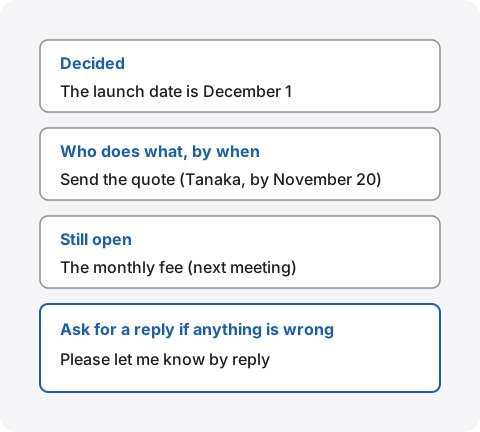
Here is an example for someone outside your company.
Thank you for your time today. To be safe, here is what we agreed.
Decided: the launch date is December 1. The quote will show prices including tax
To do: send the quote (Tanaka, our side, by November 20) / send the photos for the page (Ms. Sato, your side, by November 25)
Still open: the monthly fee, to be decided at our next meeting
If anything differs from your understanding, please let me know by reply.
The company names, people, dates and details in the example are made up for illustration.
Tips for writing it
- Send it the same day: a week later, the sender’s memory has drifted too. Right after the meeting is when you can write it most accurately
- Do not write up the whole conversation: keep it to what was decided and what needs doing. Long messages go unread and unanswered
- Ask for a reply if anything is wrong: inviting objections finds mismatches sooner than moving ahead in silence. For important agreements, ask plainly: “Please reply to confirm we can go ahead on this basis”
- Send it somewhere that keeps it: use email or a chat tool that keeps history. Even for things agreed only by phone, leave a short written message
For internal meetings, sending minutes works instead. What to put in minutes, with examples, is in What to keep in minutes.
Keeping records you can find later
A record only helps if you can pull it out within minutes when a dispute comes up. In Japan, agreements at work can be valid even when only spoken. Japan’s Civil Code says a contract is formed when an offer is accepted, and that no written form is needed unless a law says otherwise (Civil Code, Article 522). The more something was agreed only by word of mouth, the more it is worth writing down so you can check it later.
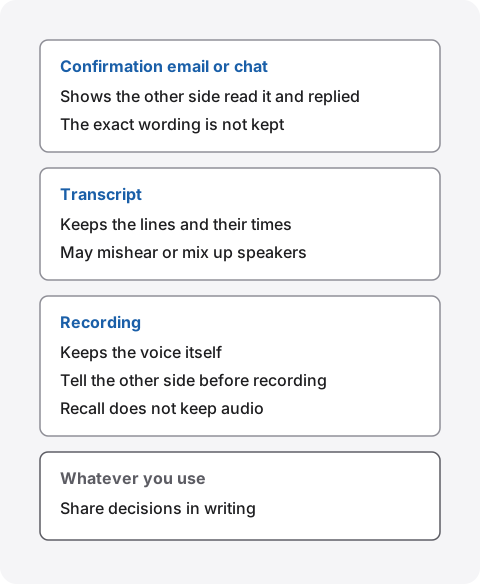
| What it keeps | What to watch for | |
|---|---|---|
| Confirmation email or chat | What was decided, and that the other side read it and replied | The exact wording of the conversation is not kept |
| Minutes | Decisions, action items and open questions | The writer’s summary shapes it. Send it to attendees to check |
| Transcript | Who said what, and when | Mishearings and mixed-up speakers happen. It is your own record |
| Recording | The voice itself | Tell the other side before recording. Finding the right moment takes time |
Keep them in one place
Keep records about the same person or project in one place. If they are spread across email, chat, a notebook and a shared folder, a dispute means searching all of them. Choose a folder or channel per project and put follow-up messages and minutes there. Putting the date and the other party’s name in file names makes them easy to line up later.
How recordings differ from written records
A recording keeps the voice itself, so tone and pauses can be checked too. On the other hand, finding one remark in an hour of audio takes time, and some people dislike being recorded. A transcript can be searched by words, but it is machine-made, so it contains mishearings and mixed-up speakers. Do not rely on a transcript alone for important numbers; match them with the other side in a follow-up message.
Tell the other side before you record or transcribe. How far either kind of record helps in a dispute depends on the situation, so this article does not say. If money or a contract may end up in a dispute, talk to a lawyer or another professional.
What to do when it happens anyway
When it happens, start by laying out the facts rather than settling who is right. Blaming makes the other person defend their memory, and the conversation stops being about checking.
- Gather the records you have: follow-up emails, minutes, chat messages, your notes and transcripts, only the parts about this matter
- Put them in order: line up when, who, and what was said or written, by date. You will see where the versions began to differ
- Look at the same records together: say “My records show this. What do yours show?”, share yours and ask for theirs. Where there is no record, admit that neither memory is certain
- Agree on what happens next: settle what to do from now on rather than who was right before, and send that in a follow-up message
If it keeps happening between a manager and their team, or between departments, making it a team habit works better than relying on each person: read back at the end of meetings, send follow-up messages, and agree where records live.
Tracing what was said with Recall
Recall sits in the menu bar and transcribes your microphone and the sound coming from your Mac. You do not invite a bot to the meeting or press a record button. Transcription happens on the Mac, and the audio is thrown away as soon as it has been turned into text. When a “he said, she said” moment comes up, you can search your own records for what was actually said.
How to check
- Search by words and dates: with ⌘K search, results appear as you type. Words such as “last week”, “yesterday”, “Zoom”, a person’s name or “I” become filters, and matching lines are listed by date. Choose one to jump to that line in the conversation
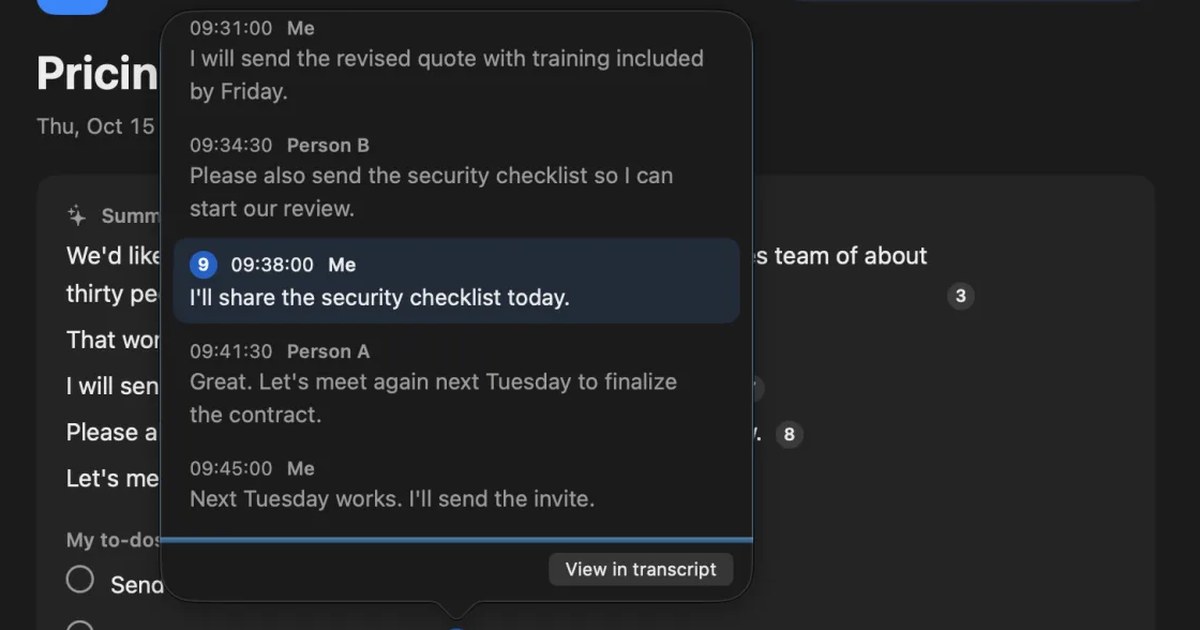
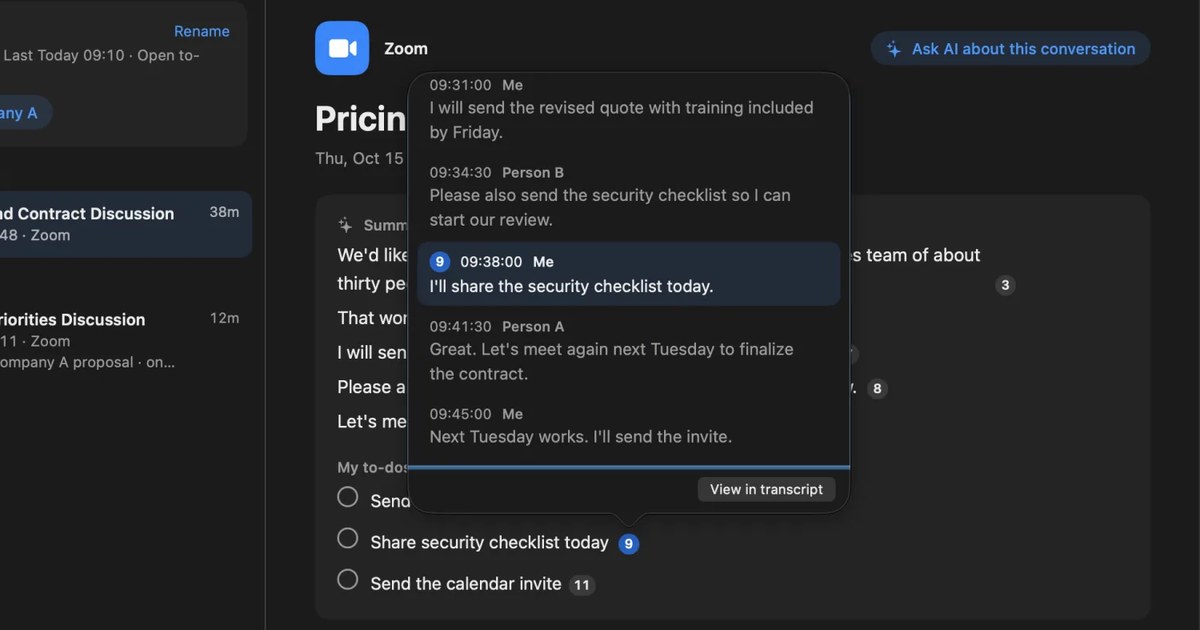
- See the surrounding lines from source numbers: click a number after a sentence in the summary or in “My to-dos” to see the source line and the five lines before and after it, with their times and speakers. You see not only the words but how the topic came up
- Follow the history with each person: “People” in the sidebar lists your conversations and open to-dos with each person. With “Ask [person]”, you can ask AI something like “Summarize how things have gone so far” with only that person’s conversations in scope
- The AI does not answer beyond your records: Ask AI searches your records first and numbers the source lines in its answer. When it finds nothing, it shows what it searched for and over which period
- Take out the part you need: “Copy” and “Save…” give you a conversation’s transcript, one line each as “time speaker: text”. This works on Free too
When showing a record to the other side, do not hand over the whole transcript. Quote only the relevant part in a follow-up message, since a transcript also contains other people’s words and unrelated talk.
Limits to know first
- It is not a substitute for a recording: the audio is not kept, so you cannot play it back. It is not evidence in the way a voice recording is; what remains is a machine-made written record
- Mishearings and mixed-up speakers happen: when the other side plays through your speakers and both voices mix into one line, it may be kept as yours. In in-person meetings, microphone lines are normally recorded as yours. If you register your voice, other voices are separated as “Person (in person)”, but everyone is recorded as that one person, however many people there are
- It is your record only: only the sound your Mac heard is transcribed, and the other side does not have the same record. To match it with them, share it in a follow-up message
- What Free covers: Free has no limit on transcription, and shows and searches the last 14 days. Older records are still kept for the retention period and appear when you upgrade to Pro. Records are kept for 90 days by default on Free and indefinitely on Pro. Pro is ¥980 a month or ¥9,800 a year (tax included), and Pro features stop if the license cannot be checked for 14 days in a row
- Mac only: it runs on a Mac with Apple silicon and macOS 26 or later. Meetings and calls you join on Windows or a phone cannot be recorded on that device. Summaries and “My to-dos” are made by the on-device AI when Apple Intelligence is on
Your records are kept on this Mac, and we do not send them to our servers. Records leave the Mac only when you use a Pro feature you turned on, or when you copy or save something and pass it on yourself. The full list is in When records leave the Mac.
Who Recall suits
- You have many meetings and calls and want to search later for what was said
- You want to follow the history of your conversations with each person
- You would rather not keep audio, but want what was said in writing on your own Mac
- You use a Mac with Apple silicon and macOS 26 or later, and your employer’s rules allow it
Free to use · No account needed · macOS 26 or later · Mac with Apple silicon · By downloading, you agree to the Terms of Service
Who Recall does not suit
- You want to keep the voice as a recording and play it back
- You want the same record shared with the other side automatically (you send follow-up messages or minutes yourself)
- You want to record meetings and calls you join on Windows or a phone, on that device
- You want each person in an in-person meeting recorded separately
- Your employer’s rules allow only apps the company has approved
Telling others you are keeping a record
Whether you record or transcribe, tell the other side. Recording quietly becomes a new source of distrust in itself. Recall does not add a bot to your meetings, so tell them yourself. The Recall site gives this as an example.
I am transcribing this on my Mac so I can check the details later. The audio is not saved, but the transcript stays on my Mac. Let me know if you would rather I stop.
If someone declines, or your employer’s rules do not allow it, do not keep a record. Reading decisions back at the end and sending a follow-up message still work without it. We do not recommend recording people without their knowledge with any product. What to check before using AI in meetings about confidential matters is in Is Otter.ai safe? Five checks for any AI meeting notetaker.
FAQ
In a “he said, she said” dispute, who is right?
Without a record, usually neither side can be shown to be right. It is not necessarily a lie; mishearing or a different reading often leaves both people honestly remembering different things. Laying out the records and agreeing on what happens next moves things along faster.
Is a spoken agreement binding?
Japan’s Civil Code says a contract is formed when an offer is accepted, and that no written form is needed unless a law says otherwise (Article 522). Rules differ in other countries. Either way, a spoken agreement is hard to check later, so put it in a follow-up message. For an actual dispute, talk to a lawyer or another professional.
No one replied to my follow-up email. What should I do?
For an important agreement, send it again and ask plainly: “Please reply to confirm we can go ahead on this basis.” If you confirmed by phone, leave a short written note such as “As agreed on the phone, we will go ahead.”
It keeps happening with my manager.
When you get an instruction, repeat it on the spot, “So that is X by the 20th?”, and send a short chat message afterwards. Framing it as a routine “just to be safe” check rather than a challenge makes it easier to keep doing.
Can a Recall transcript serve as evidence instead of a recording?
It is not a substitute for a recording. Recall does not keep audio, so you cannot play the voice back; what remains is a machine-made written record, which can contain mishearings and mixed-up speakers. To agree on the content with the other side, share it in a follow-up message.
Can I search conversations from a month ago in Recall?
Free shows and searches the last 14 days. Older records are still kept for the retention period (90 days by default on Free) and can be viewed and searched once you upgrade to Pro.
Checked on November 15, 2026. How contracts are formed was checked against the text of Article 522 of the Civil Code on e-Gov, Japan’s official law database. Recall’s features are based on its published help pages (⌘K search, Timeline and conversations, People, Ask AI, Listening and pausing, Privacy and data, Plans and licenses). The advice on checking before and after meetings is general guidance for everyday work meetings and is not legal advice.
The differences between Recall Free and Pro are in Plans and licenses.
Free to use · No account needed · macOS 26 or later · Mac with Apple silicon · By downloading, you agree to the Terms of Service
Get the product overview (PDF) by email →
Related articles
How to turn a transcript into meeting minutes: what to keep, examples, and asking AI
Pasting a transcript is not the same as writing minutes. The difference between verbatim, clean transcripts, summaries and minutes, what to keep with example lines, how to pick out decisions and action items, and how to ask AI for a draft and what a person should check.
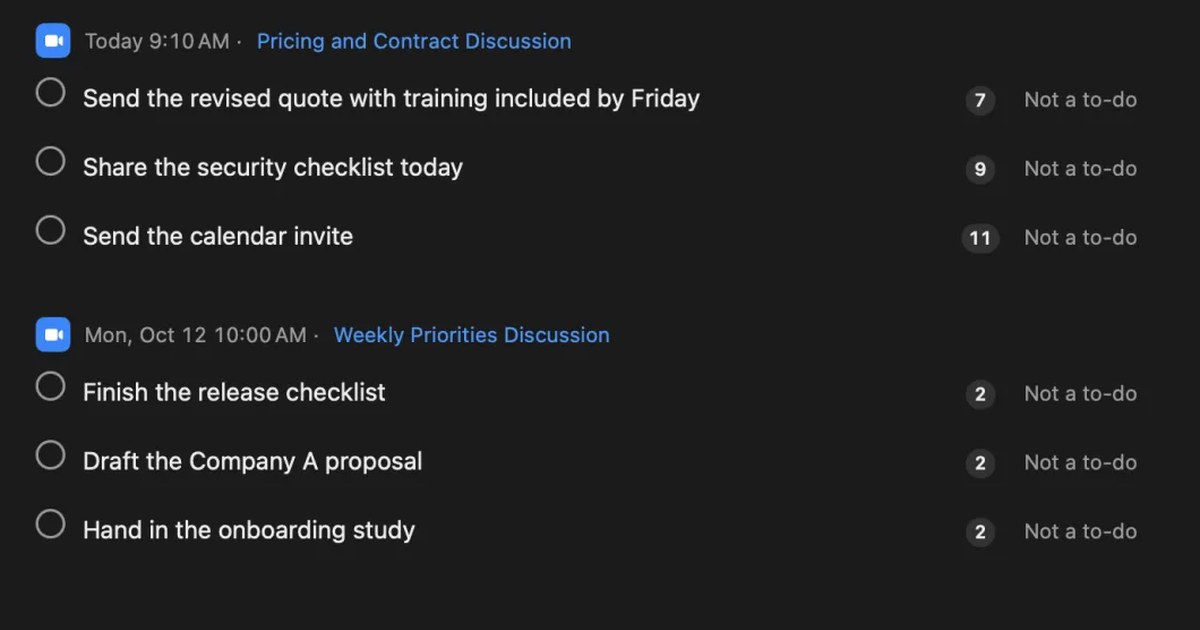
What are action items? How to write them in meetings, with examples, and follow them through
An action item is a task agreed in a meeting, with who does what by when. How it differs from next steps and decisions, how to write one with examples, how not to miss them during the meeting, how to see them through afterwards, and what to watch when Zoom, Teams or Google Meet AI picks them up.
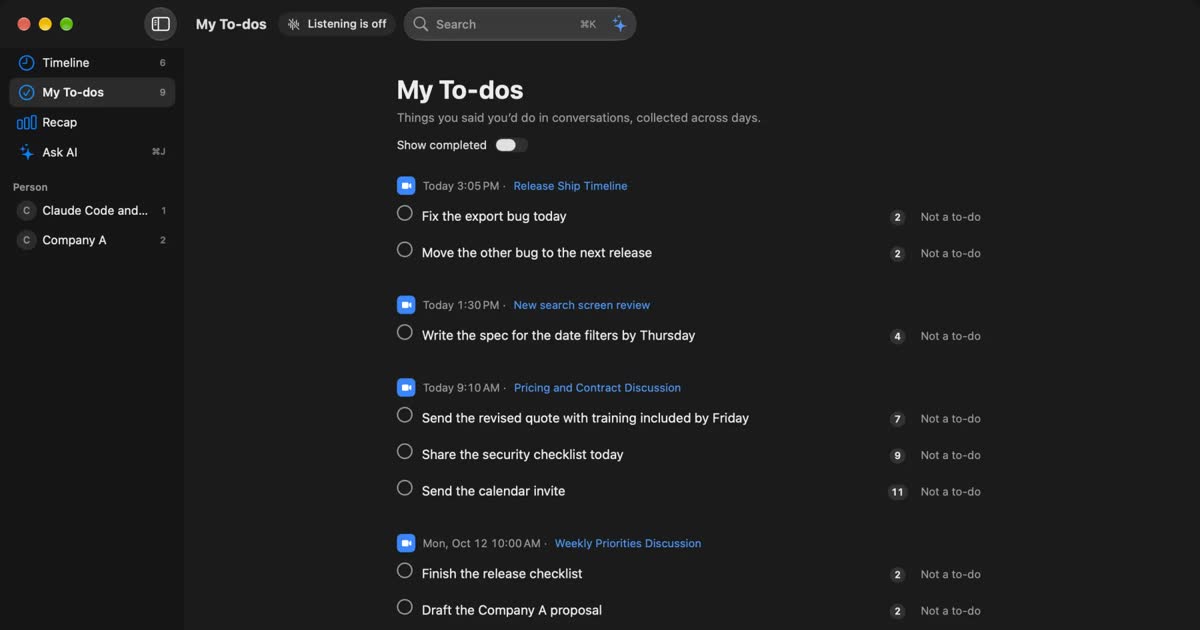
How to automate sales call notes: what to keep, what to say, and your CRM
A guide for sales and customer success. What to keep in call notes, phrases for telling the other side, how notes relate to your CRM, and how to choose among tools such as Notta and amptalk.
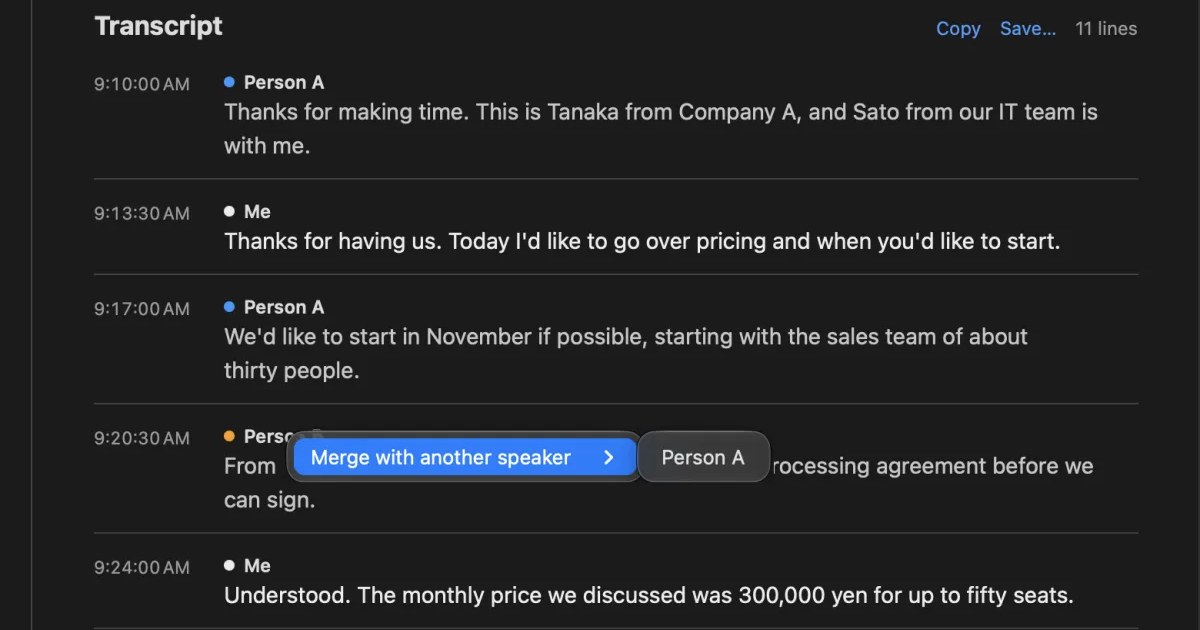
What is speaker diarization? Splitting a transcript by who spoke, and fixing it when it goes wrong
Speaker diarization splits audio by who spoke when and labels each speaker with a number such as Speaker 1 or Person A. How it differs from speaker identification, how Teams, Zoom, Word and do-it-yourself tools split speakers, why in-person meetings split badly, and how to rename and merge speakers.