 Recall
How to transcribe a podcast: when Spotify or Apple Podcasts shows no transcript
To transcribe a podcast, first check your podcast app. Conditions for Spotify and Apple Podcasts, what to do when no transcript appears, tools that take audio files, and transcribing as it plays on a Mac.
The short answer: app transcripts cover only some languages and shows
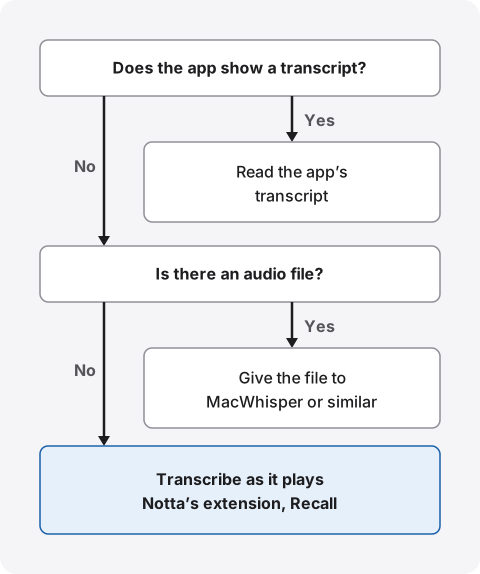
To transcribe a podcast, first check whether the app you listen in shows a transcript. Apple Podcasts and Spotify both let you read an episode’s text as it plays. But Apple Podcasts supports a fixed list of languages, which doesn’t include Japanese, and Spotify covers only some shows. If your show isn’t in a supported language, don’t count on the app.
When the app shows nothing, give the show’s audio file to a tool such as MacWhisper if you have one. For shows with no file, or ones you can only hear inside an app, transcribe as it plays with Notta’s Chrome extension or Recall. If you make the show, you can also upload a transcript file to the podcast apps.
This article is written by KOROMO K.K., the developer of Recall, a transcription app for Mac. Our own product is among the options, so please read with that in mind. Details of other products were checked on their official pages on November 5, 2026. We didn’t check the apps’ screens this time or compare accuracy on the same show, so we don’t rank accuracy.
What each podcast app offers
Whether a transcript appears depends on the show’s language more than on the app. Here is what the official pages say.
| Where listeners read it | Which shows | |
|---|---|---|
| Apple Podcasts | The Podcasts app on iPhone and other devices, and on Mac | Shows in 11 listed languages. Japanese isn’t listed |
| Spotify | The Now Playing view and episode pages in the mobile app | Some shows. No language list is published |
| Voicy, stand.fm and others | We found no official note on listener transcripts | We found no official note |
Once you know the app won’t show one, choose a method in this order.
Transcripts in Apple Podcasts
Apple Podcasts shows episode transcripts for shows in supported languages. According to Apple’s page for creators, they cover English, Danish, Dutch, Finnish, French, German, Italian, Norwegian, Portuguese, Spanish and Swedish, and need iOS 17.4 or later on iPhone. Japanese isn’t on the list.
Reading them in the Podcasts app on Mac
The Mac user guide gives these steps.
- While playing: click the transcript button in the player. Click a paragraph to play from there
- While browsing: select an episode, scroll to Transcript and click the arrow, or choose to show the transcript from the episode’s More menu
- Searching: search the transcript for words or phrases, with options for exact matches and matching case
The same guide says availability may vary by language and by country or region. You can also select text and share the episode from that timestamp. The guide doesn’t say whether you can copy the text as is or save it to a file.
Useful for listening practice
Apple’s creators page says transcripts can be read in over 170 countries and regions. Because clicking a paragraph replays it from there, it also works for practicing listening in a language you’re learning. Automatic text can contain mistakes, so check names and numbers against the audio.
Transcripts in Spotify
According to Spotify’s help for creators, listeners read transcripts in the Now Playing view and on episode pages in the Spotify mobile app. Some shows get transcripts automatically, and some have translated transcripts. The same page says the feature isn’t available to all creators.
When Spotify shows no transcript
- You’re on a computer: the help names the mobile app as where listeners read them. It doesn’t say whether they appear in the desktop app or the browser
- The show isn’t covered: only some shows are, and not every creator can use it. The help gives no language list
- The creator turned it off: creators can turn automatic transcripts on and off
As a listener, all you can do is check the episode page and the Now Playing view. The help offers no listener setting that makes a transcript appear for a show that has none.
Voicy, stand.fm and other services
Japanese audio services such as Voicy and stand.fm can also be transcribed with the methods below if you listen in a browser on a computer. As of November 5, 2026, we found no official note on a feature that lets listeners read a transcript of a broadcast. Features get added, so look inside the app you use too.
If you have the audio file, give it to a tool
If you have the show’s audio file, handing it over is the fastest way. You don’t wait for playback, even for an hour-long episode.
MacWhisper: transcribing files on your Mac
MacWhisper’s site says you drag in a file to transcribe it, and it supports mp3, wav, m4a, ogg, opus, mov and mp4. It uses local models, so the file doesn’t have to leave your Mac. The paid Pro version also takes media file URLs and can process several files at once. How it differs from Recall is in MacWhisper vs Recall.
Shows with a file, and shows without
Listeners have an audio file to work with when the creator offers the audio, for example on the show’s website. Shows you can only hear inside a podcast app have no file to hand over. Before using a tool that pulls audio out of an app, check that service’s terms.
If you make the show, you can upload a transcript
Creators can upload a transcript made from their recording to the podcast apps.
- Spotify: its help for creators says you can upload a VTT or SRT file of up to 5MB with timestamps. Turning on automatic transcripts replaces an uploaded one
- Apple Podcasts: its page for creators says you can supply your own file with the transcript tag in your RSS feed. Display is still limited to the languages above
If each speaker was recorded on a separate track, MacWhisper Pro also lists podcast transcription with individual files per speaker. For a public transcript, tools that work with files like these suit you better than Recall.
No file? Transcribe as it plays
For shows without a file, transcribe the sound as it plays. The options are Notta’s extension, which transcribes a browser tab, and Recall, which transcribes sound from the whole Mac.
Notta’s Chrome extension: shows you play in a browser
Notta’s help (in Japanese) says its Chrome extension transcribes sound playing in a browser tab. It names podcasts, online classes and live streams as examples, and it works on all plans. You sign in to Notta and start recording from the extension on the show’s page. The text stays in Notta, which suits teams that share it. It only covers shows you play in Chrome, not in Mac apps. How it differs from Recall is in Notta alternatives compared.
Recall: shows you hear on your Mac become text
Recall is an app that stays in the menu bar and turns your microphone and your Mac’s sound into text. There’s no record button and nothing to start for each show. When you play a podcast on your Mac, it becomes text from the sound. Shows where you don’t speak appear in the timeline in the “listen” color.
It needs a Mac with Apple silicon on macOS 26 or later, and permission for screen recording and system audio recording. It doesn’t record the screen itself, but it saves the title of the front window on this Mac along with what was said.
Limits to know first
- No files or links: only sound played on your Mac becomes text. A 60-minute episode takes 60 minutes of playback
- No audio is kept: it’s discarded once transcribed, so you can’t listen again in Recall
- Not tested with each podcast app: we have no results from trying Spotify or the Podcasts app for this article. Before an important episode, play a few minutes and check that text appears
- Accuracy at faster speeds isn’t measured: listen at normal speed for important episodes
- You choose the language in settings: it listens in Japanese or English and doesn’t switch automatically mid-episode. There’s no translation
- Times aren’t positions in the episode: a line’s time is when you were listening. You can’t click it to jump to that point in the episode
Finding what you heard later
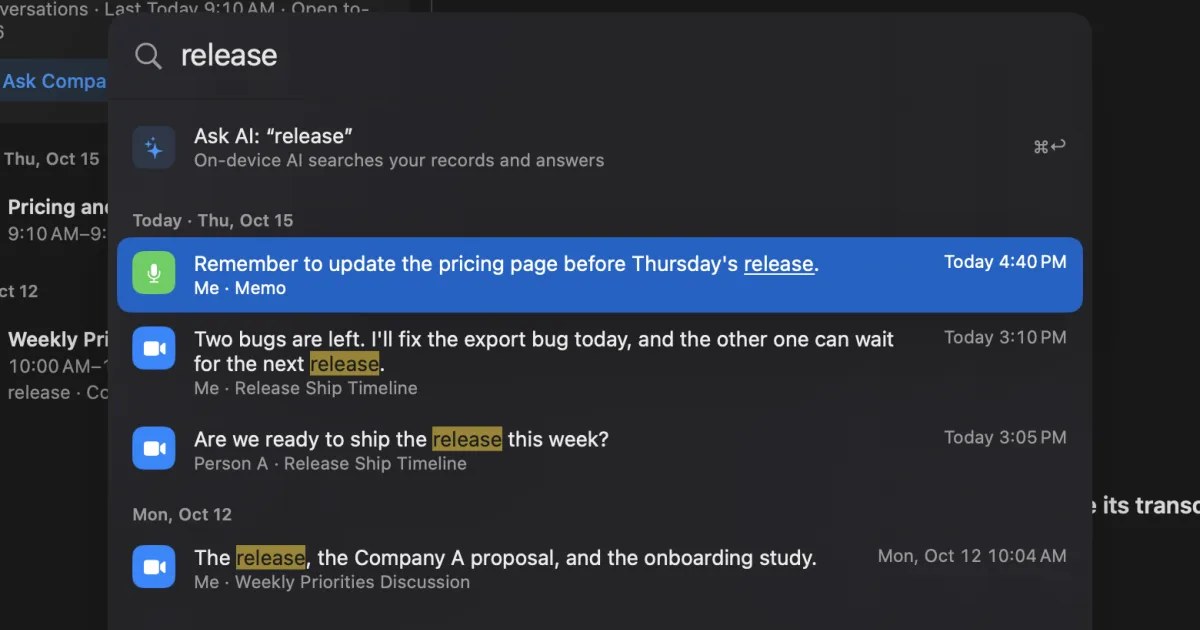
Recall helps when you can’t remember which show or episode you heard something in. App transcripts are searched one episode at a time; in Recall, the shows you heard and your meetings sit in one place and can be searched together.
| How to find it | |
|---|---|
| A word or name | Type it in ⌘K search to see what was said by date. Choose one to go to the line |
| Heard it “last week” | In ⌘K, add “last week” as a condition alongside your words |
| Which show it was | The conversation detail shows the title of the first window recorded. What appears depends on the app |
| You only remember the gist | Ask the AI “Which book was mentioned in the podcast I heard last week?” |
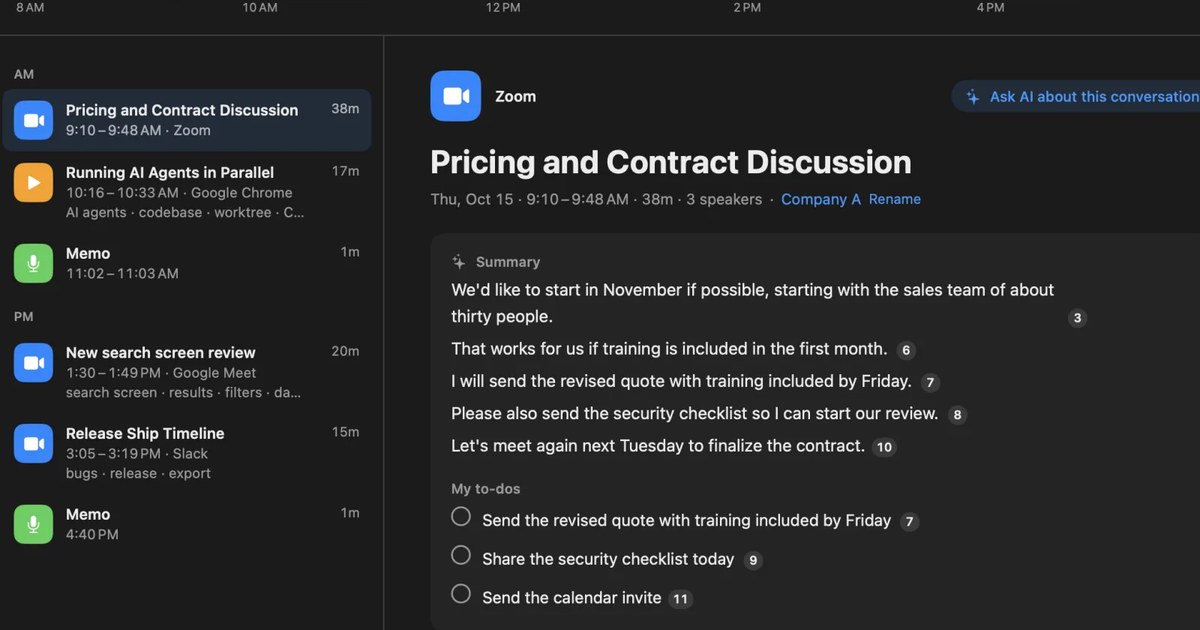
Search doesn’t use AI, so it works while the AI is still getting ready. When you ask the AI, it searches your records first and numbers the lines it bases its answer on. By default the on-device AI answers, and neither your question nor your records leave the Mac. On a Mac with less than 16GB of memory, answering questions needs Apple Intelligence turned on. Summaries and to-dos are made whenever Apple Intelligence is on, whatever the memory.
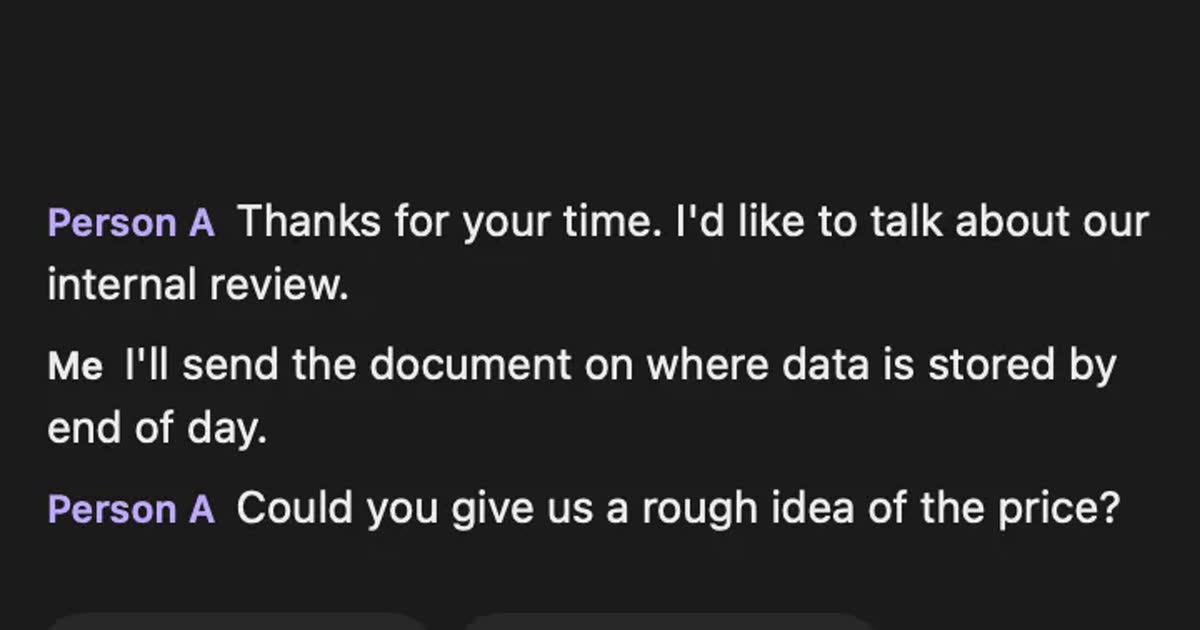
Even on Free, you can copy the text or save it to a text file. It contains lines of “time speaker: text”, without summaries.
What’s free, and how long records are kept
Free has no limit on transcription; viewing and search cover the last 14 days. Older records are kept for the retention period and become visible with Pro. By default the retention period is 90 days on Free and unlimited on Pro, and records past it are deleted. Pro is ¥980 a month or ¥9,800 a year (tax included). If the license can’t be checked for 14 days in a row, Pro features stop.
Records are kept on this Mac, and we don’t send them to our servers. They leave only when you use a Pro feature you turned on, or when you copy or save them and pass them on yourself. The list is in When records leave the Mac.
Stop it for music or anything you don’t want kept
Because it stays running, anything you hear becomes text unless you stop it. Before listening to something you don’t want transcribed, pause from the menu bar. If you notice afterward, you can remove the last 15 minutes from the same menu. Apps you never want transcribed, such as a music app, can be added to excluded apps. This is set per app, so if you hear podcasts and music in the same app, both are excluded.
Recall keeps running during meetings too. When others are on a call or in a meeting with you, tell them you’re transcribing. This goes for any product, and we don’t recommend recording people without their knowledge. Example wording is in the FAQ.
Who Recall fits, and who it doesn’t
Recall fits people who listen to a lot of podcasts and videos on a Mac and can’t keep track of where they heard something. If you need one episode’s text right now, another method suits you better.
Recall fits you if
- You want text from shows with no app transcript, kept as you listen
- You want to search the shows you heard and your meetings in one place
- You don’t want to start a recording for every episode
- You’d rather keep no audio and keep the text on your own Mac
- You use a Mac with Apple silicon on macOS 26 or later
Free to use · No account needed · macOS 26 or later · Mac with Apple silicon · By downloading, you agree to the Terms of Service
Recall doesn’t fit you if
- Your shows already have transcripts in Apple Podcasts or Spotify (the app is enough)
- You only listen to podcasts on a phone
- You want to transcribe audio files without waiting for playback
- You want a public transcript or a caption file for your show
- You want a team to share the same records
For videos, see how to transcribe a YouTube video. For choosing across Mac transcription tools, see how to transcribe locally on a Mac.
What you may do with the text
Your own show raises few issues. With other people’s shows, the wider you use the text, the more you need to check. This is the same whichever tool you use.
On copyright in Japan, a training document from the Agency for Cultural Affairs (in Japanese) lists use within a limited circle, such as personally or at home, as a condition of copying for private use, and treats work use as outside it. Other countries have their own laws. Transcribing a show to reread for your own study is different from putting the transcript in a work document or on your blog. If you publish it, check the conditions for quotation or get the creator’s permission. You can also summarize in your own words and point to the original episode.
Podcast apps’ terms also have rules on how content may be used. Before using a tool that pulls out files, or passing a transcript to others, check the terms. This is a general explanation, not a judgment on any particular use. How to check before sharing at work is covered in how to transcribe webinars and videos so you can find them later.
Frequently asked questions
Can the apps transcribe a podcast in Japanese?
Japanese isn’t in Apple Podcasts’ language list. Spotify covers some shows and publishes no language list. For Japanese shows, giving an audio file to a tool or transcribing as it plays is the reliable route.
Can I see Spotify transcripts on a computer?
The help names the Now Playing view and episode pages in the mobile app. It doesn’t say whether they appear on a computer. To transcribe shows you play on a computer, consider Notta’s extension or Recall.
Can I transcribe a podcast for free?
Apple Podcasts and Spotify transcripts can be read in the app for covered shows. MacWhisper, Notta and Recall also have free tiers, but their conditions differ, so check each pricing page.
Can I copy the app’s transcript?
The Mac Podcasts guide explains sharing from a selected timestamp, but not copying or saving. Spotify’s help doesn’t describe exporting for listeners either.
Can Recall import an audio file?
No, and it doesn’t take links either. Recall transcribes the sound coming from your Mac, so the episode must play. To transcribe from a file, consider MacWhisper.
Does Recall work when I listen with earphones?
Yes. It captures the sound coming from the Mac, so earphones work. It tries not to mistake speaker sound picked up by the mic for your own speech, but earphones are the most reliable.
Can I get a podcast translated into my language?
Some Spotify shows have translated transcripts. Recall transcribes English as English and Japanese as Japanese, and has no translation. For listening practice, reading in the original language can help more anyway.
May I post a transcript on my blog?
Avoid posting other people’s shows as they are. Check the conditions for quotation or get the creator’s permission. In Japan, copying for private use requires use within a limited circle, such as personally or at home, and excludes work use.
Checked on November 5, 2026. Apple Podcasts details come from the Mac user guide and Apple’s page for creators, Spotify’s from its help for creators, Notta’s from its help, MacWhisper’s from its site, and the notes on private use from the Agency for Cultural Affairs’ training document for fiscal 2024. For Voicy and stand.fm, we mean that we found no official note on listener transcripts. We didn’t check the apps’ screens, or whether Recall turns each podcast app’s sound into text, for this article. Terms and features change, so check each company’s latest pages before use. This article is a general explanation, not legal advice.
The difference between Free and Pro is in Plans and license.
Free to use · No account needed · macOS 26 or later · Mac with Apple silicon · By downloading, you agree to the Terms of Service
Get the product overview (PDF) by email →
Related articles
How to transcribe a YouTube video: built-in, AI, and videos with no captions
YouTube’s own transcript is enough if a video has captions. How to open and copy it, why it may be missing, and what works for no-caption or unlisted videos, comparing NotebookLM, Notta and Recall.
How to transcribe webinars and videos so you can find them later
Ways to turn webinars and videos into searchable text, comparing source transcripts, Notta, MacWhisper and Recall, plus what to check on copyright and terms.
How to transcribe Voice Memos on iPhone and Mac, and what to check when it doesn’t work
Voice Memos on iPhone and Mac can transcribe recordings so you can view, copy and search them. The steps, the device, OS and language conditions to check when no transcript appears, how to keep the text, and what to use for meetings and calls.